Effective shopping center camera coverage means every entrance, POS terminal, high-value display, stockroom, loading dock, and parking zone has dedicated, overlapping coverage designed for identification, not just detection. That coverage needs a mixed fleet of dome, bullet, PTZ, and multi-sensor cameras running on a properly sized PoE network with storage matched to resolution and retention needs, backed by defined monitoring and maintenance service level agreements (SLAs). Get those pieces right, and you get usable evidence, real deterrence, and operational data you can act on.
TL;DR:
- Cameras in critical zones like entrances and POS must have overlapping coverage with high-resolution and dedicated identification angles to ensure reliable facial recognition and transaction verification.
- Outdoor cameras like bullet units at entrances, loading docks, and parking lots should be vandal-resistant, weather-rated, and paired with LPR tech for license plate capture.
- A typical shopping mall requires around 400 cameras, but effective placement and coverage overlap are more important than raw count to prevent blind spots and reduce hardware costs.
- Network sizing should include VLAN segmentation, adequate uplink capacity, and storage estimates based on resolution, frame rates, and retention periods, with hybrid cloud-NVR solutions often being most practical.
- Regular maintenance includes quarterly physical inspections, firmware updates, defined SLAs, and coverage audits to prevent silent camera failures and ensure system reliability.
Table of Contents
- Priority Coverage Zones for Shopping Center Camera Coverage
- What Camera Types Work Best in Each Zone?
- How Many Cameras Does a Shopping Center Actually Need?
- Where Should Cameras Be Mounted for the Best Coverage?
- How Should Parking Lots and Garages Be Covered?
- What Analytics and Integrations Add the Most Operational Value?
- How Should Network and Storage Be Sized for Mall-Scale Systems?
- What Should a Camera Maintenance Program Include?
- Procurement Checklist for a Camera System Upgrade or Retrofit
- Integration With Alarm and Emergency Response Systems
- Coverage for Emergency Exits and Fire Safety Areas
- Installer Lessons From Retrofits and Multi-Site Rollouts
- How Low Voltage Corp Supports Shopping Center Camera Projects
- Sources
- FAQ
Priority Coverage Zones for Shopping Center Camera Coverage
A mall’s footprint dictates its camera plan more than any spec sheet does. Some zones need cameras built for court-ready identification, while others need coverage that simply proves someone was there.
Entrances get two jobs done at once: a dedicated identification camera mounted for a clean facial shot and a wider overview camera capturing the flow of foot traffic. Point-of-sale areas need overlapping angles so a transaction dispute has more than one camera’s word to rely on, paired with resolution good enough to read a receipt or a card terminal screen.
High-value displays and choke points, jewelry counters, electronics, exits near fitting rooms, warrant focused coverage plus a secondary angle in case someone blocks the primary view. Stockrooms, receiving areas, and loading docks need coverage that supports chain-of-custody documentation, since that’s where internal shrink and vendor disputes tend to surface. Tenant corridors and shared common areas require coordination between mall management and individual retailers so coverage boundaries don’t leave gaps between “the mall’s cameras” and “the store’s cameras.”
Retail security guidance consistently points to these same six zones as non-negotiable coverage priorities, and overlapping coverage on entrances and POS isn’t redundancy for its own sake. It’s intentional.
- Entrances and exits: identification camera plus overview camera
- Point-of-sale terminals: overlapping angles, receipt-level resolution
- High-value displays: focused primary angle with a secondary backup
- Stockroom and loading docks: continuous coverage for custody documentation
- Tenant corridors: coordinated boundaries between mall and tenant systems
What Camera Types Work Best in Each Zone?
Not every camera does the same job, and picking the wrong form factor for a zone is one of the most common mistakes facility teams make. Dome and turret cameras suit indoor ceilings and aisles because their low profile discourages tampering and their wide field of view covers long sightlines without drawing attention. Bullet cameras belong outdoors, at entrances and loading docks, precisely because their visible housing signals “you’re being recorded” and adds a deterrent layer bullet-shaped hardware is known for.
PTZ (pan tilt zoom) cameras earn their spot in large open areas like food courts or parking structures, where an operator needs to zoom into an incident in real time. The trade-off: a PTZ pointed at one thing isn’t watching everything else, so pair it with fixed cameras rather than relying on it alone.
- Dome/turret: indoor ceilings, aisles, tenant corridors
- Bullet: exterior entrances, loading docks, visible deterrence
- PTZ: food courts, garages, active incident tracking
- Multi-sensor: long corridors needing several angles from one mount point
- LPR-specific units: garage entries and exits, angled for plate capture
On resolution, mixed deployments make the most sense: reserve 4K for entrances and points of interest where facial detail matters, and use 1080p for general aisle coverage to keep storage costs sane. Anywhere natural light swings hard, entrances facing west, loading dock doors, wide dynamic range (WDR) or low-light sensor tech isn’t optional. Frame rate matters too. Fifteen frames per second is often fine for general coverage, but POS and entrance cameras should run higher to avoid gaps between frames during fast movement.
How Many Cameras Does a Shopping Center Actually Need?
There’s no universal number, but there are useful anchors. A small standalone retail space might need 6 to 8 cameras placed strategically. A mid-size store scales to a moderate number of cameras, depending on size and layout. A full shopping center scales well beyond that: a typical mall runs around 400 cameras once you account for corridors, anchor entrances, food courts, and parking structures.
- Walk the site and map every entrance, POS station, high-value zone, and blind spot before counting cameras.
- Convert that walk into a prioritized list, critical zones first, general coverage second.
- Build in intentional overlap at entrances and POS so no single camera failure creates a gap.
- Use PTZs or mobile camera towers to cover large, low-traffic areas instead of blanketing them with fixed units.
The right number is whatever your site walk produces, not a formula pulled from a competitor’s brochure. Correct placement matters more than raw camera count, and a mall with 200 well-placed cameras will outperform one with 400 poorly aimed ones.
Where Should Cameras Be Mounted for the Best Coverage?
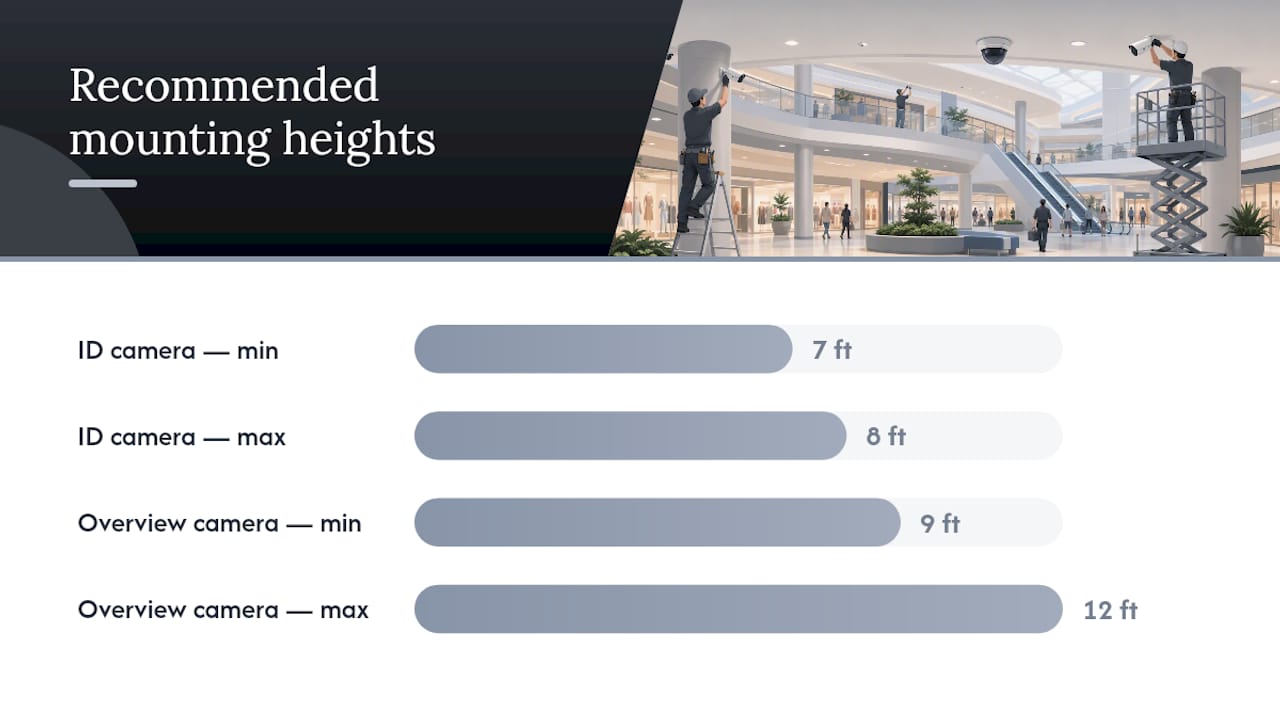
Height and angle decide whether footage is usable evidence or just a blurry record that something happened. Identification cameras at entrances belong roughly 7 to 8 feet off the ground, low enough to capture a clear facial angle, high enough to stay out of reach. Overview cameras covering general traffic flow can sit higher, 9 to 12 feet, since their job is context, not close identification.
Framing discipline matters just as much as height. An identification camera should fill most of its frame with the doorway, not the parking lot beyond it. Overview cameras can afford a wider crop since their value is showing movement patterns across a space.
Backlighting and glass reflections ruin more footage than any hardware failure does. Position cameras so entrances aren’t shot directly into afternoon sun, and where that’s unavoidable, use WDR-capable units or add supplemental lighting for surveillance areas rather than fighting the glare after installation.
- Mount identification cameras 7 to 8 feet high at entrances and POS
- Mount overview cameras 9 to 12 feet high for wide-area context
- Use vandal-resistant housings in publicly accessible mounting locations
- Enable tamper detection alerts on any camera reachable without a ladder
- Route cable runs through conduit, not exposed along ceiling tiles
Pro Tip: Run extra conduit and leave capped, unused cable pulls at likely future camera positions during your initial install or retrofit. Adding a camera later without pre-run conduit almost always costs more than the camera itself.
Installer guides repeatedly flag uniform mounting height as the single most common design mistake, a shortcut that trades identification quality for installation speed.
How Should Parking Lots and Garages Be Covered?
Parking areas carry a disproportionate share of mall-adjacent incidents, which makes them a coverage priority rather than an afterthought. Main entrances and exits need continuous fixed coverage, pedestrian crosswalks and elevator lobbies need funneling coverage that captures faces as people move toward the building, and remote corners, where lighting and foot traffic are both thin, need dedicated attention rather than a single wide camera hoping to catch everything.
License plate recognition (LPR) cameras require a specific setup: a shallow downward angle, consistent height across entry lanes, and dedicated illumination since plate capture fails fast in low light. In multi-level garages, fixed multi-sensor cameras at ramps and stairwells often outperform a single PTZ trying to cover an entire level, though mobile camera towers can plug gaps during construction or event overflow parking.
- Fixed coverage at every vehicle entrance and exit
- Funneling coverage at pedestrian crosswalks and elevator lobbies
- LPR cameras angled low and paired with dedicated lighting
- Vandal-hardened exterior housings rated for weather exposure
Layered parking security, fixed cameras, PTZs, mobile towers, and analytics working together, consistently reduces both incidents and detection time compared to any single camera type alone. Facility teams evaluating garage-specific gaps often start with a dedicated parking garage camera coverage audit rather than guessing where the blind spots are.
What Analytics and Integrations Add the Most Operational Value?
Raw footage tells you what happened. Analytics tell you what’s happening right now, and the difference changes how your security team spends its day. People counting serves two masters: operations teams use it for staffing and lease negotiations, while security teams use the same data to flag unusual crowd buildup near an exit or loading dock.
Loitering and crowd-density alerts are only useful when tuned correctly. Set the thresholds too loose and nothing triggers; set them too tight and your team drowns in false alarms within a week. Tuned properly, modern video analytics can filter out more than 90% of nuisance alerts, which shifts staff time from watching monitors to verifying flagged events.
- POS-linked review pulls the transaction timestamp, register ID, and matching camera clip automatically
- Watchlist LPR flags known vehicles at entry, raising privacy questions that need a documented policy
- Loitering alerts should be zone-specific, not applied uniformly across an entire lot
- Analytics shift staff work from constant monitoring to targeted verification
That shift, from staring at sixteen monitors to reviewing specific flagged clips, is the biggest operational change analytics bring to a security desk.
How Should Network and Storage Be Sized for Mall-Scale Systems?
Power over Ethernet (PoE) switches need headroom budgeted per camera, not per switch port, since 4K units and PTZs draw more power than standard fixed cameras. Segment camera traffic onto its own VLAN so a compromised camera can’t become a doorway into your point-of-sale network or tenant WiFi.
On storage, the choice between a network video recorder (NVR), cloud storage, or a hybrid setup comes down to bandwidth cost and how fast you need remote access to footage. Pure cloud storage for hundreds of cameras gets expensive fast; a hybrid model, local NVR for daily operations with cloud backup for critical zones, is often the more practical middle ground for larger properties.
- Budget PoE switch capacity per camera wattage, not just port count
- Put camera traffic on a dedicated VLAN, isolated from POS and tenant networks
- Calculate storage using resolution, frame rate, and retention days together, not resolution alone
- Update NVR and camera firmware on a set schedule, and change default credentials before go-live
- Plan uplink capacity now if additional buildings might join the network later
Resolution and frame rate are the two biggest levers on storage math. A property planning a multi-building CCTV network should size uplinks for the portfolio’s future footprint, not just its current camera count, since retrofitting bandwidth later usually costs more than overbuilding it up front.
What Should a Camera Maintenance Program Include?
A camera system is only as good as the maintenance behind it. Monitoring models range from a fully on-site desk to remote monitoring to a hybrid where local staff handle immediate response while a remote team handles overnight verification. Whichever model you choose, verification workflows matter more than headcount at the desk.
- Schedule quarterly physical checks on camera housings, lenses, and mounting hardware.
- Set a firmware update cadence and stick to it rather than patching reactively.
- Demand a written SLA specifying response time, uptime target, and replacement policy for failed hardware.
- Run a 60 to 90 day pilot on any new configuration before rolling it out property-wide.
- Conduct a coverage audit every quarter, testing footage retrieval and confirming no camera has silently gone offline.
A maintenance contract without a defined SLA is really just a hope, not a plan, and quarterly acceptance tests catch the dead cameras that nobody notices until they’re needed.
Procurement Checklist for a Camera System Upgrade or Retrofit
Before requesting quotes, walk the property and build a risk map: which zones have failed before, which tenants need coordination, and whether any permits apply to exterior mounting or LPR use. Your spec sheet should assign a role to every camera, identification, overview, or analytics, along with minimum resolution and expected network load.
- Site survey covering every priority zone and existing blind spot
- Tenant coordination plan for corridors and shared spaces
- Spec sheet listing camera role, resolution, and network requirements per zone
- Budget line items for cabling, conduit, and licensing, not just camera hardware
- Commissioning checklist confirming every camera’s field of view before sign-off
A typical mall-scale retrofit runs in phases to limit tenant disruption, often installing overnight or during low-traffic hours zone by zone. Hidden costs tend to hide in cabling and conduit work, not camera hardware itself, which is why a proper analog-to-IP upgrade plan should price cabling as its own line item from day one.
Integration With Alarm and Emergency Response Systems
Cameras and alarms work best when they talk to each other instead of operating as two separate systems a security desk has to watch in parallel. A door forced open at a loading dock should trigger both an alarm event and an automatic camera pull, so the responding guard sees live footage the instant the alert fires rather than searching for the right camera feed manually.
Integration also extends to access control. When a door controller denies entry or detects forced access, linking that event to the nearest camera turns a simple access log into a visual record of exactly who tried to get in and how. That pairing matters most at stockrooms, fire exits, and after-hours tenant entrances, where an alarm alone tells you something happened but not what it looked like.
For fire alarm integration specifically, cameras should be configured to pull footage automatically when a pull station or smoke detector triggers, giving the fire department and mall security a visual record of evacuation flow as it happens. This also helps verify false alarms quickly, which matters when repeated false triggers start costing the property fines or fire department goodwill.
The goal isn’t more alerts. It’s fewer blind moments between “something triggered” and “someone is looking at the right camera.” A security desk juggling a dozen disconnected systems will always be slower than one where an alarm event and a camera feed arrive together on the same screen.
Coverage for Emergency Exits and Fire Safety Areas
Emergency exits get treated as an afterthought in a lot of camera plans, which is backwards given how much liability sits in that footage. Every fire exit and emergency stairwell should have coverage confirming the door isn’t blocked, propped open outside of an emergency, or being used as an unauthorized entry point during business hours.
Coverage here serves two separate purposes that often get confused. The first is life safety documentation, proving exits were clear and functional if an incident review ever happens. The second is loss prevention, since propped-open fire doors are a common route for theft and unauthorized access that has nothing to do with fire safety at all.
Camera placement at these exits differs from standard entrance coverage. Rather than an identification-height camera aimed at faces, exit cameras typically need a wider angle capturing the full door width and the immediate exterior landing, confirming the path is clear and unobstructed. Where exits lead into parking structures or loading areas, that coverage should connect to the same camera network covering those zones rather than existing as an isolated segment.
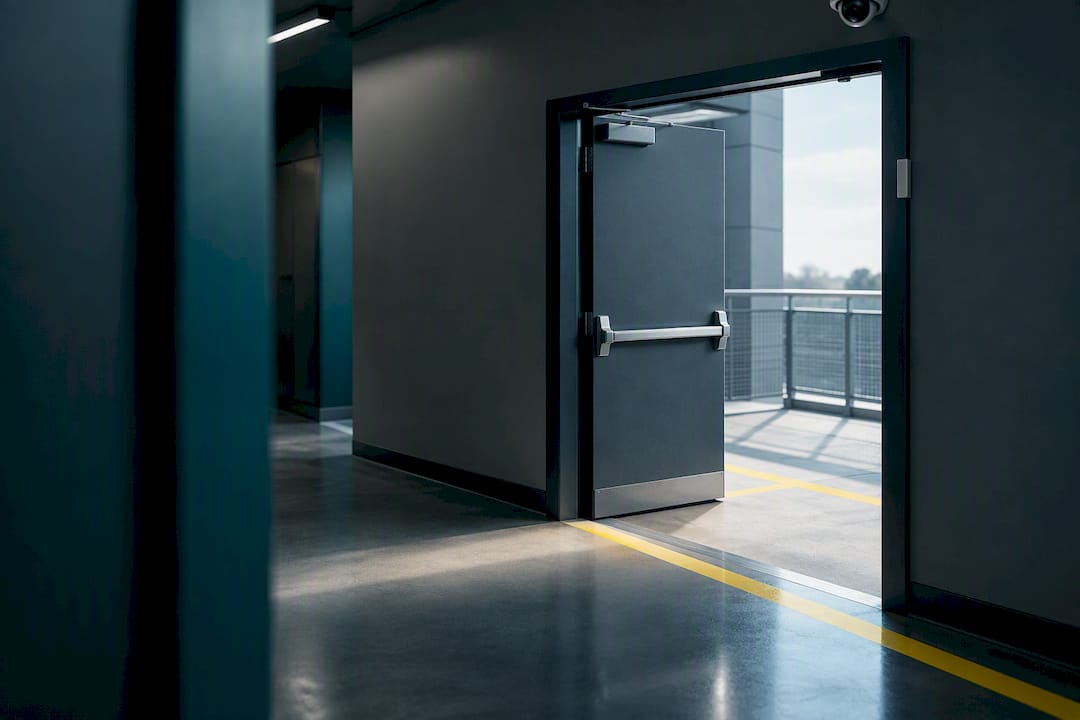
Fire code compliance in most jurisdictions requires these exits to remain unobstructed at all times, and camera footage is often the easiest way to prove compliance during an inspection or after an incident. Pairing exit cameras with door contact sensors, so an alert fires whenever an emergency door opens outside of a drill or evacuation, closes the gap between passive footage and active notification.
Installer Lessons From Retrofits and Multi-Site Rollouts
Every retrofit has the same constraint: tenants still need to operate while you’re running cable overhead. The mitigation is scheduling, working corridor by corridor during off-hours instead of shutting down a wing all at once, and it’s the difference between a smooth install and a stream of tenant complaints to property management.
Facility teams almost always face a coverage-versus-budget trade-off, and the right call is prioritizing zones by consequence, not just traffic volume. A quiet corridor near a stockroom often deserves coverage before a busy but low-risk food court seating area. Getting an installer involved during design, not after the conduit is already closed up, is what makes later camera additions affordable instead of a demolition project. A retrofit that unified feeds, analytics, and hardware health monitoring into one control desk showed measurable gains in response speed, proof that integration work pays off operationally, not just on paper.
— Aaron
How Low Voltage Corp Supports Shopping Center Camera Projects
Specialized contractors for low voltage systems handle security cameras, gates, wired and wireless networks, and cell boosters as one coordinated project built around South Florida’s regulatory and environmental demands.

A parking garage camera coverage audit identifies blind spots before you sign off on a design, and an analog-to-IP upgrade plan replaces aging cameras without ripping out working cable runs unnecessarily. For properties spanning several buildings, multi-building CCTV network services tie feeds together under one system instead of several disconnected ones, and maintenance contracts lock in response times and replacement terms so failed cameras don’t sit dark for weeks. If you’re weighing a retrofit, a garage audit, or a full multi-site rollout, request a site walk and proposal directly through Low Voltage Corp’s analog-to-IP upgrade page to get zone-by-zone recommendations specific to your property.
Sources
Technical placement guidance drew on the Retail Security Camera Installation Guide, scale figures from IntelliSee’s mall camera analysis, parking-specific tactics from Spot AI’s parking security guide, and the integrated control desk example from the Maltings case study. Legal questions about recording in public retail spaces vary by state and should go through local counsel or a qualified privacy advisor.
- Shopping Mall Security Cameras: 400 Eyes That Can’t Think
- Retail Security Camera Installation Guide 2026
- Cameras for The Maltings (case study)
- Mall and Shopping Center Parking Lot Security: A Complete Guide | Spot AI
FAQ
How Long Do Malls Keep Camera Footage?
Retention periods vary by property, and centers extend retention for zones tied to active incidents or POS disputes. The right retention window depends on storage capacity and how quickly your team reviews and closes flagged events.
What Is the Coverage Range of a Dome Camera?
A dome camera’s effective range depends on its lens and mounting height, with most indoor dome units suited for indoor aisles and ceilings to cover long sightlines without drawing attention. Mounting height and field of view matter more to actual usable range than the camera’s marketed maximum distance.
Are You Allowed to Record in a Mall?
Shopping centers are private property open to the public, and video recording in common areas is generally permitted since there’s no reasonable expectation of privacy in a mall corridor or parking lot. Audio recording carries separate legal restrictions in many states, so any system combining video and audio should be reviewed with local counsel before deployment.
How Can You Tell if You’re Under Surveillance in a Mall?
Most shopping centers post visible signage near entrances disclosing that video surveillance is in use, and cameras themselves are typically mounted in plain sight rather than hidden. Bullet-style cameras at entrances and exterior lots are intentionally visible, since their presence is part of the deterrent value the coverage is designed to provide.