The right move for most portfolios is a single cloud or hybrid video management platform running camera-agnostic hardware, deployed through a short pilot before a full rollout. That setup gives you one consistent security policy across every property instead of a dozen different logins, and it lets your team pull matching footage across sites in minutes instead of days. Start with a site survey on your key toughest locations, then scale from there.
TL;DR:
- Managing multiple sites with a centralized cloud or hybrid system reduces labor costs and improves incident response times compared to separate NVRs for each property.
- Hybrid setups, combining local gateways with cloud sync, are preferred because they maintain recordings during outages and adapt to varying bandwidths across sites.
- Effective bandwidth management involves matching sync modes to site connectivity, using event-based or scheduled uploads, and deploying mobile or solar-powered units where wired infrastructure is unavailable.
- Role-based access controls and AI-driven alert filtering are essential to prevent alert fatigue and ensure staff only see relevant footage and notifications.
- A successful multi-site rollout relies on thorough site surveys, standardized configurations, staged pilots, refined contracts, and partnering with experienced providers to avoid common installation pitfalls.
Table of Contents
- What Are Multi Site Camera Systems, and When Do You Need One?
- What Hardware and Software Do You Actually Need?
- How Do You Handle Bandwidth Across Multiple Sites?
- Who Should See What, and How Do You Keep Alerts Useful?
- What Does a Multi Site Rollout Actually Cost?
- How Do You Choose and Roll Out a Multi Site System?
- What Installers See That Property Managers Often Miss
- How Lowvoltagecorp Handles Your Multi Site Rollout
- Sources
- FAQ
What Are Multi Site Camera Systems, and When Do You Need One?
Multi-site camera systems connect the cameras at every property you manage into one management layer, so a single dashboard shows live video, recordings, and device health for every site instead of a separate login per building. Property managers running rental portfolios, campus buildings, retail clusters, or active construction sites hit this wall constantly: each location bought its own DVR or NVR years apart, on different firmware, with different passwords taped to the wall.
That fragmentation is the actual problem, not the cameras themselves. Multiple logins mean multiple points of failure, inconsistent retention policies, and a security guard who can only see the one building he’s standing in during an incident that’s unfolding three sites away. Cloud-based platforms typically become worth the switch once a portfolio reaches a moderate number of sites, which is the point where juggling separate NVRs starts costing more in labor than it saves in server costs.
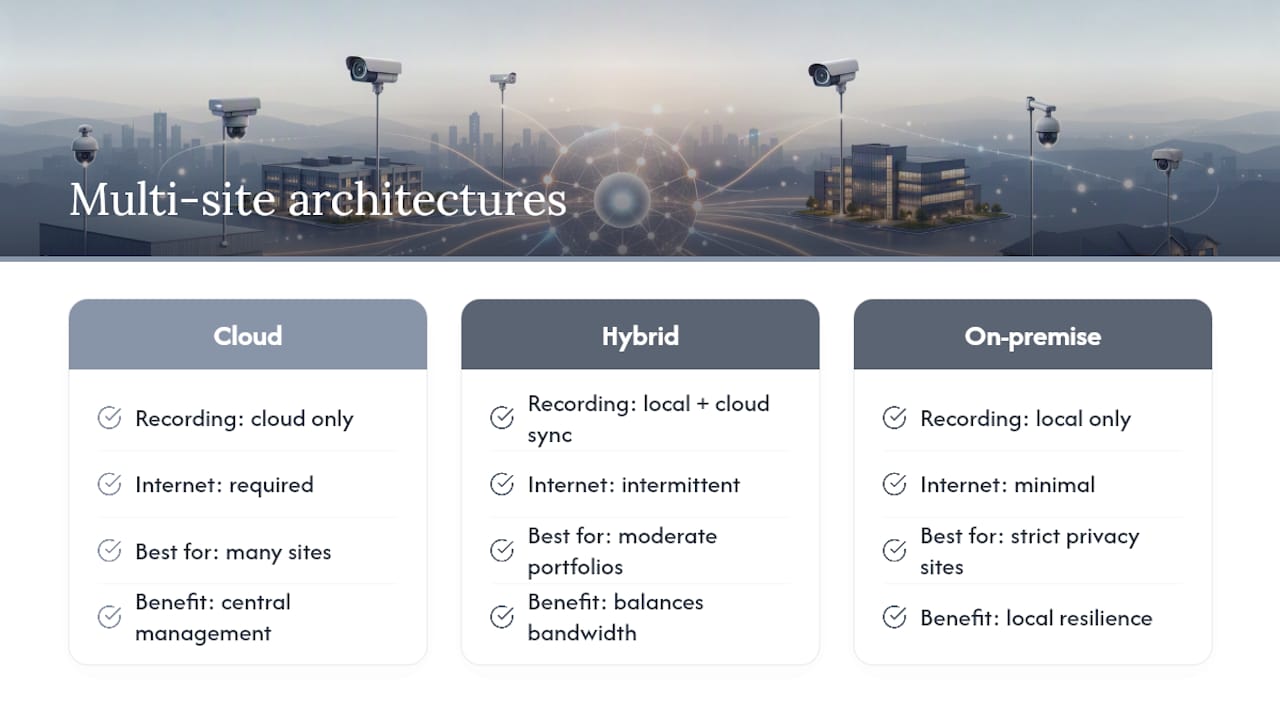
You have three architecture choices: pure cloud, hybrid (local recording plus cloud sync), or an on-premise gateway that stays local and rarely talks to the internet. Most multi-property operators land on hybrid, for reasons that become obvious once you look at bandwidth.
What Hardware and Software Do You Actually Need?
Every site needs cameras matched to what happens there, not a one-size spec sheet. A loading dock wants a fixed camera with wide dynamic range and real night vision; a parking structure or perimeter fence often justifies a PTZ camera an operator can steer during an active incident; a hallway or lobby usually does fine with a turret camera at 4MP or higher. Field of view and mounting height matter more than resolution past a certain point, which is worth confirming during your camera placement planning before you buy anything.
Behind the cameras sits either a local gateway (an on-site box that manages cameras and buffers footage) or direct-to-cloud cameras that skip the gateway entirely. Hybrid setups, gateway plus cloud sync, tend to win because they keep recording locally during an outage and push footage up once the connection returns.
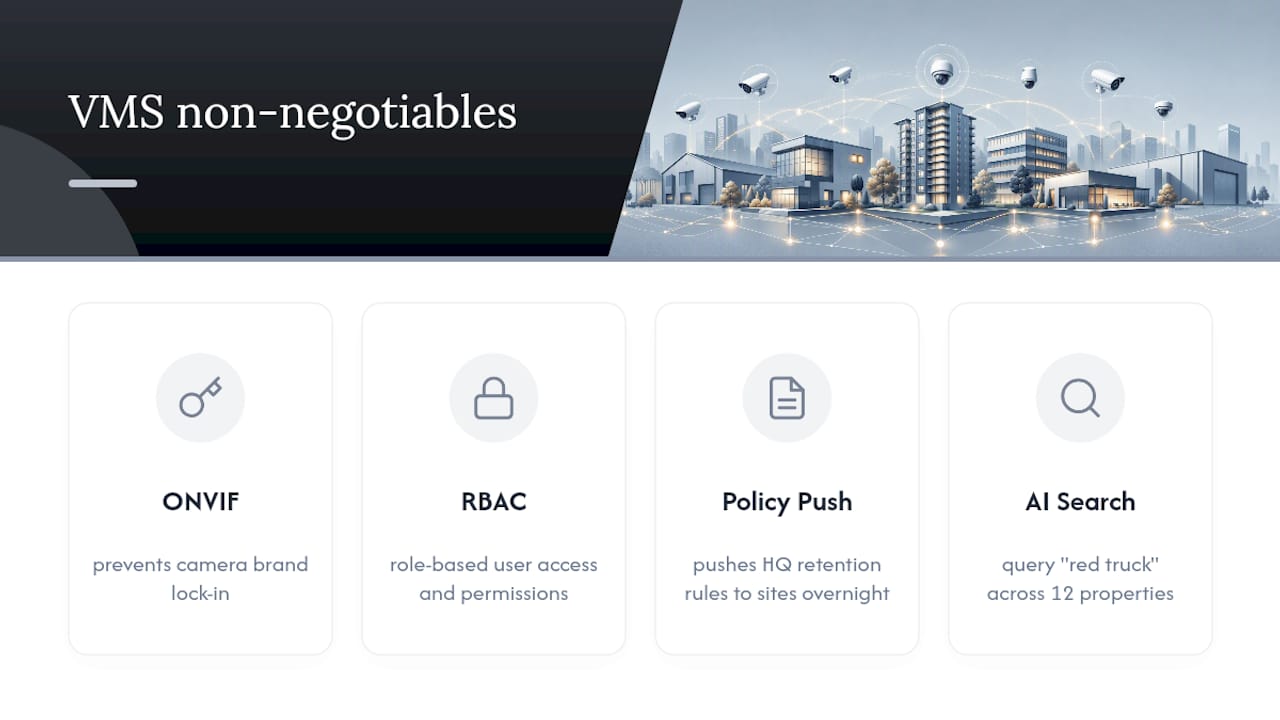
Your video management software, or VMS, needs four things non-negotiable: ONVIF support so you aren’t locked into one camera brand, role-based access control, centralized policy push so a retention rule set at headquarters applies everywhere overnight, and cross-site AI search so an investigator can query “red truck” across twelve properties at once instead of scrubbing footage building by building.
Storage splits into local retention (footage stays on-site, cheaper, but vulnerable if the box gets stolen or damaged) and cloud-first (safer, costlier, and dependent on your upload bandwidth). Most portfolios end up blending both.
How Do You Handle Bandwidth Across Multiple Sites?
Before you pick a sync mode, map what connectivity actually exists at each address. Fiber, cable, DSL, LTE/5G, and point-to-point wireless links all behave differently under load, and a plan built for fiber will choke a site running on cellular backup.
Once you know what you’re working with, match the sync strategy to the pipe:
- Continuous streaming for high-risk sites (entrances, cash-handling areas, parking garages) where you need near-real-time visibility.
- Event-based sync for constrained links, so bandwidth only spikes when motion or an alarm trigger fires.
- Scheduled bulk sync windows overnight for low-priority cameras at sites with thin or metered connections.
For sites with no wired infrastructure at all, mobile surveillance trailers and solar-powered units fill the gap. These run on battery and solar power with LTE backhaul, letting a construction site or a newly acquired property get camera coverage the same week instead of waiting on a trenching crew. Off-grid trailers can also serve as a temporary bridge while permanent wiring gets scheduled.
Whatever the sync mode, most platforms keep recording locally through an outage and reconcile footage once the link comes back, which is the failover behavior you should confirm before signing anything. Push firmware updates in staggered batches, never all sites at once, and set up a remote health dashboard that flags a camera going dark before a tenant calls to report it.
Who Should See What, and How Do You Keep Alerts Useful?
Role-based access control needs to mirror your org chart, not the software vendor’s default template. A site manager should see their building and nothing else. A regional manager sees their cluster. Corporate security and IT admins get the full portfolio, with admin rights reserved for a short list of people who actually need to change settings.
- Site manager: live view and playback for their property only.
- Regional manager: live view, playback, and analytics across their assigned cluster.
- Corporate security: full portfolio visibility plus incident export rights.
- IT admin: device configuration, firmware push, and user provisioning.
Alert fatigue kills adoption faster than any hardware failure. AI-driven filtering cuts down false alarms by surfacing only meaningful events instead of pinging someone every time a raccoon crosses a lot, and it lets staff tag and search matching footage across every site at once during an active investigation.
Pro Tip: Tune alert thresholds per site, not portfolio-wide. A rule that works for a quiet office park will spam your team at a 24-hour parking garage.
Pair the dashboard with a documented repair workflow, ideally backed by a maintenance contract so a dead camera gets a ticket and a technician instead of sitting broken for three months. The full repair workflow is worth mapping out before your first outage, not after.
What Does a Multi Site Rollout Actually Cost?
Budget across six buckets: cameras and mounting hardware, installation and wiring labor, gateways where needed, VMS subscription fees, bandwidth and cloud storage, and ongoing maintenance. Licensing usually comes per-camera, per-site, or as an enterprise tier, and the fine print on overage bandwidth charges or per-site minimums is where budgets quietly blow up.
- Hardware and mounting: cameras, brackets, enclosures, cabling.
- Software and connectivity: VMS licensing, cloud storage tiers, bandwidth overage fees.
- Labor: installation, wiring, and ongoing maintenance visits.
The ROI side is easier to defend than most managers expect. Faster investigations mean fewer guard hours spent scrubbing footage manually, and centralized visibility tends to reduce theft and loss simply because staff know every site is being watched the same way. Some insurers offer credits for documented, monitored coverage, worth asking about once your system is live. Phase the rollout by cluster and reuse cameras that still meet spec instead of replacing everything on day one.
How Do You Choose and Roll Out a Multi Site System?
- Inventory every site. Document power availability, connectivity type, existing camera count, and any local privacy or recording laws that apply to that jurisdiction.
- Set selection criteria before you shop. Require ONVIF compatibility, tiered RBAC, bandwidth-intelligent sync modes, and a written support SLA from any vendor or platform you consider.
- Run a pilot at two or three sites. Track uptime percentage, false-positive alert rate, and sync reliability during outages for at least thirty days before deciding.
- Standardize before you scale. Lock in a camera naming convention, batch provisioning templates, and a maintenance schedule so site fifteen looks identical to site one.
- Build the contract right. Specify response-time SLAs, firmware update cadence, and who owns footage retention and export rights.
Pro Tip: Pick your pilot sites deliberately, one with strong connectivity and one with the weakest link you have. If the platform performs at your worst site, it will work everywhere else.
Choosing camera-agnostic platforms also protects your existing investment, since you can phase in new hardware without ripping out cameras that still work fine.
What Installers See That Property Managers Often Miss
Field visits turn up the same mistakes on repeat: a gateway sized for the wrong bandwidth, cameras mounted where glare wrecks night footage, mounts loosened by six months of heat cycling, and three buildings running three different firmware versions because nobody standardized the rollout. None of that shows up on a spec sheet until it fails during an actual incident.
The fixes that save the most time are boring ones. Pre-configured camera profiles, a fixed naming convention across every site, and a cellular fallback plan for locations where the primary link goes down. A maintenance contract with scheduled audits catches loose hardware and stale firmware before a manager finds out the hard way, usually during a police report request when the footage isn’t there.
— Aaron
How Lowvoltagecorp Handles Your Multi Site Rollout
Lowvoltagecorp is the alternative to piecing together a multi-property system yourself, site survey by site survey, vendor call by vendor call. Instead of coordinating separate installers for cameras, connectivity, and maintenance at every property, you work with one team that specializes in exactly this stack across South Florida.

That means a technician who understands point-to-point WiFi backhaul for a building with no fiber, analog-to-IP upgrades for legacy cameras still worth keeping, and a maintenance contract structured around fast repair turnaround instead of a support ticket that sits for weeks. Property managers running rental portfolios, retail clusters, or campus buildings across South Florida can start with a site survey rather than committing to a full deployment blind.
For portfolios juggling several buildings under one roof structure or association, the Multi Building CCTV Network service is built specifically for that scenario. Request a site survey and get a proposal scoped to your actual sites, not a generic package.
Sources
For deeper reading on centralized platform architecture, see Lumana’s breakdown of multi-site camera management, iFovea’s guide to cloud surveillance consolidation, and EPIC IO’s overview of unified operational platforms.
- Multi-Site Camera Management: Centralize Control, Reduce Complexity
- Multi-Site Cloud Surveillance Management | iFovea
FAQ
What Is the Difference Between a Cloud VMS and a Hybrid VMS?
A cloud VMS stores footage entirely off-site, while a hybrid VMS records locally first and syncs to the cloud, which keeps recording going even if the internet connection drops.
How Many Sites Justify Switching to a Centralized System?
Most operators find the switch pays off once they’re managing roughly five to twenty separate sites, the point where separate logins and inconsistent policies start costing real time.
Does Lowvoltagecorp Install Multi Site Camera Systems?
Yes, Lowvoltagecorp provides Multi Building CCTV Network services along with camera installation, repair, and maintenance contracts for property managers across South Florida. Pricing is available on request based on your site count and scope.
Can I Use Cameras From Different Brands Across My Sites?
Yes, as long as your VMS platform supports the ONVIF standard, which lets cameras from different manufacturers connect to the same management system without vendor lock-in.
What Happens to Recordings if a Site Loses Internet?
Most hybrid platforms keep recording locally during an outage and automatically sync the footage once connectivity returns, so you don’t lose video from a dropped connection.