Change every default password, put cameras on their own network segment, patch firmware on a fixed schedule, encrypt remote access with a VPN and MFA, and log every export. Those five moves close most of the gaps that turn a camera system into an open door. Everything below explains why each step matters and how to actually get it done, whether you handle it in house or hand it to a contractor.
TL;DR:
- Changing default passwords on all cameras, NVRs, and DVRs is critical to prevent easy unauthorized access.
- Segmenting CCTV traffic on its own VLAN and blocking internet access to management interfaces minimize cross-network risks.
- Regular firmware updates, tested before deployment, close known vulnerabilities listed in vulnerability databases.
- Requiring MFA and VPN access for remote management ensures only trusted users can control the system remotely.
- Physical security measures like tamper-proof mounts and secured cabinets prevent vandalism and unauthorized wire access.
Table of Contents
- CCTV Cyber Security Best Practices: The Priority Checklist
- Passwords, Accounts, and Access Control
- Network Design: Segmentation, Firewalls, and Port Management
- Device Hardening and Patch Management
- Secure Remote Access, Monitoring, and Logging
- Data Protection: Encryption, Retention, and Export Controls
- Physical Security and Tamper Protection
- Incident Response, Audits, and Vendor Vetting
- A Technician’s Maintenance Workflow for Property Managers
- Why Secure-by-Design Beats Bolting Security on Later
- How Lowvoltagecorp Can Help You Lock This Down
- Sources
- FAQ
CCTV Cyber Security Best Practices: The Priority Checklist
You don’t need a security degree to fix the biggest holes in a camera system. You need a list, and about a weekend of focused work. This is the order that reduces the most risk per hour spent:
- Change every default password on cameras, NVRs, and DVRs before anything else touches the network.
- Isolate CCTV traffic on its own VLAN so a compromised camera can’t reach payroll servers or guest WiFi.
- Patch firmware on a set schedule instead of waiting for a breach to remind you.
- Disable unused services like Telnet, UPnP, and plain HTTP on every device.
- Force TLS/HTTPS for any camera or NVR web interface.
- Require MFA and a VPN for remote administrative access. Never expose a camera directly to the internet.
- Centralize logs and review them weekly, not just after something goes wrong.
- Harden mounts and cabling so someone can’t physically tamper with a camera or splice into a wire.
- Vet vendors for update cadence and published security practices before you buy.
- Assign a single owner for camera cybersecurity, even if that owner is a contracted technician instead of in-house IT.
A facility manager can delegate most of this to a contractor or an IT lead. The point is that someone owns it, on paper, with a date attached to each task.
Passwords, Accounts, and Access Control
Default credentials are the single most common way outside attackers get into a camera system, and the FTC’s guidance on securing home security cameras puts changing them at the top of its list for exactly that reason. Every camera, NVR, and DVR ships with a factory login that’s published online, sometimes in the manual itself. If you haven’t changed it, assume someone else already knows it.
Beyond the first password swap, access needs structure:
- Force a password change at first boot on every new device, and never reuse one password across the whole camera fleet.
- Separate viewing access from configuration access. A front-desk employee who needs to check a live feed doesn’t need the ability to change network settings or delete footage.
- Build an onboarding and offboarding checklist. When someone leaves the property management team, their camera-system credentials should be disabled that day, not at the next audit.
- Rotate administrative passwords on a schedule, not only after an incident.
Pro Tip: Keep a printed or offline copy of your current admin credentials in a locked safe. If your password manager or network goes down during an incident, you still need a way into the system to shut things down.
Network Design: Segmentation, Firewalls, and Port Management
Cameras belong on their own network segment, full stop. ONVIF’s cybersecurity recommendations call for using VLANs to separate CCTV traffic, avoiding direct internet exposure for cameras and NVRs, and running a firewall that only opens the ports a system actually needs. That’s the blueprint most facility networks should follow.
A VLAN works for most single-building properties. A physically separate network makes sense for larger campuses or multi-tenant buildings where the stakes of cross-contamination are higher. Either way, the goal is the same: if a camera gets compromised, the attacker should hit a dead end, not a path to your accounting server.
- Block management interfaces (the camera’s admin login page) from any internet-facing rule.
- Allow only the specific protocols a system needs, ideally RTSP, HTTPS, and RTP for business traffic, and nothing else.
- Avoid port forwarding for remote viewing. It’s the fastest way to end up exposed on a scanning tool like Shodan.
- Prefer a cloud-managed platform or a VPN over exposing a raw port to the public internet; a remote monitoring setup done right avoids the port-forwarding trap entirely.
- Use a jump host for administrative access if a VPN alone isn’t available, so no device ever connects directly to an untrusted network.
Multi-building properties add a layer of complexity here, since segmentation has to work consistently across every site rather than just one closet. That’s a big enough problem that it deserves its own approach to network design.
Device Hardening and Patch Management
Every camera on your network is a small computer running its own operating system, and most of them ship with services turned on that you’ll never use. Disable Telnet, UPnP, and unencrypted HTTP wherever the device allows it, and force HTTPS and TLS for anything that touches the web interface. The ITU’s F.743.23 guidance recommends restricting network application traffic to only the protocols a CCTV platform actually needs for business purposes, plus device fingerprinting so you can spot an unauthorized or swapped device fast.
- Keep an inventory with IP address, MAC address, model, current firmware version, and end-of-life date for every camera and recorder.
- Test new firmware on one device before pushing it fleet-wide.
- Verify firmware signatures when the vendor supports it, so you’re not installing a tampered image.
- Set a fixed patch review cadence (monthly is reasonable for most properties) instead of ad hoc updates.
The National Vulnerability Database lists numerous CVE entries tied to specific camera models running outdated firmware, which is the clearest evidence that patch management isn’t optional maintenance. It’s the difference between a known, fixed flaw and an open door.
Secure Remote Access, Monitoring, and Logging
Remote access is where most camera breaches actually start, because it’s the one feature every property manager wants and the one feature most vendors implement poorly by default. Require multi-factor authentication for any administrative login, and route remote access through a VPN or a secure gateway rather than a direct connection to the camera or NVR.
- Never allow direct internet exposure for an admin interface, even for a “temporary” fix.
- Centralize logs from every camera and NVR in one place, and restrict who can access that log storage.
- Watch for new device fingerprints appearing on the network, repeated failed logins, or unusual export activity, all of which suggest something’s wrong before footage goes missing.
- If your property already runs a SIEM tool, feed camera logs into it and set alert thresholds for failed logins and after-hours configuration changes.
Weak retrieval and export governance, not just camera placement, is often what determines whether a facility can actually produce clean footage during an audit when it matters.
Data Protection: Encryption, Retention, and Export Controls
Video streams should run over TLS from camera to recorder, and anything stored on disk, whether that’s a local NVR or a cloud platform, needs encryption at rest. The ITU’s F.743.23 guidance specifically calls out encrypting sensitive video data and managing authorization for who can view or export it, which lines up with what most standards bodies recommend for surveillance systems generally.
- Encrypt local downloads automatically rather than leaving exported clips as unprotected files on a laptop or USB drive.
- Set retention windows based on actual risk, not habit. A retail lobby camera might need video retention for a period appropriate to its risk level, and a cash-handling area might require a longer retention period.
- Automate deletion once a retention window closes, where local law allows it, so old footage doesn’t sit around as a liability.
- Use visible or invisible watermarking on exported clips and require an approval step before footage leaves the system, preserving a clean chain of custody.
Physical Security and Tamper Protection
Digital controls fall apart fast if someone can just walk up and unplug a camera or splice into an exposed cable. Mount cameras high enough to resist casual tampering, use tamper switches where the hardware supports them, and run cabling through conduit instead of leaving it exposed along a wall. Many real-world incidents trace back to accessible junction boxes and low-mounted cameras rather than anything happening on the network itself.
- Lock NVR and DVR cabinets, and log who enters the storage room and when.
- Protect recorder rooms from heat and moisture, since a failed drive is as bad as a hacked one.
- Walk the property once and note every exposed cable run or unsecured junction box; fix what you can that same day.
Pro Tip: A raised camera and a locked conduit run cost almost nothing compared to a re-installation after vandalism. Physical hardening is the cheapest insurance in this entire list. If your cabling needs a second look, a proper wiring installation guide is worth reviewing before your next upgrade.
Incident Response, Audits, and Vendor Vetting
When something goes wrong, speed and order matter more than heroics. Work through it in this sequence:
- Isolate the affected device or network segment immediately, without powering it down if you need forensic evidence intact.
- Preserve logs and video before anyone touches configuration settings.
- Investigate what happened, patch the specific vulnerability, and only then restore normal operation.
Audit readiness is a separate, ongoing habit: test that you can actually retrieve footage from three months ago, verify your timestamps are accurate, and keep an export log showing who pulled what and when.
Vendor vetting deserves its own line item. Ask how often a manufacturer ships firmware updates, whether they publish security advisories, and whether their products align with frameworks like IEC 62443 or UL 2900. A vendor that discloses CVEs openly and patches quickly is a better long-term partner than one with a cleaner-looking spec sheet and no update history.
A Technician’s Maintenance Workflow for Property Managers
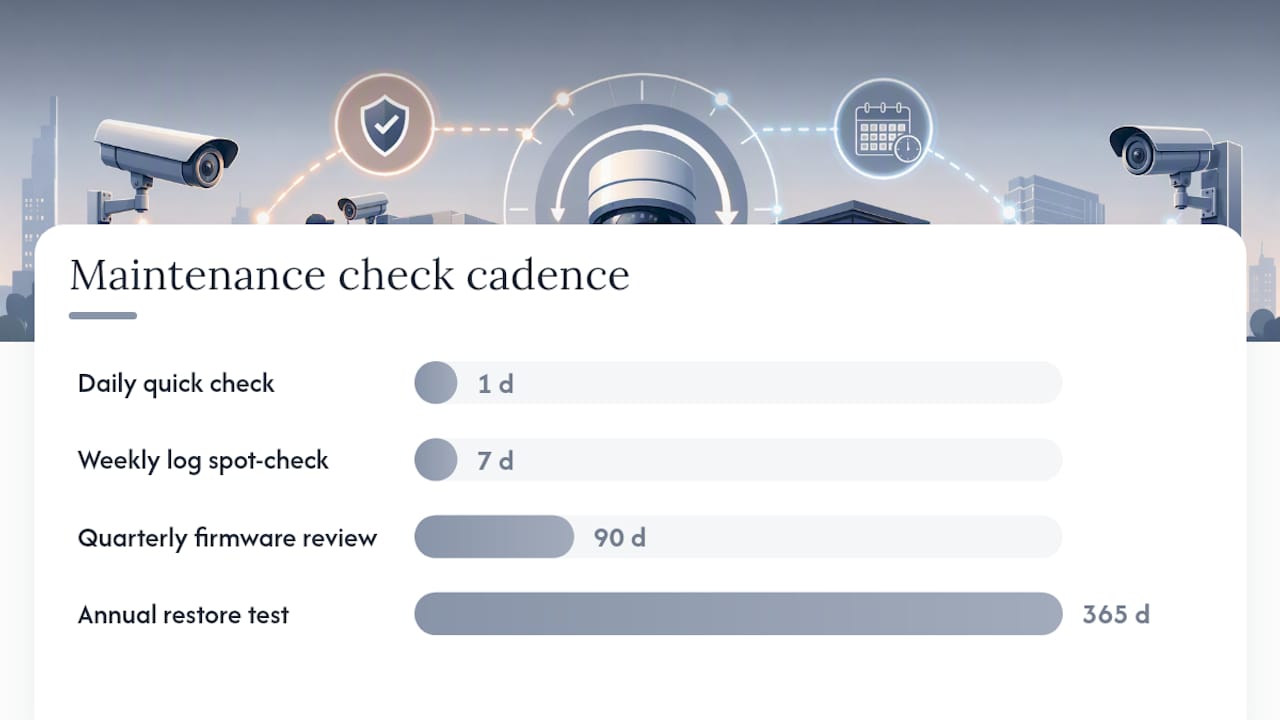
A camera system isn’t a one-time install. It’s an ongoing maintenance job, and the properties that stay secure treat it that way. A workable device inventory tracks IP address, MAC address, model, firmware version, install date, and end-of-life date for every camera and recorder on site.
On the operational side:
- Run a daily quick check that every camera is online and recording.
- Spot-check logs weekly for failed logins or unusual export activity.
- Review firmware versions quarterly against manufacturer release notes.
- Test full footage retrieval and restore once a year, not just when you need it.
- Call a contractor when firmware won’t update cleanly, a camera drops offline repeatedly, or an audit turns up a gap in your logs.
A maintenance contract should include exactly this cadence, plus a documented report after every visit. If your system started as analog and got patched together over the years, an analog-to-IP upgrade is usually the cleaner fix than layering more workarounds onto old hardware.
Why Secure-by-Design Beats Bolting Security on Later
Most of the camera systems I’ve seen get into trouble weren’t hacked because of some exotic exploit. They got into trouble because someone left a default password in place for three years, or because a camera got wired straight into the main office network with no segmentation at all. Those are design decisions, made once, at install.
Secure-by-design means treating cybersecurity as part of the initial site plan, not a patch applied after a scare. Budget for firmware reviews and vendor checks the same way you budget for lens cleaning. It’s cheaper every time.
— Aaron
How Lowvoltagecorp Can Help You Lock This Down
A professional low voltage contractor can handle parts of this checklist that take specialized tools and hands-on access: proper VLAN setup, firmware management, and physical hardening done right the first time.

If your current setup started as an analog system, an analog-to-IP upgrade brings encryption and modern access control into the mix without a full rebuild. For properties that want the ten-point checklist above handled on a schedule instead of remembered under stress, a security camera maintenance contract covers patching, log checks, and firmware reviews as part of the visit. Multi-site operators managing several buildings under one network should look at multi-building CCTV network services for consistent segmentation across every location. Request a site audit and the contractor will walk the property, document every camera and recorder, and hand over a written plan before any work starts.
Sources
- ONVIF Recommendations for Cybersecurity Best Practices for IP-based Physical Security Products
- How To Secure Your Home Security Cameras
- ITU guidance (F.743.23) — excerpts on CCTV access, fingerprinting, encryption, and network controls
- NVD / CVE vulnerability listings (representative entries)
FAQ
What Are the 5 C’s of Cyber Security?
Definitions vary across the industry, but a common version covers change, compliance, cost, continuity, and coverage, treated as the pillars of a security program rather than a fixed CCTV standard. For camera systems specifically, the checklist in this article, credentials, segmentation, patching, encryption, and logging, maps more directly onto real risk.
What Are the 7 Components of a CCTV System?
A typical CCTV system includes cameras, lenses, a recorder (NVR or DVR), storage, a monitor or viewing client, cabling or wireless links, and power supply. Each component carries its own security considerations, from encrypted video streams on the cabling side to access control on the viewing client.
What Is the 80/20 Rule in Cybersecurity?
It’s the idea that roughly 20% of your security actions prevent 80% of realistic incidents. For CCTV systems, that 20% is changing default passwords, isolating cameras on their own network, and keeping firmware patched, the three steps that close off the most common attack paths.
What Are the Top Best Practices for CCTV Cybersecurity?
The highest-priority steps are eliminating default credentials, segmenting camera traffic on its own VLAN, patching firmware on a fixed schedule, requiring MFA and a VPN for remote access, and centralizing logs for review. A maintenance contract from a qualified contractor keeps these running on schedule instead of falling to the bottom of a to-do list.
How Often Should CCTV Firmware Be Updated?
A monthly review of available firmware updates is reasonable for most commercial properties, paired with a quarterly deeper audit of every device’s version against the manufacturer’s release notes. Test any update on one device before rolling it out across the whole camera fleet.