Use this seven-phase wireless network setup workflow to deliver a repeatable, high-availability network instead of a patched-together access point rollout: pre-installation assessment, predictive RF design, hardware and architecture selection, logical and security configuration, physical deployment and cabling, validation and acceptance testing, and ongoing operations with change control.
Skip any phase and you inherit its risk later, usually during a Monday morning all-hands call when the guest network falls over. Here is the sequence, phase by phase:
- Pre-installation assessment — capture requirements, run the site survey, log constraints
- Predictive RF design — model AP count, placement, and channel plan against real device density
- Architecture and hardware selection — pick controller model, AP class, and PoE switching
- Logical and security configuration — build the SSID/VLAN map and authentication policy
- Physical deployment and cabling — mount hardware, run structured cabling, document as-built
- Validation and acceptance testing — AP-on-a-stick, throughput tests, sign-off against SLAs
- Operations and change control — monitor KPIs, tune quarterly, govern configuration changes
Each phase produces a deliverable the next phase depends on: a signed requirements doc, an RF design report, a VLAN/SSID map, a PoE budget spreadsheet, and a written acceptance criteria checklist. Miss one and the project stalls at handoff, not at kickoff.
Key Takeaways
A repeatable enterprise wireless deployment works when a predictive site survey drives capacity-based RF design, PoE budgeting prevents field failures, and acceptance testing verifies performance before sign-off.
| Point | Details |
|---|---|
| Survey before you design | Skipping the site survey creates coverage gaps that no configuration change can fully repair later. |
| Design for capacity, not just coverage | Model device density and application mix per zone, not just signal strength on a heat map. |
| Budget PoE with a safety margin | Calculate each AP’s maximum draw against switch chassis totals before ordering hardware. |
| Set measurable acceptance criteria | Sign off on throughput, latency, packet loss, and roaming thresholds before go-live, not after. |
| Work with a documented process | Lowvoltagecorp follows this same survey-to-monitoring workflow for South Florida commercial wireless installs. |
Table of Contents
- Pre-Installation Assessment: What to Capture Before Design Starts
- How Do You Design Wireless Coverage for High-Density Areas?
- Choosing Hardware and Architecture for Enterprise Wi-Fi
- SSID and VLAN Design: Building the Security Foundation
- Physical Deployment: AP Placement, Cabling, and Safety
- How Do You Test a Wireless Network Before Go-Live?
- Operations After Deployment: Monitoring, Tuning, and Change Control
- What Does an Enterprise Wireless Install Typically Cost and Take?
- Field Checklist and Handoff Pack for Wireless Installers
- Connecting New Wireless Deployments to Existing Infrastructure
- Planning Redundancy for Networks That Can’t Go Down
- Setting Up User Onboarding and Authentication
- Managing Firmware and Software Updates Without Breaking Production
- Testing Failover Before You Actually Need It
- What Operations Teams Get Wrong After Handoff
- How Lowvoltagecorp Handles Enterprise Wireless Installations
- Frequently Asked Questions
- Sources
Pre-Installation Assessment: What to Capture Before Design Starts
The gap between a working wireless network and a chronically flaky one usually traces back to one decision: whether anyone did a real site survey and AP placement assessment before ordering hardware. Skipping this step doesn’t just risk weak signal in a back office. It creates security gaps and capacity shortfalls that no amount of post-install tuning will fully fix.
Start with stakeholder interviews, not a floor plan. You need answers to specific questions before you can model anything:
- What are the primary use cases? Voice over Wi-Fi, video conferencing, warehouse scanners, medical telemetry, POS terminals?
- What SLA does the business expect, and which devices count as mission-critical if the network degrades?
- What’s peak concurrency per zone, not average? A 200-seat conference center at capacity behaves nothing like its Tuesday afternoon baseline.
- Where does coverage matter more than capacity, and where is it the reverse (open floor plans, warehouse aisles)?
Pair those answers with a physical site walk. Your checklist should include:
- Floor plans with accurate scale and material notes (concrete, drywall, metal decking, glass curtain walls)
- Existing RF sources: neighboring networks, microwave-heavy equipment, industrial machinery
- Power and rack locations, including available breaker capacity near planned AP zones
- Current switch models and PoE headroom at each closet
The phase closes with four deliverables: a documented requirements brief signed by the stakeholder, an annotated floor plan, structured inputs ready for predictive design software, and a risk log flagging anything that could blow the schedule.
How Do You Design Wireless Coverage for High-Density Areas?
Predictive design is where coverage-focused thinking gets replaced with capacity-focused thinking, and that shift matters more than any other decision in the workflow. A heat map that looks fully green on a floor plan can still represent an environment where every AP radio is overloaded during peak hours, because coverage alone doesn’t guarantee performance once real device density and application mix enter the picture.
Feed the design tool with the site survey outputs plus three additional inputs: expected device density per zone, the application mix (real-time voice and video behave very differently from bulk IoT telemetry), and the interference sources you logged during the walk.
Capacity math looks different depending on the space. A high-density open office with 150 people on laptops and phones might need one AP per 20 to 25 concurrent devices to keep per-client throughput usable for video calls. A warehouse corridor with scanners and forklift telemetry can run wider AP spacing because the device count per square foot is lower, even though the physical footprint is larger.
Channel planning follows the same logic:
- Reserve 2.4 GHz mainly for IoT and legacy devices; don’t rely on it for primary client traffic
- Plan 5 GHz and 6 GHz (Wi-Fi 6E/7 where deployed) channel width and reuse distance to avoid co-channel interference between adjacent APs
- Enable band steering carefully. It helps push capable clients to less congested bands, but poorly tuned thresholds can cause connection delays on dual-band devices
- Account for DFS channel behavior in 5 GHz. Radar detection events can force a channel change mid-operation, which matters for latency-sensitive traffic
Pro Tip: Run the predictive model against the worst-case floor, not the average floor. A design that clears the noisy conference wing usually clears the quiet back office too, but the reverse almost never holds.
Choosing Hardware and Architecture for Enterprise Wi-Fi
Architecture decisions made in phase three lock in your operational model for years, so treat this as more than a shopping list. The core decision is controller-based versus cloud-managed versus controllerless, and each comes with different failure modes worth mapping out before you commit.
Run through this checklist before selecting hardware:
- Does the environment need centralized controller redundancy, or does cloud management’s built-in resilience cover the SLA?
- What backhaul switching capacity does the design require, and does the existing wired core support it without an upgrade?
- Do critical services (security cameras, access control, point-of-sale) need physical or logical isolation from general staff traffic?
- Does the AP class support the 802.11 version your capacity plan assumes, including Wi-Fi 6 or 6E/7 readiness for the applications you documented?
- What telemetry does the platform expose for operations, and does it integrate with your existing monitoring stack?
PoE budgeting deserves its own line item, because undersized power budgets cause reboots and radio failures under load that look like RF problems but are actually electrical ones. List each AP model’s maximum draw, confirm whether it needs 802.3af, 802.3at, or higher, and multiply by a safety margin before you check switch chassis totals against per-port budgets. A switch that technically supports 24 ports of PoE+ doesn’t necessarily support all 24 running at full draw simultaneously.
If mesh backhaul is part of the plan for hard-to-cable zones, understand the tradeoffs before committing hardware; a practical guide to wireless mesh covers where mesh helps and where it just adds latency.
SSID and VLAN Design: Building the Security Foundation
Logical configuration is where most enterprise deployments quietly fail, not because the design was wrong but because someone left the setup wizard’s defaults in place. Wizards are useful for getting an AP on the air quickly, but guest isolation, captive portals, and advanced ACL rules typically live deeper in the admin console and need to be configured on purpose, not assumed.
Start with an SSID-to-VLAN map before you touch a controller GUI:
| SSID category | VLAN purpose | Isolation rule |
|---|---|---|
| Staff | Corporate traffic, internal apps | Full internal access, 802.1X required |
| Guest | Internet-only access | Isolated from internal VLANs, client isolation on |
| IoT | Sensors, badge readers, HVAC controls | Segmented, no internet access unless required |
| Security systems | Cameras, access control, gate controllers | Isolated VLAN, restricted to management subnet only |
Minimum security posture for day one: WPA3 wherever the hardware supports it, with WPA2-PSK as the absolute floor, never open authentication on anything but a captive-portal guest network. Staff networks should run 802.1X with RADIUS authentication rather than a shared pre-shared key, and firmware updates need to happen immediately after initial configuration, not on a “someday” backlog.
A few operational habits worth locking in:
- Never put building addresses or company names in SSID strings; it hands reconnaissance data to anyone scanning nearby
- Tag VLANs consistently across every switch and controller, and document the tag numbers in the same file as your floor plan
- Apply ACLs between VLANs by default-deny, then open only the specific ports and protocols each service needs
- Review the full role of VLANs in facility networks before finalizing segmentation for mixed-use buildings with security and access control systems on the same physical AP infrastructure
Physical Deployment: AP Placement, Cabling, and Safety
Physical installation turns the predictive model into hardware on the ceiling, and this is where cabling quality and mounting discipline routinely outperform any last-minute configuration tweak. Placement should follow the heat map, not convenience. Mount APs on ceilings rather than walls where possible for more even radiation patterns, keep at least a foot of clearance from metal ductwork or fluorescent fixtures, and respect the inter-AP spacing your design software calculated rather than eyeballing it in the field.
Cabling and grounding checklist:
- Run Cat6A for new installs supporting Wi-Fi 6E or higher AP throughput; Cat6 is acceptable for lower-bandwidth legacy AP classes
- Keep cable pathways clear of high-voltage lines and follow local conduit fill rules
- Label every run at both ends, and map each cable to its patch panel port and switch port before the crew leaves site
- Document switch port assignments in the same spreadsheet as your VLAN tags, not a separate file someone will lose
Safety matters as much as signal quality. Technicians working from man-lifts need proper fall protection and a spotter in occupied spaces, and anyone opening a live ceiling grid should confirm HVAC and fire suppression systems aren’t affected by fixture placement. Secure every AP mount to structural framing, not just ceiling tile.
Pro Tip: Photograph every AP mount and cable run before closing the ceiling. It takes ninety seconds per AP and saves hours of guesswork when someone asks “where does this cable actually go” eighteen months from now.
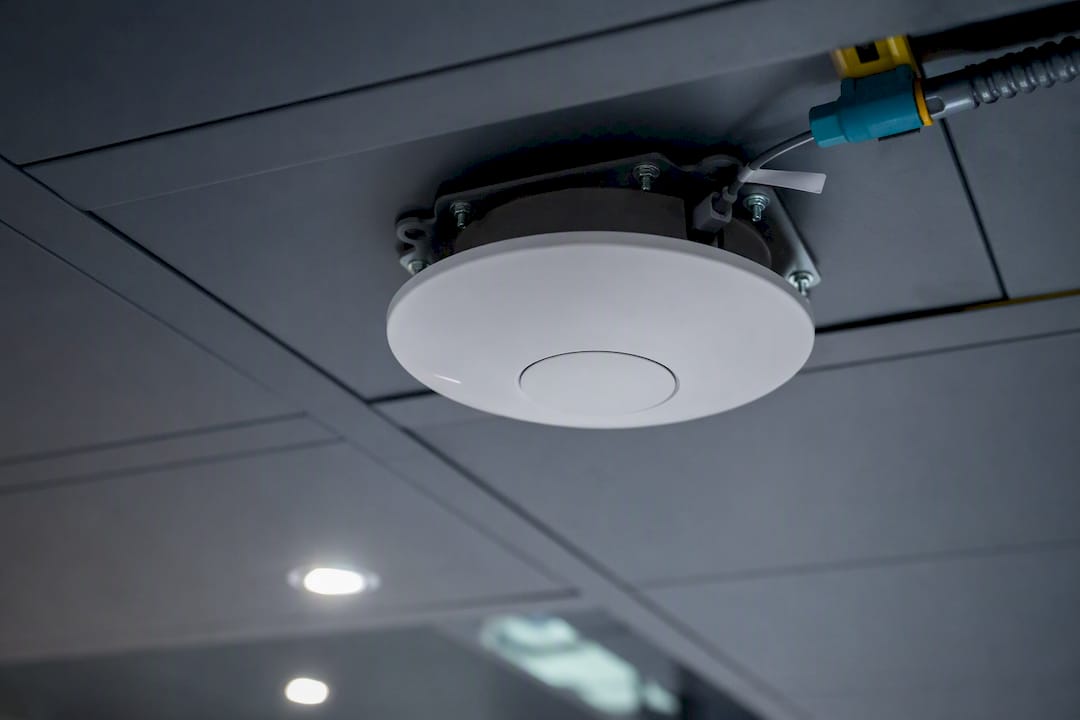
Close the phase with a short handoff packet: mount locations, cable IDs, and switch port assignments ready for the validation phase.
How Do You Test a Wireless Network Before Go-Live?
Validation is the phase that separates a network you can defend from one you’re hoping works. Acceptance testing needs measurable thresholds signed off before go-live, not a vague “it seems fine” from whoever walked the floor with a phone.
Test procedure, in order:
- Run AP-on-a-stick testing at each planned mounting location before permanent installation to confirm the predictive model matches real-world RF behavior
- Walk the entire site post-install with a survey tool, capturing signal strength, noise floor, and channel utilization at defined anchor points
- Run throughput and latency tests at each anchor point during normal business hours, not just after hours when the building is empty
- Test roaming handoff explicitly by walking a connected device between AP zones and logging handoff time
- Verify authentication flows for every SSID category, including a failed-credential test on the staff network and a captive-portal test on guest
| Metric | Pass threshold | Test method |
|---|---|---|
| Throughput per client | Meets application SLA (e.g., 25 Mbps for HD video) | Speed test at anchor points |
| Latency | Low latency for voice/video traffic | Ping/jitter test during business hours |
| Packet loss | Under 1% for real-time traffic | Sustained traffic capture |
| Roaming handoff time | Under 150ms | Walk test with connected device |
| Authentication success | 100% on valid credentials, 100% rejection on invalid | Manual login test per SSID |
Log every result against the site’s floor plan reference points so the acceptance report ties directly back to the design.
Operations After Deployment: Monitoring, Tuning, and Change Control
Handoff to operations is where most wireless projects either stay healthy or slowly decay, and the difference comes down to whether anyone is actually watching the KPIs. Track client counts per AP, retry rates, airtime utilization, channel utilization, and per-AP health metrics like CPU and memory on the controller side.
Set a tuning cadence rather than reacting only to complaints:
- Daily health checks during the first week after go-live, when unexpected load patterns tend to surface
- Weekly tuning reviews through the first month as usage settles into a real baseline
- Quarterly capacity reviews checking whether device counts have grown past the original design assumptions
- Annual predictive re-surveys, especially after any building renovation or major floor plan change
Change control needs a defined approval chain before the first ticket comes in. Decide who can approve SSID or VLAN changes, document an emergency rollback procedure for a bad configuration push, and require every change, however small, to update the same master documentation set created during handoff. A network that drifts from its documentation is a network nobody can troubleshoot quickly.
What Does an Enterprise Wireless Install Typically Cost and Take?
Timeline scales with square footage and AP count more than with any single technical decision. A small office deployment (under 20 APs) typically runs two to four weeks from survey to sign-off. A mid-size building (50 to 150 APs) usually needs six to ten weeks once procurement lead times are factored in. Large or multi-building enterprise rollouts can stretch three to six months, particularly when structured cabling has to be pulled through occupied space.
Primary cost drivers to budget against, not just the AP invoice:
- Predictive AP count from the RF design, since each additional AP adds hardware, a cable run, and a switch port
- Structured cabling versus wireless bridging for hard-to-reach zones, which can shift labor costs significantly
- PoE switch capacity, particularly if the existing wired core can’t support the new power budget without an upgrade
- Controller licensing or cloud management subscription costs, which often get underestimated in year-one budgets
- Specialized RF survey tools or contracted survey time for large or RF-hostile environments
The items that blow budgets aren’t usually the AP hardware. They’re unmapped plenum ceilings discovered mid-install, interference sources nobody logged during the survey, and stakeholder requirement changes that arrive after the RF design is already locked.
Field Checklist and Handoff Pack for Wireless Installers
A clean handoff pack is the difference between operations trusting the network and operations dreading every ticket tied to it. Field crews should run a pre-flight equipment check, verify cable labeling against the design map, confirm AP mounting matches the heat map placement, sanity-check PoE draw at each switch port, and stage firmware versions before final power-up.
The handoff pack itself needs: as-installed floor plans, AP serial numbers and MAC addresses, switch port mapping, the SSID/VLAN matrix, firmware versions per device, and the acceptance test logs from validation.
Pro Tip: Stage firmware updates before mounting, not after. Updating twenty ceiling-mounted APs one at a time after install day is how a two-hour job turns into a two-day truck roll.
Connecting New Wireless Deployments to Existing Infrastructure
New wireless networks rarely land on a blank slate. Most enterprise sites already run a wired core, legacy Wi-Fi in some zones, and security or access control systems that predate the current project, and integration planning has to account for all three.
Start by mapping the existing wired backbone’s capacity against your new PoE and uplink requirements. A core switch that handled a previous generation of lower-power APs may not have the chassis budget for Wi-Fi 6E or 7 access points running at full radio output, and that gap shows up as random reboots, not obvious failures. Confirm uplink speeds between wiring closets and the core support the aggregate wireless throughput you designed for, not just the throughput of a single AP.
Legacy wireless coexistence deserves explicit planning rather than a “just turn off the old one” assumption. If older APs stay live during a phased migration, document their channel assignments so they don’t create co-channel interference with the new design, and set a hard decommission date so the network doesn’t end up running two overlapping SSIDs indefinitely.
Security and access control integration is its own conversation. Systems like camera VLANs, gate controllers, and badge readers often ride on infrastructure installed years before the wireless refresh, and reviewing wired network solutions alongside the wireless plan avoids a scenario where the new access points outperform a core network that can’t keep up. Document every integration point in the same VLAN map used for the wireless design, so operations has one source of truth instead of two systems maintained separately.
Planning Redundancy for Networks That Can’t Go Down
High availability starts with an honest answer to one question: what happens the moment a controller, switch, or uplink fails? For mission-critical environments, that answer needs to be planned before deployment, not improvised during an outage.
Controller redundancy is the first layer. Cloud-managed architectures typically build in resilience through geographically distributed management planes, while on-premises controller deployments need an active-standby or clustered pair to avoid a single point of failure taking down configuration and monitoring for every AP on site.
Uplink and core redundancy matter just as much as controller failover. Dual uplinks from wiring closets to the core, with spanning tree or a modern loop-prevention protocol properly configured, prevent one severed cable from isolating an entire floor. For sites where downtime carries real cost, redundant power feeds to core switches and UPS coverage sized for at least the graceful shutdown window matter as much as any wireless-specific decision.
AP-level redundancy comes from overlapping coverage cells rather than hardware duplication. A predictive design that provides adequate overlap between adjacent APs means a single AP failure degrades capacity in that zone rather than creating a dead spot, which is one more reason capacity-based design pays off long after installation.
Document the redundancy plan explicitly: which components have failover, what the expected recovery time is for each failure type, and who gets notified automatically when a redundant path activates. A redundancy plan nobody documented is a redundancy plan nobody tests.
Setting Up User Onboarding and Authentication
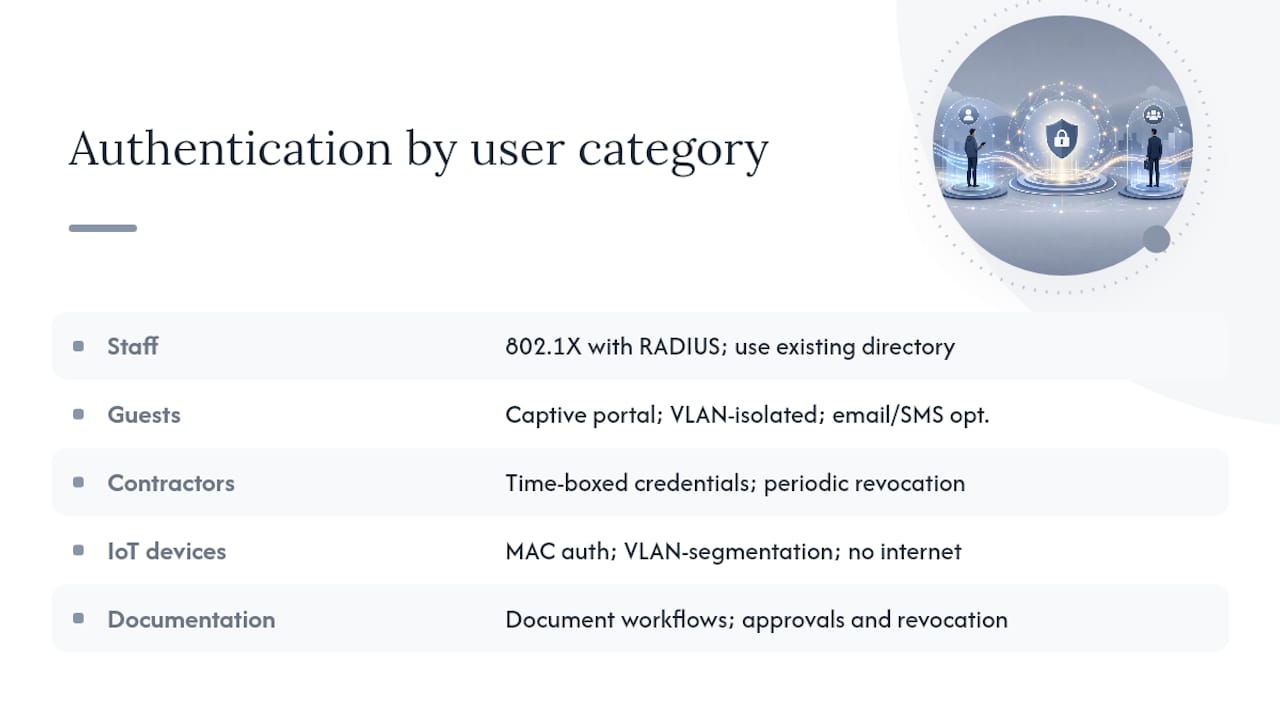
Authentication design decides how much friction employees, guests, and contractors experience on day one, and getting it wrong generates more help desk tickets than almost any other part of the deployment. Staff onboarding should run through 802.1X with RADIUS, tied to the organization’s existing directory service so credentials aren’t managed separately from every other system employee already uses.
Guest onboarding needs a different posture entirely. A captive portal with time-limited access, clear terms of use, and full isolation from internal VLANs keeps visitor traffic contained without creating a support burden for IT. For higher-traffic environments, self-service guest registration with email or SMS verification cuts down on front-desk involvement without weakening isolation.
Contractor and vendor access sits in the middle. Time-boxed credentials tied to a specific engagement, reviewed and revoked on a schedule rather than left active indefinitely, close one of the more common gaps in enterprise wireless security. IoT device onboarding is its own workflow again: most sensors and controllers can’t do 802.1X, so MAC-based authentication combined with strict VLAN segmentation and no internet access unless the device specifically requires it is the practical baseline.
Document the onboarding workflow for each user category in the same handoff pack as the VLAN matrix, including who approves new access requests and how revocation happens when an employee leaves or a contractor’s engagement ends. An authentication workflow that only exists in one administrator’s head isn’t a workflow. It’s a liability waiting for that person’s vacation.
Managing Firmware and Software Updates Without Breaking Production
Firmware discipline is one of the least glamorous parts of wireless operations and one of the most consequential. An AP running outdated firmware isn’t just missing features; it’s carrying known vulnerabilities that patched versions already closed, which is exactly why immediate firmware updates following initial setup belong in the baseline security checklist, not the optional maintenance backlog.
The practical challenge is updating firmware without triggering unplanned outages. Staging updates in a test segment or on a small subset of APs before pushing fleet-wide catches compatibility issues before they hit every user on the floor. Scheduling updates during confirmed low-traffic windows, and never during a week with a major business event, avoids turning a routine patch into an incident.
Version control matters as much as timing. Track which firmware version runs on every AP and controller in the same documentation set as the handoff pack, so a support call about one misbehaving AP starts with “what version is it running” instead of a guessing game. Rollback plans need to exist before you push an update, not get improvised after one breaks something.
Set a review cadence: monthly checks for critical security patches, quarterly review of feature updates against operational needs, and immediate out-of-cycle patching for any vulnerability rated critical by the vendor. Controller-based architectures typically simplify this by pushing firmware fleet-wide from a central console; cloud-managed platforms often automate it entirely, which is worth weighing during the architecture decision back in phase three.
Testing Failover Before You Actually Need It
An emergency procedure that’s never been tested isn’t a procedure. It’s a hope. Mission-critical wireless deployments need documented failover steps for every major failure mode: controller loss, core switch failure, uplink loss, and full site power loss, each with a defined recovery path and an owner responsible for executing it.
Controller failover should be tested on a schedule, not just designed on paper. Force a failover in a maintenance window, time how long APs take to reassociate with the standby controller, and confirm client sessions recover without requiring manual intervention. If that test has never run outside a vendor’s marketing claim, the redundancy plan is unverified.
Power failure testing matters especially for sites with life-safety or security dependencies, like access control and camera systems sharing wireless infrastructure. Confirm UPS runtime actually covers the graceful shutdown window under real load, not the manufacturer’s best-case rating, and verify PoE switches maintain power to APs long enough for a controlled failover rather than an abrupt drop.
Document a communication plan alongside the technical one. Who gets notified when failover triggers, what the expected user impact is, and how operations confirms full recovery before closing the incident. Run a full failover drill at least annually, and after any major infrastructure change, so the first real test of your redundancy plan isn’t during an actual outage.
What Operations Teams Get Wrong After Handoff
Most wireless failures that show up months after a clean installation trace back to the same root cause: nobody kept watching after the project team left. The workflow above front-loads the hard technical work into design and validation, but the outages I hear about most often happen in month four, not week one, when monitoring alerts get muted and firmware updates quietly stop.
The operational priorities that actually prevent this are unglamorous: monitoring dashboards someone checks daily, capacity reviews that happen quarterly whether or not anyone’s complaining, firmware discipline that doesn’t wait for a security incident to force it, and emergency procedures documented and tested before they’re needed rather than improvised during an outage. None of that requires exotic tooling. It requires someone owning the calendar reminder.
How Lowvoltagecorp Handles Enterprise Wireless Installations
Lowvoltagecorp runs this exact seven-phase workflow for property managers and facility teams across South Florida who need a wireless network that survives contact with real building conditions, not just a lab test. Services cover the full sequence: predictive site survey, RF design, PoE and structured cabling installation, AP mounting, acceptance testing, and documentation, plus ongoing monitoring contracts for sites that need someone watching KPIs after go-live.

Before signing with any contractor for a wireless deployment, ask three questions: can they show a sample handoff pack from a prior enterprise install, do they document PoE and cabling standards in writing before work starts, and what SLA metrics do they commit to for post-install support. A contractor who can’t answer all three clearly isn’t ready for a mission-critical environment.
Lowvoltagecorp also installs and maintains the wired backbone, security camera systems, and cell signal boosters that often share infrastructure with a wireless refresh, so integration between systems gets planned once instead of patched together by three different vendors. If your property needs a predictive site survey or a full wireless setup, start with the wireless network basics and setup guide and request a site assessment.
Frequently Asked Questions
What is the standard workflow for setting up an enterprise wireless network?
The standard wireless network setup workflow runs through seven phases: pre-installation assessment, predictive RF design, hardware and architecture selection, logical and security configuration, physical deployment, validation testing, and ongoing operations. Each phase produces a specific deliverable the next phase depends on.
How long does an enterprise wireless deployment usually take?
Small offices under 20 access points typically take two to four weeks from survey to sign-off. Mid-size buildings with 50 to 150 APs usually run six to ten weeks, and large multi-building rollouts can extend three to six months, depending on cabling and procurement lead times.
What security settings should be configured immediately during setup?
Why does coverage look fine on a heat map but performance still suffers?
Heat maps measure signal strength, not capacity. An AP can show full bars while still being overloaded by concurrent client connections and heavy application traffic, which is why predictive design must plan for device density and traffic mix, not signal strength alone.
What causes most access point failures during initial power-up?
Undersized PoE budgets are a common cause. If a switch’s total chassis power budget can’t support every connected AP running at full radio output simultaneously, APs reboot unpredictably under load, which often gets mistaken for an RF or hardware defect.
Sources
- Wi‑Fi Protected Access — Wikipedia
- Why coverage alone doesn’t guarantee performance — Ekahau blog
- CISA: Project Upskill — Module 5 (network admin guidance)
- Understanding PoE budget for AP deployment — Network‑Switch blog