What are the best wired network solutions available today?
The strongest wired network setups in 2026 center on matching the right network interface card (NIC) to your workload, then building the surrounding infrastructure to support it. For most business deployments, that means choosing between standard NICs, Smart NICs, and Data Processing Units (DPUs), each suited to a different performance tier.
Here is a quick breakdown of the core hardware categories and what they cover:
- Standard NICs: 1 Gbps to 10 Gbps cards for general office workloads, file servers, and workstations. Brands like Scan UK, BrosTrend, and Ulansen offer solid options at accessible price points.
- Smart NICs: Cards with onboard processors that offload tasks like encryption, packet filtering, and storage I/O from the host CPU. H!Fiber.com produces fiber-based Smart NIC options for high-throughput environments.
- Super NICs and DPUs/IPUs: Cards from the Vimin category and enterprise-grade vendors that handle full programmable data-plane processing, used in hyperscale data centers and high-frequency trading floors.
- Managed switches: Layer 2/3 switches with VLAN segmentation, traffic prioritization, and Power over Ethernet (PoE) support for complete LAN control.
- Ethernet cables: Cat6A for new in-wall runs, Cat6 for patch cables, fiber for long-distance or high-interference backbone segments.
- Network testers: Handheld tools like the Fluke LinkIQ and Platinum Tools Net Prowler for validating cable performance and diagnosing switch issues.
The card type you choose shapes everything downstream. A 10 Gbps standard NIC paired with Cat6A cabling and a managed switch covers most small-to-midsize business needs without the complexity of a DPU. Larger environments with virtualization, NVMe-over-Fabrics storage, or security-intensive workloads are where Smart NICs and DPUs start earning their cost premium.
What network protocols do wired network cards actually support?
Ethernet dominates wired networking because it is the recognized standard governed by IEEE 802.3, covering speeds from 10 Mbps through 400 Gbps. Every NIC you buy for a standard office, data center, or industrial deployment runs some variant of Ethernet, whether that is Gigabit Ethernet at 1 Gbps or 10GBASE-T over Cat6A.
Beyond Ethernet, a few specialized protocols matter depending on your environment:
- InfiniBand: Used in high-performance computing (HPC) clusters and AI training infrastructure. It delivers extremely low latency and high bandwidth, but requires dedicated InfiniBand NICs and switches, making it impractical outside HPC or research environments.
- Fibre Channel: The standard for storage area networks (SANs). Fibre Channel over Ethernet (FCoE) lets you converge storage and data traffic over a single 10 Gbps or 25 Gbps Ethernet link, reducing cabling complexity.
- RoCE (RDMA over Converged Ethernet): Allows remote direct memory access over Ethernet, cutting CPU overhead for latency-sensitive workloads like distributed databases and AI inference.
- EtherCAT and PROFINET: Industrial Ethernet protocols used in manufacturing automation. The Fluke LinkIQ tester supports both for validating industrial cable plants.
Protocol choice directly constrains hardware selection. A NIC marketed as “10 Gbps” may support only standard Ethernet. If your storage fabric runs NVMe-oF with RoCE, you need a card with RDMA capability, not just raw throughput. Always confirm protocol support in the NIC datasheet before purchasing, not after the card arrives.
What types of wired network cards should you know about?
The NIC market splits into four tiers, and the differences between them go well beyond port speed.
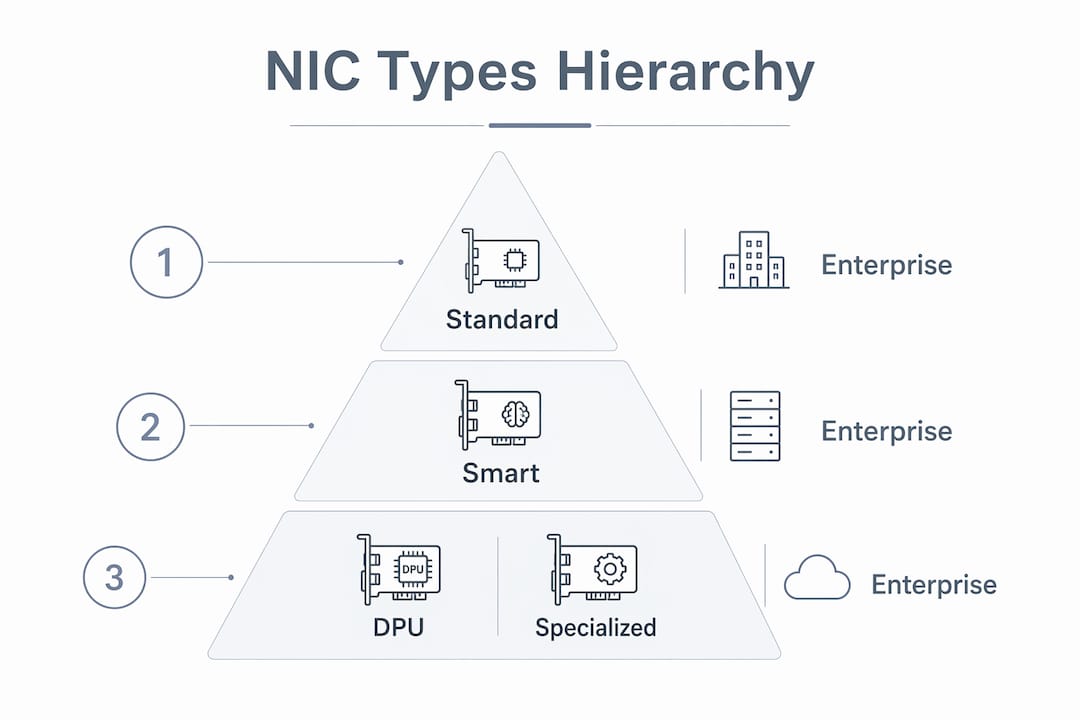
Standard NICs handle Ethernet framing, checksum offload, and basic interrupt coalescing. They work well for workstations, file servers, and most SMB deployments. BrosTrend and Ulansen both produce PCIe standard NICs in the 1 Gbps to 2.5 Gbps range that install cleanly in Windows and Linux without additional driver work.
Smart NICs add an onboard ARM or RISC-V processor that runs a miniature OS alongside the host. That processor handles TLS encryption, VXLAN tunneling, and storage I/O offload without touching the host CPU. H!Fiber.com positions its fiber-based adapters in this tier, targeting environments where CPU cycles are expensive. The tradeoff is cost and configuration complexity.
- Super NICs extend Smart NIC capabilities with higher-bandwidth SERDES lanes, typically targeting 25 Gbps to 100 Gbps per port.
- DPUs (Data Processing Units) and IPUs (Infrastructure Processing Units): These are full programmable network processors. They run firewall policy, load balancing, and storage virtualization entirely on the card, freeing the host CPU for application workloads. Vimin-class DPUs appear in cloud provider racks and large enterprise deployments where infrastructure overhead would otherwise consume a meaningful share of server capacity.
The practical takeaway: standard NICs cover roughly 90% of business deployments. Smart NICs make sense when you are running dense virtualization or NVMe-oF storage. DPUs belong in environments where you are building private cloud infrastructure or need hardware-enforced network security at scale.
How do physical interfaces and form factors affect your choice?
PCIe is the dominant form factor for server and workstation NICs, and for good reason. PCI Express delivers the bandwidth headroom that 10 Gbps, 25 Gbps, and 100 Gbps NICs require, with PCIe 4.0 x8 slots providing roughly 128 Gbps of theoretical bandwidth in each direction.
The port type on the card matters as much as the slot:
- RJ45 ports: Use standard Cat5e through Cat8 copper cabling. Convenient for most office and data center top-of-rack deployments. Scan UK offers PCIe cards with RJ45 ports suited to 1 Gbps and 10GBASE-T environments.
- SFP and SFP+ ports: Use pluggable transceivers, letting you choose copper DAC cables for short runs or fiber modules for longer distances. More flexible than fixed RJ45 for mixed environments.
- OCP (Open Compute Project) cards: A form factor used in hyperscale server designs. OCP 3.0 cards mount horizontally in the server chassis rather than in a standard PCIe slot, saving space and improving airflow in dense rack deployments.
- USB network adapters: A niche option for laptops or systems without open PCIe slots. USB 3.0 adapters from BrosTrend handle 1 Gbps adequately for a single workstation, but USB introduces latency overhead and lacks the bandwidth ceiling of PCIe for anything above 1 Gbps.
Compatibility is where most installation problems originate. A PCIe 4.0 NIC installs in a PCIe 3.0 slot but runs at PCIe 3.0 speeds. Linux kernel support for newer NICs varies by distribution; always check the vendor’s driver support matrix against your OS version before ordering. Ulansen NICs, for example, list driver support for Windows 10/11, Windows Server 2019/2022, and mainstream Linux kernels, but older enterprise distributions may need manual driver installation.
Pro Tip: When ordering NICs for a mixed OS environment, download and test the driver package on a spare machine before deploying across your fleet. A driver incompatibility discovered after a rack-wide NIC swap costs far more time than a 30-minute pre-deployment test.
How do you choose the right wired network card for your environment?
Picking the right NIC comes down to five criteria, and the order matters.
1. Throughput and protocol requirements first. Match the card’s rated speed to your actual traffic. A 10 Gbps NIC in a workstation connecting to a 1 Gbps switch is wasted money. Conversely, a 1 Gbps NIC bottlenecks a NVMe storage server. Confirm whether you need standard Ethernet, RoCE, or FCoE before looking at any other spec.
2. Power consumption and thermal output. High-port-count 25 Gbps and 100 Gbps NICs draw 15–25W each, which adds up in dense deployments. Check the card’s TDP against your server’s PCIe slot power budget. Some Smart NICs with onboard processors draw more than a low-end GPU.
3. Driver support and OS compatibility. Enterprise Linux distributions like RHEL 8 and Ubuntu 22.04 LTS have broad NIC driver coverage. Niche cards from smaller vendors sometimes ship with out-of-tree drivers that break on kernel updates. Stick to NICs with inbox kernel driver support or a vendor-maintained DKMS package.
4. Security features. Look for cards that support MACsec (IEEE 802.1AE) for link-layer encryption, especially in environments where physical access to patch panels is not fully controlled. Smart NICs and DPUs can enforce firewall policy at the NIC level, preventing east-west traffic from reaching the host CPU at all.
5. Management and long-term maintainability. NICs with IPMI or out-of-band management integration simplify remote diagnostics. For large deployments, prioritize vendors with a clear firmware update cadence and published CVE response history.
- Assess your switch’s port speed before selecting NIC speed.
- Verify PCIe slot availability and generation in your server spec sheet.
- Confirm driver support for your specific OS version and kernel.
- Check TDP against your chassis power budget.
- Review the vendor’s security advisory history for the NIC firmware.
A wired network setup guide can help you map these criteria against your specific deployment before you commit to hardware.
What advanced wired networking components complete a professional installation?
Network cards are only one piece. The components surrounding them determine whether a wired LAN delivers on its performance potential or becomes a bottleneck in disguise.
Managed switches are where most of the network intelligence lives. A quality Layer 3 managed switch handles VLAN segmentation to isolate traffic between departments, QoS (Quality of Service) rules to prioritize VoIP and video over bulk file transfers, and PoE to power access points and IP cameras over the same cable that carries data. PoE++ ports deliver up to 90W per port, enough to power Wi-Fi 7 access points and PTZ security cameras without a separate power run.
90W per port. That is the PoE++ (IEEE 802.3bt) ceiling, and it changes what you can power over Ethernet. Wi-Fi 7 access points, pan-tilt-zoom cameras, and thin client terminals all fall within that budget, eliminating dedicated power circuits for each device.
Network testers are non-negotiable for professional installations. The Fluke LinkIQ validates cable bandwidth up to 10 Gbps and delivers nearest-switch diagnostics in under 10 seconds, including switch name, IP address, port number, and VLAN assignment. The Platinum Tools Net Prowler adds TDR technology that locates cable breaks, shorts, and miswires by measuring the distance to the fault, cutting troubleshooting time dramatically compared to basic continuity testers. For protocol-level traffic analysis, Wireshark remains the standard free tool for capturing and inspecting packets across hundreds of protocols on any platform.
Fiber optic infrastructure belongs in any run exceeding 100 meters or passing through areas with heavy electromagnetic interference. Fiber optics provide immunity to EMI and effectively unlimited bandwidth compared to copper, making them the right choice for building-to-building backbone runs and environments with industrial equipment nearby. Pairing fiber backbone with copper last-mile drops using SFP-to-RJ45 media converters gives you the best of both. For a detailed comparison of when to choose fiber over copper, Lowvoltagecorp’s fiber vs. copper guide walks through the decision criteria for IT professionals.

Wired gateways round out the picture for business deployments. Dedicated wired gateways outperform all-in-one consumer routers on VPN throughput, firewall depth, and multi-WAN load balancing. Separating the gateway from the wireless access layer also gives you independent control over each, so a firmware update on the wireless side does not touch your routing and firewall configuration.
For a deeper look at how PoE integrates with managed switches and NICs, Lowvoltagecorp’s PoE explainer for IT pros covers the IEEE 802.3af/at/bt standards and practical wiring considerations.
What do network interface cards actually do in a wired network?
A NIC is the hardware that connects a device to a wired network. It translates data from the device’s internal bus into Ethernet frames, manages the physical link negotiation with the switch, and handles low-level functions like checksum verification and interrupt signaling to the CPU.
Every device on a wired LAN has a NIC, whether that is a server, workstation, IP camera, or managed switch uplink port. The NIC’s MAC address is the unique identifier the switch uses to build its forwarding table and direct traffic to the correct port. Without a functioning NIC, the device is invisible to the network regardless of how well everything else is configured.
Modern NICs do considerably more than basic frame handling. Features like TCP Segmentation Offload (TSO), Large Receive Offload (LRO), and Receive Side Scaling (RSS) move CPU-intensive networking tasks onto the NIC’s onboard processor, freeing the host CPU for application work. On a busy file server or database host, these offload features can reduce network-related CPU load noticeably. The gap between a basic NIC and a well-specified one shows up most clearly under sustained high-throughput workloads, not in idle benchmarks.
Driver quality matters as much as hardware specs. A NIC with excellent silicon but poor driver maintenance causes intermittent packet loss, kernel panics on updates, and hours of debugging. Prioritize NICs from vendors with active driver repositories and a track record of responding to CVEs promptly.
PCI vs. PCIe vs. USB: which connection type fits your needs?
The three connection types serve different eras and use cases, and the differences are not subtle.
PCI (Peripheral Component Interconnect) is a legacy 32-bit parallel bus with a shared 133 MB/s bandwidth ceiling across all devices on the bus. A PCI NIC tops out at 100 Mbps in practice, and the shared bus means other PCI devices compete for the same bandwidth. PCI slots still appear on some older servers and industrial control systems, but no modern NIC worth deploying ships in PCI form factor. If you are still running PCI NICs, the hardware is the bottleneck.
PCIe (PCI Express) replaced PCI by switching to a serial, point-to-point architecture where each device gets its own dedicated lane. A PCIe 3.0 x1 slot delivers roughly 985 MB/s in each direction. A PCIe 4.0 x8 slot delivers approximately 16 GB/s. That headroom is why every serious NIC from 10 Gbps upward uses PCIe. There is no bandwidth contention with other devices, latency is lower, and the slot generation scales with NIC speed requirements. PCIe is the correct choice for any server, workstation, or desktop NIC deployment in 2026.
USB adapters occupy a specific niche: adding network connectivity to a device with no open PCIe slot, typically a laptop or a thin client. USB 3.0 handles 1 Gbps adequately for a single user workstation. USB 3.2 Gen 2 can theoretically support 2.5 Gbps adapters. The limitations are real though. USB introduces additional protocol overhead compared to PCIe, CPU utilization under sustained load is higher, and the physical connector is less reliable than a PCIe card seated in a slot. For any fixed workstation or server, PCIe is the right answer. USB adapters are a convenience solution, not a performance one.
The practical decision tree is straightforward. Server or desktop with an open PCIe slot: use PCIe. Laptop or device without a PCIe slot: USB 3.0 or 3.2 adapter for up to 2.5 Gbps. Legacy system with only PCI slots: replace the hardware before investing in new NICs. Affordable wired network solutions for most SMB environments land on PCIe NICs paired with Cat6A cabling and a managed switch, which covers 10 Gbps throughput at a cost that scales with port count rather than exotic hardware.
For home ethernet wiring that follows the same structured cabling principles used in professional deployments, this Alberta ethernet wiring guide covers patch panels, wall sockets, and cable routing in practical detail.
Key Takeaways
The best wired network solutions pair the right NIC tier with appropriate cabling, a managed switch, and proper testing tools to deliver reliable, high-speed LAN performance.
| Point | Details |
|---|---|
| Match NIC tier to workload | Standard NICs cover most SMB needs; Smart NICs and DPUs belong in virtualization-heavy or cloud infrastructure environments. |
| PCIe outperforms PCI and USB | PCIe delivers dedicated per-device bandwidth with no contention, making it the correct form factor for any server or workstation NIC. |
| Cat6A for new in-wall runs | Cat6A supports 10 Gbps over 100 meters and handles PoE++ loads more reliably than Cat6 under sustained electrical load. |
| PoE++ delivers up to 90W per port | IEEE 802.3bt switches power Wi-Fi 7 access points and PTZ cameras over the data cable, eliminating separate power circuits. |
| Test before you trust | Tools like the Fluke LinkIQ validate cable bandwidth up to 10 Gbps and return switch diagnostics in under 10 seconds. |
Lowvoltagecorp specializes in professional wired and wireless network installation, repair, and maintenance across South Florida. Whether you are upgrading a commercial LAN, running structured cabling for a new build, or troubleshooting an underperforming network, the team brings licensed low-voltage expertise to every job. Start with Lowvoltagecorp’s complete wired network guide or explore the security camera wiring guide if your network upgrade includes surveillance infrastructure.
