A wireless mesh network (WMN) is a group of interconnected Wi-Fi nodes that share a single network connection across a wide area, all under one SSID, so your devices roam without dropping. It’s the right call when a single router can’t reach every corner of your property, when running Ethernet through walls isn’t practical, or when you need a network that keeps working even if one node goes offline. Built on the IEEE 802.11s standard, mesh systems use self-healing routing to automatically reroute traffic around a failed node. For homeowners dealing with dead zones and property managers overseeing multi-building sites, mesh is often the cleanest solution. Lowvoltagecorp installs and maintains these systems across South Florida, which means the guidance here comes from real deployments, not just spec sheets.
Common applications for wireless mesh networking include:
- Whole-home Wi-Fi where a single router leaves bedrooms or garages without signal
- Small commercial spaces like retail stores, offices, or warehouses with irregular floor plans
- Multi-building properties such as apartment complexes, campuses, or industrial sites
- Outdoor and temporary networks for construction sites, events, or municipal Wi-Fi
- IoT and security camera networks where dozens of devices need reliable, distributed connectivity
Table of Contents
- How does a wireless mesh network actually work?
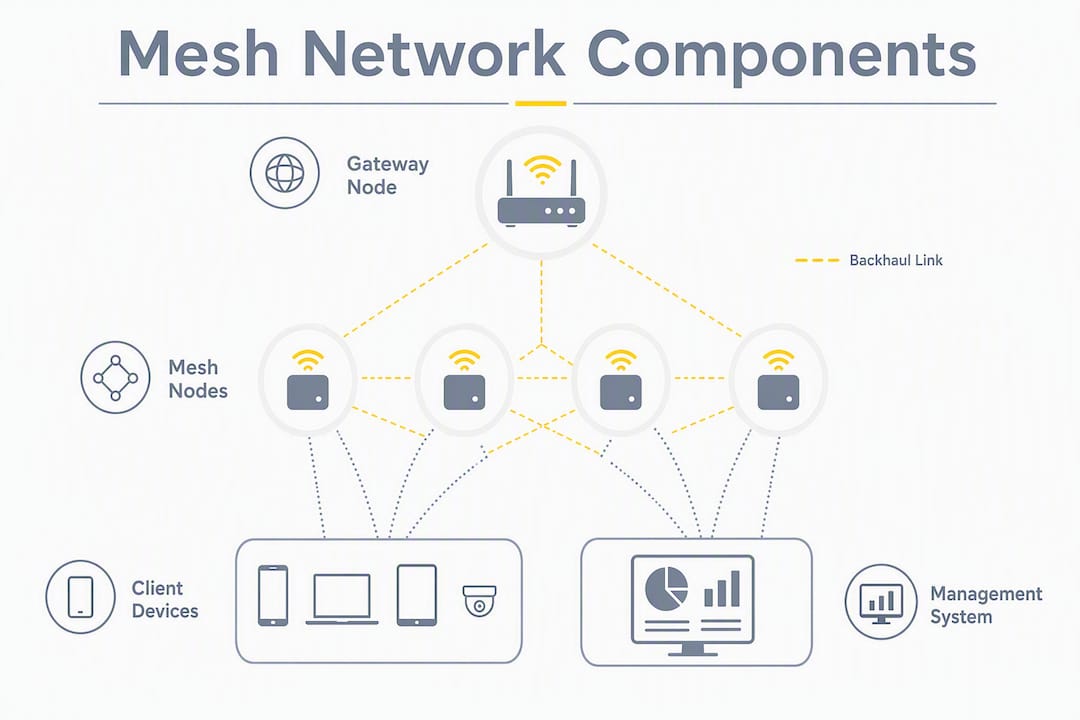
- Core components and terms you need to know
- What mesh Wi-Fi does better than a single router
- Limitations and trade-offs worth knowing before you commit
- When should you pick mesh over a router or extender?
- Practical deployment: placement, backhaul, and troubleshooting
- When should you hire a professional installer?
- Key Takeaways
- The part most guides skip
- Lowvoltagecorp handles mesh installs across South Florida
- Useful sources and further reading
How does a wireless mesh network actually work?
Multiple nodes act as a single network under one SSID, so from your phone’s perspective, there’s just one Wi-Fi network. Behind the scenes, data travels from your device to the nearest node, then hops from node to node until it reaches the gateway, which is the one unit physically connected to your modem or ISP equipment.
Each hop adds a small amount of latency and can reduce throughput, which is why hop count matters. A packet crossing three nodes to reach the internet travels a longer wireless path than one crossing two. The mesh routing protocol, typically IEEE 802.11s with HWMP (Hybrid Wireless Mesh Protocol), continuously evaluates link quality and selects the best path. When a node fails or a signal degrades, the network reconfigures automatically. That’s the self-healing behavior that separates mesh from a simple extender setup.
The backhaul is where most mesh systems either earn their price or fall short. A single-radio node uses the same radio to talk to neighboring nodes AND to serve your devices, so every hop cuts available bandwidth roughly in half. Tri-band systems solve this by dedicating one radio band exclusively to inter-node traffic, keeping the other bands free for clients.
Dedicated backhaul radios prevent the classic extender problem: bandwidth halving because the same radio receives and retransmits client traffic. That’s the core reason a quality mesh system outperforms a cheap extender in a real home.
Key performance factors to keep in mind:
- Hop count: fewer hops between your device and the gateway means better speed
- Radio bands: tri-band hardware with a dedicated backhaul radio preserves client throughput
- Interference: neighboring networks, microwaves, and building materials all degrade signal
- Node density: too few nodes creates gaps; too many in a small space causes channel contention
Pro Tip: If you’re buying a mesh system for a busy household or small office, prioritize tri-band hardware with a dedicated 5 GHz backhaul. The price difference over dual-band is real, but so is the throughput difference under load.
Core components and terms you need to know
Understanding the vocabulary makes every vendor conversation and setup guide easier to follow. Here’s what the key terms actually mean in practice:
- Gateway node: the mesh unit connected to your modem or ISP router. It’s the only node that needs a wired internet connection; every other node extends coverage wirelessly from there.
- Mesh node (satellite): any additional unit that joins the mesh wirelessly or via Ethernet. It relays traffic between clients and the gateway.
- Backhaul: the communication link between nodes. Wireless backhaul uses a radio band; wired backhaul uses an Ethernet cable. Wired is faster and more reliable.
- Hop: one wireless link between two nodes. A device connected to a node two hops from the gateway has its traffic cross two wireless links before reaching the internet.
- SSID: the network name your devices see. Mesh systems broadcast one SSID across all nodes, enabling seamless roaming.
- Client steering: the mesh controller’s ability to move a device from a congested node or band to a less loaded one automatically.
- HWMP (Hybrid Wireless Mesh Protocol): the default path-selection protocol in IEEE 802.11s mesh networks. It combines proactive and reactive routing to find the best path between any two nodes.
- Mesh client: any end-user device (phone, laptop, camera) that connects to the mesh but does not relay traffic for other devices.
Single-radio vs. dual-radio vs. tri-band nodes: a single-radio node shares one radio for both backhaul and client traffic, which tanks throughput at scale. Dual-radio nodes split 2.4 GHz and 5 GHz, giving more flexibility. Tri-band nodes add a second 5 GHz radio dedicated to backhaul, which is the configuration worth paying for in any deployment larger than two nodes.
Multi-radio mesh increases throughput by isolating collision domains for each hop, reducing retransmission and contention across the network.
What mesh Wi-Fi does better than a single router
The clearest advantage is coverage. A single gateway node shares internet access to the mesh, and adding nodes expands coverage without pulling new cable through walls. For a two-story home with a detached garage, or a property manager overseeing a building with thick concrete walls, that matters enormously when considering what is smart air conditioning as part of home automation connectivity.

Coverage and roaming. Because all nodes share one SSID, your phone doesn’t disconnect and reconnect as you walk from room to room. Client steering handles the handoff. Compare that to a traditional extender setup, where devices often cling to a distant router signal rather than switching to the closer extender.
Scalability. Adding a node to a mesh takes minutes and no wiring. For a growing small business that adds a back office or a warehouse section, that’s a meaningful operational advantage over scheduling an Ethernet run.
Redundancy. Self-healing algorithms maintain resilience by automatically rerouting traffic when a node fails or a connection becomes unreliable. A single router going down takes the whole network with it. A mesh losing one node typically keeps most of the property connected.
Local traffic efficiency. In some mesh architectures, traffic between two devices on the same mesh segment doesn’t need to travel all the way to a central server. That reduces latency for local applications like security camera feeds viewed on-site.
Pro Tip: For any deployment where throughput matters, run Ethernet to at least one intermediate node and use it as a wired backhaul point. That single cable can dramatically improve speeds for everything downstream.
Limitations and trade-offs worth knowing before you commit
Mesh isn’t the right answer for every situation. The same distributed architecture that makes it flexible also introduces real performance ceilings.
Throughput drops with hops. Research confirms that as hop count and node count increase, throughput drops due to protocol overhead and interference. A device three hops from the gateway on a single-radio mesh can see a fraction of the gateway’s actual internet speed. This is physics, not a firmware bug.
Interference and channel contention. Multiple nodes operating in the same frequency bands in a dense space compete for airtime. In apartment buildings or office parks where dozens of neighboring networks share the same channels, mesh performance degrades faster than in open environments.
High-mobility environments are a poor fit. Practitioners note that frequent node mobility shifts mesh capacity away from data delivery toward route maintenance. If you’re thinking about mesh for a scenario where nodes themselves move (vehicles, forklifts, mobile equipment), the routing overhead consumes the bandwidth you’re trying to deliver.
Management complexity. A single router is simple to troubleshoot: reboot it, check the ISP connection, done. A mesh with six nodes across three floors has more failure points, more firmware to keep updated, and more channel planning to maintain. Cloud-managed systems reduce this burden, but they add a dependency on the vendor’s cloud infrastructure.
Wired Ethernet still wins for raw performance. Mesh offers agility and lower deployment cost compared with cabling, but wired Ethernet outperforms wireless for high-performance enterprise needs. If you’re running a video production studio, a trading floor, or any application where latency and throughput are non-negotiable, Ethernet is the answer.
Key limitations at a glance:
- Each wireless hop reduces available throughput
- Channel contention worsens in dense RF environments
- High-mobility deployments suffer from routing overhead
- More nodes means more firmware management and troubleshooting surface area
- Cannot match Ethernet for latency-sensitive or high-bandwidth applications
When should you pick mesh over a router or extender?
The decision comes down to three variables: the size of the space, whether running cable is practical, and how much throughput you actually need.
Choose wired Ethernet when throughput and latency are the priority. A wired network is the right foundation for security camera systems, VoIP, and any application where dropped packets cost money. If the walls are open during construction or renovation, run the cable.
Choose mesh when the space is large, multi-floor, or multi-building, and running Ethernet to every corner isn’t practical. Mesh is also the right call for outdoor coverage across a property, for IoT device networks spread across a campus, and for any site where you need to expand coverage incrementally.
Choose a range extender only for a single, small dead zone in an otherwise well-covered space. Extenders are cheap and easy, but they create a separate network segment, don’t support seamless roaming, and cut bandwidth in half on a shared radio.
Node count rules of thumb
- Small home (under 1,500 sq ft, single story): 1 gateway node often covers it; add 1 satellite if there are dead zones
- Medium home (1,500–3,000 sq ft, two stories): 2–3 nodes typically provide full coverage
- Large home or small commercial space (3,000–6,000 sq ft): 3–5 nodes, with wired backhaul to at least one intermediate node
- Multi-building or outdoor property: site survey required; node count depends on building materials, distances, and interference
| Network type | Coverage | Throughput | Cost | Complexity | Best for |
|---|---|---|---|---|---|
| Single router | Small to medium | High near router, drops fast | Low | Very low | Apartments, small homes |
| Mesh network | Large, multi-floor, outdoor | Good with few hops, degrades with more | Medium to high | Medium | Large homes, multi-building sites, IoT |
| Range extender | Targeted dead-zone fix | Halved on shared radio | Very low | Low | Single dead zone, temporary fix |
Pro Tip: Whenever possible, run an Ethernet cable to one or two intermediate mesh nodes and configure them as wired backhaul points. You get the coverage flexibility of mesh with the throughput stability of a wired backbone. This is the single biggest performance upgrade available in a mesh deployment.
Practical deployment: placement, backhaul, and troubleshooting
Getting the hardware right is only half the job. Where you put the nodes and how you configure the backhaul determines whether the system performs or frustrates.
Node placement checklist
- Place the gateway node as close to your modem or ISP equipment as possible, ideally with a short Ethernet run between them.
- Position each satellite node roughly midway between the gateway (or another node) and the area you want to cover. A practitioner rule of thumb: keep nodes within about two rooms or 30 feet of each other indoors.
- Never place a node in a dead zone where it can barely reach its neighbor. Improper node placement defeats self-healing and degrades the entire mesh.
- Avoid placing nodes near microwaves, cordless phones, baby monitors, or other 2.4 GHz interference sources.
- Elevate nodes when possible. A node on a shelf at chest height outperforms one tucked behind furniture on the floor.
- For outdoor coverage, use hardware rated for outdoor use and mount it with line-of-sight to the next node where possible.
Wired backhaul and PoE
Running Ethernet between nodes converts wireless backhaul to wired backhaul, which removes the throughput penalty of wireless hops entirely. Power over Ethernet (PoE) lets you power a node through the same cable that carries data, which simplifies installation in locations without nearby outlets. For property managers overseeing network wiring across multiple units or buildings, PoE switches are often the most cost-effective way to anchor a mesh backbone.
Firmware, management, and maintenance
Keep firmware updated on every node. Most enterprise-grade mesh systems support cloud management, which lets you push updates, monitor node health, and adjust channel plans from a single dashboard. Consumer systems often update automatically, but verify this is enabled. Schedule a channel audit every six months in dense RF environments, since neighboring networks shift channels and what worked at install time may cause contention a year later.
Troubleshooting slow speeds
- Check hop count first: which node is the slow device connected to, and how many hops is it from the gateway?
- Test with a wired device at the gateway to rule out an ISP issue
- Verify backhaul band usage in the mesh management app; confirm dedicated backhaul is active if your hardware supports it
- Scan for neighboring networks on the same channel using a tool like Wi-Fi Analyzer and switch to a less congested channel
- Check for physical interference: a microwave or new appliance near a node can degrade a previously stable link
Pro Tip: Before assuming a node is faulty, move it three feet in any direction. Physical obstructions affect signal in ways that aren’t always obvious from the floor plan.
When should you hire a professional installer?
Some mesh deployments are genuinely DIY-friendly. A two-node system in a single-family home with no special requirements is one of them. But there’s a clear line where professional help pays for itself.
Signs you need a pro:
- Multi-building or campus-scale deployment where node placement requires a site survey
- Structured wiring needs, including Ethernet runs, PoE switches, or conduit
- Security camera networks integrated with the mesh, where camera placement and network coverage must be planned together
- Performance SLAs for a business where downtime has a cost
- Persistent interference that a consumer app can’t diagnose
- IoT device networks with dozens of endpoints that need VLAN segmentation or dedicated SSIDs
Installer checklist to send before the first meeting
- Site survey: RF scan of the property, identification of interference sources, and a coverage map
- Node count and placement plan with specific mounting locations
- Wired backhaul design: which nodes get Ethernet, switch placement, and PoE requirements
- Channel planning: band selection and interference mitigation strategy
- Integration plan for security cameras, access control, or other low-voltage systems on the same network
- Firmware and management platform: who manages updates and monitors the system after install
- Maintenance SLA: response time for outages and scheduled check-ins
Questions to ask any installer
- What mesh hardware do you recommend for this property type, and why?
- Have you integrated mesh with security cameras or IoT systems before?
- How do you handle wired backhaul in a building with existing conduit?
- What does your on-site testing methodology look like after installation?
- What’s included in your warranty and post-install support?
Lowvoltagecorp handles the full scope of this work in South Florida, from professional network installation and site surveys to camera integration and ongoing maintenance. For property managers who need a single contractor for network, cameras, and gates, that’s a meaningful operational simplification.
Pro Tip: Ask any installer to walk you through the post-install test results, specifically the signal strength at each node and the throughput measured at the furthest point from the gateway. A contractor who can’t show you those numbers didn’t test properly.
Key Takeaways
A wireless mesh network is the right choice when coverage area, redundancy, and deployment flexibility matter more than raw throughput, and professional installation pays off the moment the deployment spans multiple buildings or integrates with cameras and IoT systems.
| Point | Details |
|---|---|
| What mesh does | Multiple nodes share one SSID, enabling seamless roaming and self-healing coverage across large or multi-building areas. |
| Biggest limitation | Throughput drops with each wireless hop; wired backhaul between nodes is the most effective fix. |
| Node placement rule | Keep nodes within about two rooms or 30 feet of each other indoors; never place a node in a dead zone. |
| When to hire a pro | Multi-building sites, camera or IoT integrations, structured wiring needs, or persistent interference require professional site planning. |
| Lowvoltagecorp | Installs and maintains mesh networks, security cameras, and low-voltage systems for South Florida properties under a single service contract. |
The part most guides skip
Most mesh explainers stop at “add nodes until you have coverage.” That’s fine for a two-bedroom apartment. For anything larger, it misses the most important decision in the whole deployment: where the wired backbone ends and the wireless mesh begins.
The properties that get the most out of mesh are the ones where someone thought carefully about which nodes get an Ethernet cable and which ones go wireless. Run cable to the nodes that anchor the most coverage, and let the wireless mesh handle the last stretch to hard-to-wire areas. That hybrid approach, wired backbone with wireless edge, gives you the redundancy and flexibility of mesh without the throughput penalty of stacking wireless hops.
The other thing worth saying plainly: consumer mesh systems have gotten genuinely good. But they’re designed for a homeowner who plugs them in and walks away. A property manager running cameras, access control, and tenant Wi-Fi on the same infrastructure needs channel planning, VLAN segmentation, and a maintenance schedule. That’s not a consumer product problem. It’s a scope problem. The hardware can handle it; the question is whether the deployment was designed to.
Lowvoltagecorp handles mesh installs across South Florida
For property managers and facility managers who need reliable wireless coverage without managing the complexity themselves, Lowvoltagecorp offers a complete mesh network service: site survey, node placement design, wired backhaul installation, camera and IoT integration, and post-install support under a single contract.

The process starts with an on-site RF survey to map coverage gaps and interference sources before a single node goes up. From there, the team designs a placement plan, runs any needed Ethernet for wired backhaul, and tests throughput at every endpoint before signing off. For South Florida properties that also need security camera wiring or low-voltage system integration, that work happens in the same visit under the same contract. Contact Lowvoltagecorp to schedule a site survey and get a coverage plan for your property.
Useful sources and further reading
The claims in this article draw from a small set of authoritative references. Here’s where to go for deeper reading on each topic.
| Source | What it covers |
|---|---|
| Wireless mesh network, Wikipedia | Definitions, topology types, backhaul concepts, and dedicated radio configurations |
| HowStuffWorks: How Wireless Mesh Networks Work | Plain-English explanation of gateway, nodes, single-SSID behavior, and placement rules |
| TechTarget: Wireless Mesh Network Definition | Self-healing, enterprise trade-offs, and wired vs. wireless performance comparison |
| Coursera: What Is a Mesh Network | Use cases including home, business, IoT, and disaster recovery applications |
| IEEE TechNav: Wireless Mesh Networks | IEEE 802.11s standard, HWMP protocol, and enterprise routing considerations |
| MDPI: Wireless Mesh Networking Survey | IoT-oriented survey covering IEEE 802.11, Bluetooth, and LoRa mesh technologies |
| IntechOpen: Mesh Mobility and Performance | Research on high-mobility limitations and routing overhead in mesh deployments |
| Akyildiz Survey on Mesh Scalability | Scalability research showing throughput degradation with increased hops and node count |