Load-test your backup batteries, confirm surge protection on power and data lines, and verify your monitoring center’s cellular failover before hurricane season starts. Those three checks stop most security equipment losses. If a professional load test is overdue, schedule one now, and confirm your integrator’s after-hours contact and escalation process in writing.
TL;DR:
- Load-test batteries annually and confirm UPS units can provide the advertised runtime to prevent backup failures during power outages.
- Inspect and replace surge protectors on all power and data lines, especially those exposed to outdoor conditions or near lightning-prone areas.
- Verify cellular failover paths are operational, and keep a physical contact list of your monitoring center for emergency communication.
- Tighten camera mounts, recheck enclosure seals, and use proper cable management techniques to prevent water intrusion into outdoor security components.
- Establish a written pre-storm plan with your contractor that includes priority response, documentation procedures, and asset inventory to streamline post-storm recovery.
Table of Contents
- Hurricane Prep Security Systems Checklist for the Weeks Before Storm Season
- What Should You Do in the Final 72 Hours?
- What Happens to Your Security System During the Storm?
- Post-Storm Verification: How Do You Know Your System Actually Survived?
- Low Voltage Corp’s Practitioner Checklist for Contractors and Managers
- Building a Hurricane Preparation Timeline That Actually Works
- Weatherproofing Outdoor Security Components Beyond the Mount
- Coordinating With Your Security Contractor Before and After a Storm
- Keeping Monitoring Service Running When Power or Signal Drops
- Protecting Gates, Electric Locks, and Related Storm-Exposed Hardware
- Editorial Perspective: Maintenance Rhythm Beats Last-Minute Scrambling
- How Low Voltage Corp Supports Your Hurricane Prep Security Systems Plan
- Sources
Hurricane Prep Security Systems Checklist for the Weeks Before Storm Season
The bulk of storm-related security failures trace back to six categories: power, surge protection, communications, physical mounting, access control, and paperwork. Work through them in that order, because each one exposes a weakness the next one depends on.
1. Batteries and UPS units. A battery can read a healthy voltage while sitting idle and still collapse the moment it’s asked to carry a real load. That’s why NFPA 72 requires annual load testing of life-safety and fire alarm batteries, not just a resting voltage check. Replace any battery past its manufacturer-recommended service life, and confirm your UPS units can actually keep NVRs and recorders running for the runtime advertised on the box, not just the runtime you assume they have.
2. Surge protection. A lightning strike nearby can ride into a building through unprotected Ethernet or PoE lines and take out an entire camera run in one event, even when the service-entrance surge protector held. Inspect device-level surge protectors and data-line protectors on every camera drop, not just the main panel. If you’ve never checked the manufacture date on your surge devices, that’s the first sign they need attention.
3. Generator and ATS. Generators tend to get the attention; automatic transfer switches don’t, and that’s backward. Field reports consistently show the “generator failure” people report during outages is often an ATS handoff failure, where the generator runs fine but never actually connects the load. Run the generator under load, watch the transfer switch complete the handoff, and confirm security-critical circuits, not just lights, are on the generator side.
4. Monitoring and communications. Verify cellular failover works when the primary line drops, confirm video is backing up to the cloud or an offsite location, and update your monitoring center’s contact list before, not during, a storm.
5. Physical hardening. Tighten every camera mount, pull down anything loose near an entrance, and check enclosure IP and IK ratings against expected wind-driven debris.
6. Access control. Audit whether doors are set to fail-safe or fail-secure, and make sure that setting matches your evacuation plan, not just habit.
7. Documentation. Photograph every panel, camera, and enclosure now, and log part numbers and warranty dates while everything’s still dry.
Pro Tip: Take the pre-storm photos with a timestamp visible in frame, either from your phone’s metadata or a whiteboard with the date written on it. Insurance adjusters move faster when the damage timeline isn’t in dispute.
What Should You Do in the Final 72 Hours?
- Remove or secure small external devices: loose signage, unmounted sensors, anything not bolted down.
- Open large vehicular gates per the manufacturer’s wind-load guidance, or lock them fully closed, whichever your engineering documentation specifies. Never leave a gate half-open.
- Power down non-essential electronics. Life-safety systems stay on regardless of code requirements.
- Top off generator fuel and stage extra fuel securely away from flood-prone areas.
- Confirm your monitoring center’s after-hours escalation contact by phone, not email.
- Save remote access credentials somewhere accessible offline, and put insurance policies and equipment lists in one emergency folder.
What Happens to Your Security System During the Storm?
Nobody should be outside adjusting a camera mount or resetting a panel once winds pick up. Human safety outranks equipment every time.
- Expect cellular and internet service to degrade or drop; this is normal, not a system failure.
- Lean on your monitoring center’s updates and whatever cloud backup is already running rather than trying to check in yourself.
- Skip any physical intervention. Log alarm timestamps if you can see them remotely, since that log becomes useful later.
- If cameras stay online, note what time footage cuts out. That timestamp matters more than the footage itself once you start the insurance conversation.
Post-Storm Verification: How Do You Know Your System Actually Survived?
Rebooting a panel and seeing a green light doesn’t mean the system survived. Integrator field reports consistently show that water intrusion in electrical rooms and hidden surge damage show up days after a storm, well after everyone assumed things were fine.
Safety first, always. Before anyone touches a panel, OSHA’s hurricane safety guidance calls for confirming structural and electrical safety and checking equipment rooms for standing water before restoring power to anything.
Once the site is safe, work through this sequence:
- Photograph everything before you touch it. Damaged panels, water lines on walls, downed mounts. FEMA’s continuity guidance notes that timestamped documentation is what actually speeds insurance claims, not a verbal description after the fact.
- Pull and secure footage. Confirm cloud or offsite backups captured what you need, and log every alarm event that fired during the storm window.
- Load-test batteries again. A battery that survived the storm physically can still be too degraded to hold a real load afterward.
- Run the ATS and generator handoff test to confirm security-critical circuits actually power on, not just that the generator starts.
- Inspect cameras, mounts, PoE switches, and enclosure seals for water intrusion or corrosion, and check NVR drives for gaps or corruption in the recording timeline.
One insight worth repeating to anyone managing multiple properties: the failures that show up first almost always trace back to the same three items — batteries, surge-exposed devices, and mounts that were never re-tightened after the last storm.
Restore life-safety systems first, then monitoring, then recording. Build your repair list with photos and part numbers attached so an integrator can quote accurately on the first visit instead of a second trip.
Low Voltage Corp’s Practitioner Checklist for Contractors and Managers
Hand this list to whoever is doing the physical work, or use it to verify their work afterward.
- Battery load test with documented results, not a visual inspection.
- ATS and generator load run, confirming actual handoff to security circuits.
- Surge device manufacture-date check on every power and data line.
- Ethernet surge protection installed on all exterior camera runs.
- Camera mount reinforcement, torque-checked, not just visually tight.
- Cloud backup verification, confirmed with a test clip retrieval, not just a settings screen.
Pro Tip: Ask your integrator three questions before signing off: “Can you show me the battery load-test results?” “Did you bench the ATS under an actual load?” “What surge devices did you inspect or replace, and when?” If the answers are vague, the work probably was too.
Print the security system checklist and walk the property with it. It takes fifteen minutes and catches problems a rushed visual inspection misses.
Building a Hurricane Preparation Timeline That Actually Works
Most property managers treat hurricane prep as a single event that happens the week a storm shows up on the National Hurricane Center’s forecast map. That’s the mistake. Build a calendar instead.
June (season start): Full system audit. Battery load tests, surge device inspection, ATS/generator run, and photo documentation of every panel and camera.
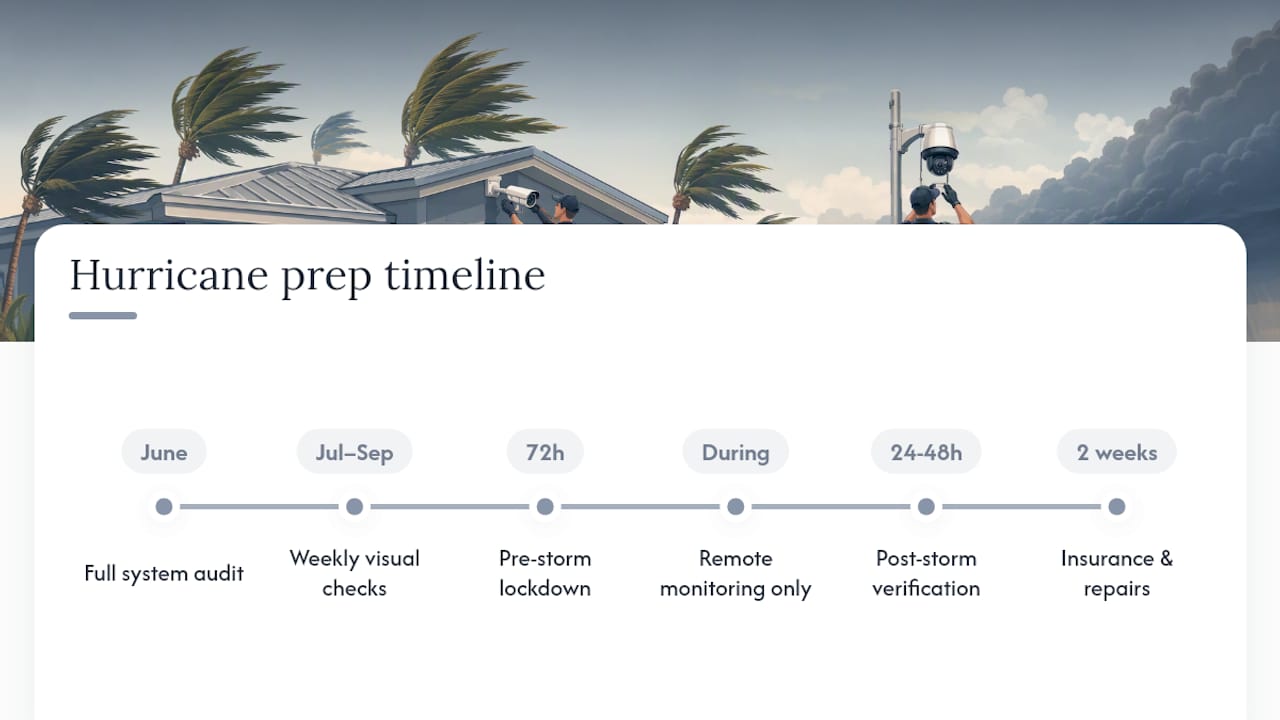
July through September (peak season): Weekly visual checks on mounts and enclosures. Confirm monitoring contacts are current every month, since staff turnover at monitoring centers happens more often than people expect.
72 hours before landfall: Execute the immediate pre-storm action list, secure loose hardware, fuel the generator, lock down gates.
During: Monitor remotely only. No physical intervention.
Within 24 to 48 hours after: Safety check, then the full post-storm verification sequence, then repair prioritization.
Within two weeks after: Submit insurance documentation while damage details and dates are still fresh, and schedule any deferred repairs before the next storm system develops.
Writing this down once and reusing it every year beats reinventing the plan every time a storm enters the forecast cone. Ready recommends exactly this kind of standing plan for the same reason businesses use continuity plans: improvisation under deadline pressure produces gaps.
Weatherproofing Outdoor Security Components Beyond the Mount
A secure mount doesn’t mean a sealed enclosure. Wind-driven rain finds gaps that a calm afternoon inspection never reveals, and that’s where most outdoor camera failures actually start.
Check gasket seals on every outdoor camera housing and NVR enclosure. Rubber gaskets degrade with UV exposure over a few years even when they look fine, and a compressed or cracked gasket lets water track in along the cable entry point rather than through the housing itself. That’s the failure mode that catches people off guard: the camera looks intact, but the connector inside has been sitting in moisture for weeks.
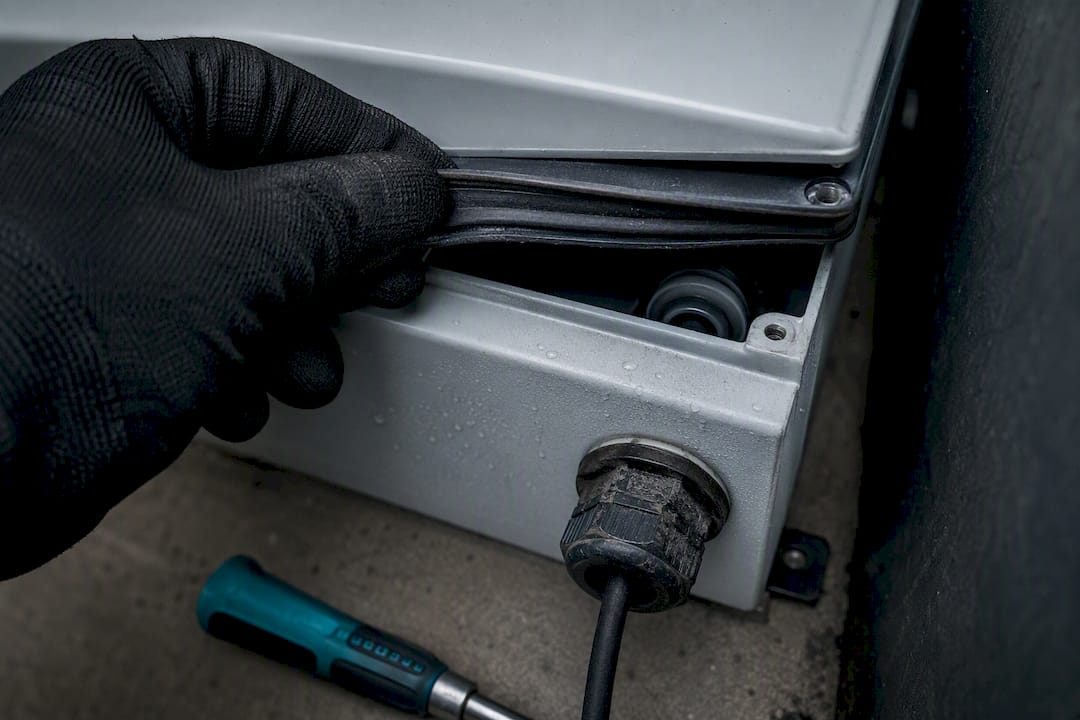
Cable entries deserve their own look. Use properly rated cable glands or drip loops on every outdoor run so water traveling down the cable can’t pool at the connection point. A drip loop, a simple downward dip in the cable before it enters the housing, costs nothing and stops gravity from doing the damage.
For PoE switches and junction boxes mounted outdoors or in unconditioned spaces, confirm they carry an enclosure rating suited to direct weather exposure, not just a general outdoor label. Indoor-rated equipment stuffed into an outdoor box is a common shortcut that works fine until the first sideways rain event.
Silicone sealant around conduit penetrations and enclosure seams is cheap insurance. Reapply it annually, because it degrades faster than most people assume in direct sun.
Coordinating With Your Security Contractor Before and After a Storm
The property managers who recover fastest aren’t the ones with the newest equipment. They’re the ones who already know exactly who to call and what that call will accomplish.
Before hurricane season starts, get a written commitment from your integrator on two things: pre-storm service availability and post-storm response priority. Ask directly whether contracted maintenance clients get dispatch priority over one-off service calls after a regional event, because that distinction becomes very real when an entire county is calling the same handful of technicians at once.
Share your building’s access protocols and equipment inventory with your integrator ahead of time, not during the emergency. A technician who already has your panel locations, camera counts, and gate model on file can move straight to diagnosis instead of spending the first hour of a post-storm visit just figuring out what’s installed.
Set a rapid-assessment agreement in writing: a defined response window (24 hours, 48 hours) for contracted clients, and a clear scope for what counts as an emergency visit versus a scheduled repair. This avoids the awkward conversation about billing and priority happening in the middle of a crisis.
If you manage multiple properties, centralize this coordination with one point of contact on both sides. A single dispatcher juggling five separate contractor relationships during a storm response loses time nobody has.
Keeping Monitoring Service Running When Power or Signal Drops
A monitoring center that can’t reach your panel is functionally useless, no matter how good the equipment behind it is. Build redundancy into the communication path itself, not just the power supply.
Confirm your panel has a cellular backup path independent of your landline or internet connection, and verify that path actually failed over successfully during your last test, not just that it’s configured to. A cell booster can materially improve that cellular reliability in properties with weak signal, which matters more than usual when landlines and broadband are the first things to go down in a storm.
Keep a physical, printed copy of your monitoring center’s phone number, account number, and escalation contact somewhere that doesn’t depend on a working phone to access. It sounds basic. It’s also the detail that gets missed every single storm season.
Set expectations with your monitoring provider about what “continuity” actually means for your account: do they call a secondary contact if the primary doesn’t answer within a set window, and how many attempts before an alarm gets escalated to local authorities. Get that answer in writing, not as a verbal assurance during onboarding.
If your building runs on generator power during outages, confirm the monitoring panel and its cellular communicator are wired to the generator circuit, not just the cameras. A system that records but can’t call out isn’t monitoring anything.
Protecting Gates, Electric Locks, and Related Storm-Exposed Hardware
Gate operators and electric locks sit outside the perimeter of most people’s “security system” mental model, right up until one fails and a property is wide open. Treat them with the same rigor as cameras and panels.
- Confirm gate operators have surge protection on both the power and control-wiring side, since these components sit fully exposed and are frequent lightning targets.
- Decide in advance whether large vehicular gates get locked open or locked closed during high wind, based on the gate’s engineering rating, and document that decision so staff aren’t guessing during the storm.
- Check electric lock power supplies for battery backup and confirm fail-safe versus fail-secure settings match your evacuation plan, the same audit you’re running on interior access control.
- Inspect gate operator enclosures for weatherproof seals and confirm control boards aren’t exposed to direct water intrusion from a damaged housing.
- Secure or remove any loose gate accessories, keypads, remotes, sensors, that could become wind debris themselves.
Gate motors and control boards are expensive to replace and slow to source after a regional event, which makes prevention considerably cheaper than repair here.
Editorial Perspective: Maintenance Rhythm Beats Last-Minute Scrambling
Most storm-related security failures aren’t storm problems. They’re maintenance problems that a storm happened to expose. Quarterly checks and annual load testing catch the battery that was already failing in April, long before a named storm ever enters the forecast. A signed maintenance agreement with prioritized response isn’t a luxury for a property manager juggling a dozen buildings; it’s the difference between a same-day technician and a two-week wait behind everyone else who skipped the spring inspection.
— Aaron
How Low Voltage Corp Supports Your Hurricane Prep Security Systems Plan
You’ve got the checklist. The harder part is executing it correctly on equipment you didn’t install and don’t service every day. Professional technicians handle the technical side, including battery and UPS load testing, surge protection audits on power and data lines, generator and ATS load testing, camera repair and mount reinforcement, and cloud-backup configuration that actually gets verified, not just switched on.

Contracted maintenance clients may receive priority dispatch when a storm response floods the phone lines, which can affect restoration times for security systems. If your camera wiring or mounts haven’t been inspected in a while, start with Lowvoltagecorp’s security camera repair workflow to see what a proper post-storm assessment actually involves, or check gate automation troubleshooting if your gate operator is due for a look. For physical storm hardening beyond electronics, One Day Doors & Closets of Treasure Coast handles shutters and door reinforcement that pairs well with a hardened security system.
Consider contacting a professional service provider to schedule a pre-storm system audit before the next season’s outlook hits the news.