You have full bars on your phone, but your call drops anyway. Sound familiar? That gap between what your signal display shows and what you actually experience is exactly why cell signal issues confuse so many people. RF signal attenuation, the industry term for signal degradation over distance and through obstacles, happens for reasons that go far deeper than being “too far from a tower.” Physical obstructions, network congestion, device hardware, and even how you hold your phone all play a role in why cell signal is weak at your specific location.
Table of Contents
- Key Takeaways
- Why cell signal is weak: physical causes
- Network congestion and tower geometry
- Device and user factors you might be overlooking
- Practical solutions that actually work
- Diagnosing why your signal fluctuates
- My honest take on diagnosing weak signal
- Get reliable cellular reception at your property
- FAQ
Key Takeaways
| Point | Details |
|---|---|
| Bars don’t equal performance | Full bars can still mean slow data and dropped calls when the network is congested. |
| Buildings block more than you think | Concrete and steel can reduce signal by 10 to 30 dBm, making basements and offices particularly problematic. |
| Tower distance matters more on 5G | 5G covers shorter distances than 4G, making location relative to towers a bigger factor than ever. |
| Device issues mimic network problems | A worn SIM card or outdated software can look identical to a coverage problem from the user’s perspective. |
| Boosters work only with outdoor signal | A signal booster amplifies what exists outside your building. If there’s nothing to amplify, it won’t help. |
Why cell signal is weak: physical causes
The single most fundamental cause of poor reception is distance. 5G towers cover shorter ranges than 4G towers and are more severely affected by physical obstructions, which creates uneven coverage especially in dense urban neighborhoods and suburban sprawl. If a 5G tower is several blocks away, your phone might show a 5G icon while pulling in a signal so weak it barely functions.
Building materials are the second major culprit and arguably the one most people underestimate. Here’s how common construction materials affect signal:
- Concrete and cinder block walls: Can attenuate signal by 10 to 30 dBm per wall, which is enough to drop a usable signal to near nothing in a thick-walled office or apartment building.
- Steel framing and metal roofing: Acts like a Faraday cage, reflecting and absorbing signals rather than letting them pass through.
- Metalized or low-emissivity (low-E) window glass: Increasingly common in energy-efficient buildings, this glass has a metallic coating that blocks RF signals almost as effectively as a wall.
- Basements and underground levels: Signal must pass through floors, ceilings, and earth. Even a moderate outdoor signal rarely survives the trip down two levels.
- Elevators: Metal shafts and cab construction create near-complete signal isolation.
Terrain creates dead zones just as reliably as buildings. Hills, dense tree cover, and urban street canyons formed by tall buildings can block the line-of-sight path between your phone and the nearest tower. This matters because cellular signals travel best in straight lines. A ridge or a row of mature trees between you and the tower is enough to cut reception dramatically.
Pro Tip: Cellular signals rely on line-of-sight and elevation. If you’re struggling with reception outside, try moving to higher ground. Even walking up a flight of stairs or stepping onto a balcony can shift your signal noticeably.
Weather plays a minor but real role. Heavy rain and storms cause measurable attenuation, especially on high-frequency 5G bands. Rain fade is temporary and rarely the sole cause of persistent weak signal. But during a major storm, it can push an already marginal connection over the edge.
Network congestion and tower geometry
You can be standing right next to a tower and still have a terrible experience. This is one of the most misunderstood aspects of factors affecting cell signal strength. When too many users connect to the same tower at once, peak-hour congestion throttles the bandwidth each person receives. The bars on your screen reflect signal strength, not available bandwidth. At a concert, a packed stadium, or during a morning commute rush, you might have perfect bars and still be unable to send a text.
Tower antenna geometry adds another layer of complexity most users never consider. Each cell tower antenna covers roughly 120 degrees horizontally, and downtilt settings control the vertical range. If you’re positioned at the edge of an antenna’s coverage arc, inside a side lobe, or in the gap between two towers’ coverage zones, you’ll experience weak or unstable signal even though you appear to be geographically close to infrastructure.
The 5G band-switching problem compounds this. Your phone frequently chooses 5G over LTE even when the 5G signal is marginal. Forcing LTE in weak 5G areas often produces more stable calls and better data speeds, because a strong LTE connection outperforms a weak 5G one in every practical way.
Pro Tip: When your signal feels unstable but your bars look fine, check if your phone is on 5G. On both Android and iPhone, you can manually set the network mode to LTE only. Test it for a day and compare call quality and data reliability.
Understanding these network behaviors helps you recognize when the issue is beyond your immediate environment. If your signal is consistently poor in one spot but fine 50 meters away, that’s a coverage geometry problem. If it’s bad at 8 AM and fine at noon, that’s congestion.
Device and user factors you might be overlooking
Your phone itself may be the source of the problem. Damaged antennas, faulty SIM cards, and outdated software can all mimic network issues in ways that are nearly impossible to distinguish without basic testing. Here’s a structured approach to ruling out device causes:
- Test with a different SIM card. If signal improves with another SIM or on another carrier’s network, your SIM may be degraded or your plan may lack coverage in that area.
- Try a different device. Borrow a phone from someone nearby. If their reception is significantly better in the same spot, your hardware or settings are the likely issue.
- Check your OS version. Resetting network settings and updating your OS can correct bugs that cause phones to hold onto weak connections or limit network scanning under power-saving modes.
- Disable battery saver mode. Power-saving settings often reduce how aggressively your phone scans for and connects to available networks.
- Observe how you’re holding the phone. Covering the antenna band (usually located at the sides or bottom of the device) with your palm can noticeably reduce reception.
Physical orientation and movement matter more than most people realize. Rotating your phone, moving a few feet, or simply raising it higher in a room can change the signal you receive. This connects to multipath interference, where your phone receives the same signal from multiple reflected paths simultaneously, causing the waves to cancel each other out in certain positions.
Pro Tip: If you’re troubleshooting at a specific location, slowly rotate and move your phone while watching the signal strength in field test mode (available on both iOS and Android). A rapid change over just a couple of feet confirms multipath fading rather than simple distance from a tower.
Practical solutions that actually work
Before spending money on hardware, start with settings. The improvements available through phone and network configuration are free and often overlooked.
- Enable Wi-Fi Calling. Wi-Fi Calling routes calls and texts through your broadband internet connection, bypassing cellular entirely for voice. It’s available on most modern phones and carriers at no extra cost, and it works exceptionally well in buildings where cellular signal doesn’t penetrate.
- Force LTE mode. As discussed above, switching from 5G to LTE in weak coverage areas often produces immediately better results.
- Reset network settings. This clears cached connection preferences that can cause your phone to favor a weak network it previously connected to.
- Find your signal sweet spot. Cellular signals are stronger near windows, on upper floors, and in open spaces. In a home office, repositioning your desk closer to an exterior window facing the nearest tower can make a meaningful difference.
When settings aren’t enough, a cell signal booster is the most effective hardware solution available. The key caveat: boosters require an existing outdoor signal to amplify. They don’t create coverage where none exists. They capture a weak outdoor signal through an exterior antenna, amplify it, and rebroadcast it inside your building.
| Solution | Best for | Limitations |
|---|---|---|
| Wi-Fi Calling | Indoor voice and text | Requires reliable broadband |
| Force LTE mode | Unstable 5G in weak areas | Disables 5G benefits |
| Signal booster | Homes and offices with weak indoor signal | Needs usable outdoor signal |
| Network reset | Software and settings bugs | Temporary fix if issue is hardware |
| Move to higher floor or window | Immediate reception improvement | Not always practical |
Booster antenna placement is where most DIY installations fail. The outdoor antenna needs to go at the point on your property with the strongest outdoor signal, typically the rooftop or an exterior wall facing the tower directly. Poor placement doesn’t just reduce effectiveness. It can cause the booster to oscillate and degrade the signal further.
Pro Tip: Before buying a booster, walk around the outside of your building with your phone in field test mode. Note where the signal reading is strongest. That’s where the outdoor antenna should go. If you can’t get a reading above minus 100 dBm anywhere outside, a booster won’t solve your problem.
Diagnosing why your signal fluctuates
Signal that changes from minute to minute or from one side of a room to the other is typically caused by multipath interference. Multiple reflections of the same signal arrive at your phone with slightly different timing, and depending on your position, those reflections either reinforce or cancel each other. This is why moving just a few feet sometimes completely changes your reception.
Distinguishing between a coverage gap and network congestion requires a different approach:
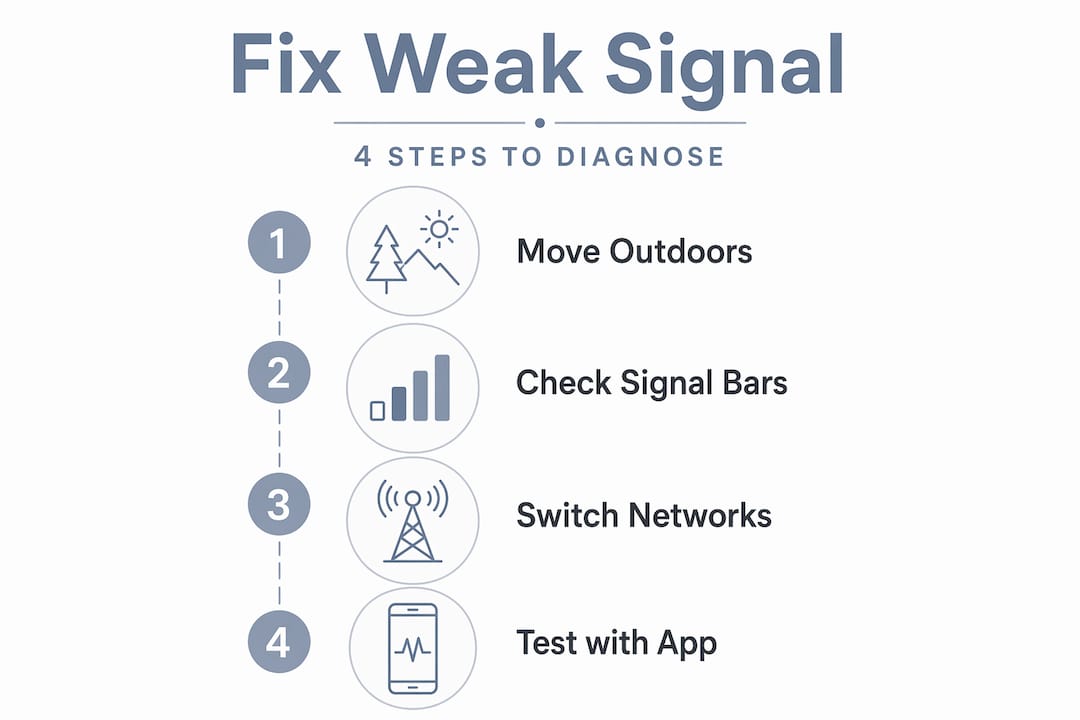
- Note the time of day when signal is bad. Congestion follows predictable patterns tied to commute times, lunch hours, and evenings.
- Test the same location at 3 AM. If signal is strong at 3 AM but weak at 8 AM, you’re dealing with tower congestion, not a physical obstruction.
- Compare against a different carrier’s signal using a second device. Strong signal on another carrier in the same spot confirms a carrier coverage hole rather than a universal physical obstacle.
- Move to an open outdoor space nearby. If signal improves dramatically outside, the building’s construction is the primary barrier.
Pro Tip: Download a signal strength app that displays your connection in dBm rather than bars. Minus 70 dBm is excellent. Minus 90 dBm is marginal. Minus 110 dBm is essentially unusable. This gives you real numbers to work with when troubleshooting.
My honest take on diagnosing weak signal
I’ve worked on dozens of properties where the owners were convinced they needed a booster, and half of them just needed a network reset and Wi-Fi Calling turned on. The other half genuinely needed hardware, but placed it wrong and got worse results than before.
What I’ve learned is that chasing signal bars almost always leads people down the wrong path. A bar display is a marketing abstraction. The actual metric that matters is dBm, and signal strength doesn’t always correlate with performance when congestion or band selection is the real issue. I’ve seen phones with three bars unable to load a webpage, and phones with one bar holding a clear call.
My approach now is always the same: rule out the device first, then the settings, then the environment, then the network. Most people skip straight to blaming the carrier or buying a booster. That wastes time and money. Systematic testing takes 20 minutes and usually reveals the actual cause before you spend a dollar.
The other thing I’d push back on is the idea that no setting creates new coverage. Settings don’t amplify signal. But they absolutely control how well your phone uses the signal that exists. A phone stuck on a weak 5G band can perform three times worse than the same phone on a strong LTE band. That’s a free fix most people never try.
— Aaron
Get reliable cellular reception at your property
If you’ve worked through the troubleshooting steps and still can’t get reliable reception, the issue is likely structural and worth addressing professionally. At Lowvoltagecorp, we specialize in diagnosing and resolving exactly these situations, from installing and positioning signal boosters correctly to building out the wired network infrastructure that complements your wireless coverage.
Whether you manage a commercial property, a multi-unit building, or a home office, we’ve handled signal challenges across South Florida with real hardware and real results. Our signal boosting services cover installation, antenna placement, and post-installation testing so you don’t waste money on a booster that’s fighting itself. Reach out to Lowvoltagecorp to schedule a site assessment and stop guessing at the problem.
FAQ
Why do I have full bars but slow data?
Signal bars measure signal strength, not available bandwidth. When a tower is congested with many users, your data slows regardless of how strong your physical signal is.
Does distance from a cell tower really affect signal?
Yes. Tower distance is the primary factor in signal quality, and this effect is stronger with 5G than 4G because 5G signals cover shorter distances and attenuate faster through obstacles.
Can my phone’s settings fix weak reception?
Settings like enabling Wi-Fi Calling, forcing LTE, and resetting network preferences can significantly improve performance. However, settings optimize existing signal. They cannot create coverage where none exists.
Will a signal booster work in my home?
A booster will work if there is at least a weak outdoor signal to amplify. Boosters require external antenna placement at the strongest outdoor point on your property, usually the rooftop, for best results.
How do I tell if the problem is my phone or the network?
Test with a second device or SIM card in the same location. Swapping devices or SIMs isolates whether the issue is carrier coverage, building obstruction, or hardware specific to your phone.