For managed properties in South Florida, WPA3-Enterprise with 802.1X/RADIUS authentication, Protected Management Frames (PMF) enabled, and VLAN-segmented SSIDs is the recommended correct baseline. Anything less leaves cameras, access controllers, and IoT devices exposed to credential theft, deauthentication attacks, and lateral movement across your network.
Three things to require in every SOW before you sign:
- Require 802.1X certificate-based authentication (EAP-TLS preferred) on all operational SSIDs. No shared passwords on security-critical networks.
- Mandate PMF on every access point. This closes the deauthentication attack vector that can knock cameras offline.
- Specify firmware update cadence, RADIUS logging, and rogue AP monitoring as contractual deliverables, not verbal promises.
Guidance in this article draws on Wi-Fi Alliance security standards, Cisco Meraki enterprise wireless best practices, and Lowvoltagecorp’s installation experience across South Florida commercial properties.
Table of Contents
- What are the main wireless security protocols you need to know?
- Why does WPA-Personal fail multi-device properties?
- Why encryption alone won’t protect your property
- What should your contractor’s installation checklist include?
- What should your SLA include for ongoing maintenance?
- How do you vet a low-voltage contractor for wireless security work?
- Key Takeaways
- What installers see that the specs don’t show
- Lowvoltagecorp handles the full wireless security scope for South Florida properties
- Authoritative references for your technical lead
What are the main wireless security protocols you need to know?
Understanding the terminology lets you read a contractor’s proposal critically and catch gaps before installation day.
Core protocols:
- WEP (Wired Equivalent Privacy): Introduced in 1999, retired by Wi-Fi Alliance in 2004. RC4-based encryption with known, exploitable weaknesses. Disallow it on every SSID without exception.
- WPA (Wi-Fi Protected Access): Replaced WEP using TKIP encryption. Better than WEP, but TKIP is now deprecated. Do not accept it on new installations.
- WPA2: Uses AES with CCMP, which is cryptographically sound. WPA2 remains widely deployed and is an acceptable fallback for legacy hardware, but only when configured correctly with AES, not TKIP.
- WPA3: The current Wi-Fi Alliance certification standard. WPA3 mandates PMF, introduces SAE (Simultaneous Authentication of Equals) for personal mode, and provides stronger cryptographic options for enterprise deployments. It should be required on all new APs.
Authentication models:
- WPA-Personal (PSK): One shared password for all devices. Simple to deploy, brittle at scale.
- WPA-Enterprise (802.1X/RADIUS): Each device or user authenticates with individual credentials or certificates through a RADIUS server. Per-device identity, per-device revocation, full audit logs.
Other terms you’ll see in proposals:
- PMF (Protected Management Frames): Extends encryption to Wi-Fi management frames, preventing forged deauthentication packets from disconnecting devices.
- SAE: The WPA3-Personal handshake that resists offline dictionary attacks.
- RADIUS: The authentication server that 802.1X relies on for centralized credential validation.
- VLAN segmentation: Logical network separation that keeps cameras, IoT devices, and guest traffic on isolated segments.
- Rogue AP: An unauthorized access point broadcasting your SSID or a convincing lookalike to intercept credentials.
Pro Tip: Before specifying WPA3-only mode, ask your contractor to inventory every device on the property. Older IP cameras, card readers, and building automation controllers often lack WPA3 support. The right answer is usually WPA3 on new APs with legacy devices isolated on a separate VLAN, not a blanket WPA3-only mandate that breaks half your security hardware.

Why does WPA-Personal fail multi-device properties?
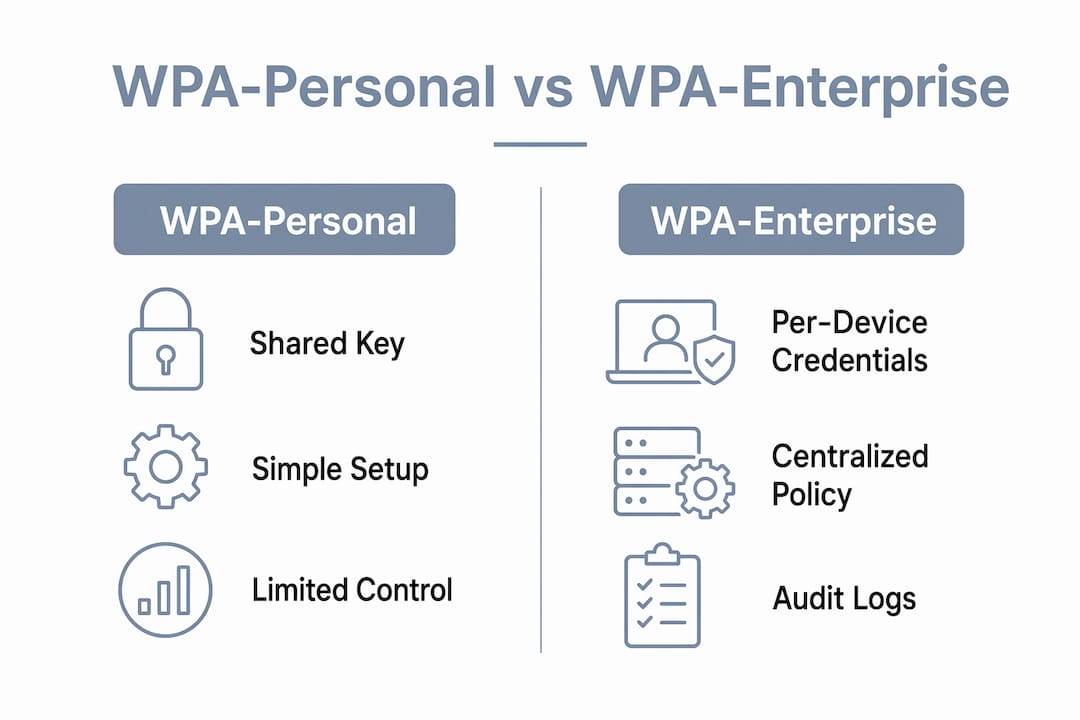
PSK is convenient for a home network with five devices. For a managed property running 40 cameras, a dozen access controllers, and staff mobile devices, it creates a single point of failure. One compromised device, one disgruntled contractor who memorized the password, and every device on that SSID is at risk.
WPA2/WPA3-Enterprise uses 802.1X and RADIUS for per-device authentication and centralized policy enforcement. The difference in operational control is significant.
| Dimension | WPA-Personal (PSK) | WPA-Enterprise (802.1X) |
|---|---|---|
| Credential scope | Shared across all devices | Unique per device or user |
| Revocation | Requires changing password on every device | Revoke one certificate; other devices unaffected |
| Audit trail | None | RADIUS logs every authentication event |
| Scaling | Painful beyond a handful of devices | Designed for hundreds of devices |
| Setup complexity | Low | Moderate; requires RADIUS infrastructure |
The audit trail point matters more than most managers realize. When a camera goes offline at 2 AM, RADIUS logs tell you whether it was a network authentication failure, a firmware crash, or something deliberate. PSK gives you nothing.
Here is a concrete example: a contractor installs 30 cameras on a PSK network. Six months later, one camera is physically compromised and its stored credentials are extracted. On a PSK network, you must rotate the password on all 30 cameras and every other device sharing that SSID. On an 802.1X network, you revoke that one device’s certificate. The other 29 cameras keep running without interruption.
Why encryption alone won’t protect your property
Enabling WPA3 or WPA2 without securing management frames, disabling legacy protocols, and segmenting networks leaves installations vulnerable regardless of how strong the encryption cipher is. Encryption protects data in transit. Configuration, segmentation, and management protections determine whether an attacker can get onto the network in the first place, or disrupt it once they are blocked.
The layered controls your contractor must implement:
- PMF enabled on all APs. PMF protects unicast and multicast management frames, blocking forged deauthentication packets that attackers use to knock cameras and sensors offline.
- Disable WEP and TKIP entirely. No legacy protocol exceptions on operational SSIDs.
- VLAN segmentation. Cameras on one VLAN, IoT/building automation on another, staff devices on a third, guests isolated completely. See VLAN design guidance for South Florida facility networks.
- Separate SSIDs for operational vs. guest traffic. Never share a network segment between security cameras and visitor Wi-Fi.
- Certificate and key rotation schedule. Certificates expire; unmanaged expiration locks devices out at the worst possible time.
- Firmware updates on a defined cadence. Unpatched APs are the most common entry point in enterprise wireless compromises.
- WPA3 Transition Mode only as a stopgap. Transition mode supports both WPA2 and WPA3 but can allow attackers to force weaker WPA2 connections. Isolate legacy devices on their own VLAN instead of relying on transition mode long-term.
Pro Tip: Skip SSID cloaking. Passive sniffing reveals hidden SSIDs within seconds, and cloaking complicates legitimate device provisioning without adding real security. Put that effort into 802.1X and PMF instead.
What should your contractor’s installation checklist include?
Require these items in the SOW before bids go out. Vague language like “enterprise-grade Wi-Fi” is not a specification.
AP hardware and placement:
- AP model, firmware version at installation, and firmware update policy documented
- PoE provisioning sized for AP power draw plus 20% headroom
- Cable pathways rated for the environment (outdoor-rated conduit in South Florida humidity and UV exposure)
- Spectrum analysis and channel plan delivered before installation begins
- Physical AP mounting: tamper-resistant hardware, out of easy reach, with wired backhaul to a secured IDF
Authentication and network design:
- 802.1X with EAP-TLS on all operational SSIDs
- RADIUS server configured with appropriate timeout and retry settings
- SSID-to-VLAN mapping documented and tested
- NTP/time synchronization configured on all APs and RADIUS server (certificate validation fails without accurate time)
- Guest SSID isolated with client-to-client blocking enabled
Certificate management:
- Certificate authority (CA) documented and accessible to the property manager
- Certificate expiration schedule delivered at project close
- Renewal process defined in the SLA
Testing deliverables before final payment:
- RF heat map showing coverage and signal strength at every camera and access point location
- Authenticated client test: each device class connects successfully via 802.1X
- PMF verification: deauthentication attack simulation confirms cameras stay online
- Rogue AP scan: baseline report showing no unauthorized APs at project close
- Failure/recovery test: RADIUS server failover tested and documented
- Network diagrams and certificate inventory handed over in editable format
Pro Tip: Before releasing final payment, review the RADIUS authentication logs, the certificate expiration schedule, and the firmware baseline document. If the contractor cannot produce all three, the installation is not complete.
What should your SLA include for ongoing maintenance?
Security degrades without scheduled maintenance. Specify these items in the contract, not as optional add-ons.
| Task | Recommended cadence |
|---|---|
| Firmware updates (APs, switches, RADIUS) | Monthly review; apply critical patches promptly |
| Certificate rotation | 60 days before expiration; annual at minimum |
| Rogue AP scan | Monthly |
| Vulnerability/configuration audit | Quarterly |
| Log review and retention check | Weekly automated; monthly human review |
| Full penetration test | Annually |
SLA items to specify:
- Uptime target for management VLAN and RADIUS service (99.5% or better for security-critical networks)
- Incident response window: Prompt response for authentication failures affecting cameras or access control
- Quarterly written report covering firmware status, certificate inventory, and any detected anomalies
- Annual penetration test with written findings and remediation timeline
For ongoing security monitoring tied to your camera and access control systems, the SLA should cross-reference the wireless network health alongside device-level monitoring.
On costs: a basic wireless security audit for a mid-size South Florida commercial property typically runs a few hundred to low thousands of dollars depending on device count and site complexity. A full upgrade from PSK to 802.1X with RADIUS infrastructure, VLAN redesign, and new APs is a larger project scoped per site. Build the maintenance contract cost into your annual operating budget from day one rather than treating it as optional.
How do you vet a low-voltage contractor for wireless security work?
Lead with this: any contractor who defaults to PSK-only designs for a multi-device commercial property either lacks enterprise wireless experience or is cutting corners. Either way, keep looking.
Selection criteria:
- Documented 802.1X/RADIUS deployments with references from comparable properties
- Sample SOWs that include PMF, VLAN design, and certificate management language
- Evidence of rogue AP detection capability in their monitoring stack
- Clear firmware patch policy in writing
- Liability coverage for security incidents caused by misconfiguration
Questions to ask during interviews:
- Describe a past 802.1X rollout: what RADIUS platform did you use, and how did you handle legacy devices that couldn’t support EAP-TLS?
- How do you detect and respond to rogue APs after installation?
- Walk me through your certificate management process: who owns the CA, and what happens when a certificate expires?
- How do you handle a firmware vulnerability disclosure between scheduled maintenance windows?
- What does your network documentation package include at project close?
Red flags:
- Proposes PSK for all SSIDs with no mention of 802.1X
- Cannot explain PMF or dismisses it as unnecessary
- No logging or monitoring plan beyond “we’ll check in if something breaks”
- Refuses to provide network diagrams or certificate inventories at handover
- Vague firmware policy (“we update when needed”)
The risks of under-specified wireless installations for managed properties go beyond data exposure. A camera network that can be disrupted by a $30 deauthentication tool is a physical security liability, not just an IT problem.
Key Takeaways
WPA3-Enterprise with 802.1X, PMF, and VLAN segmentation is the correct baseline for South Florida managed properties, and it must be specified in the SOW, not assumed.
| Point | Details |
|---|---|
| Require 802.1X in every SOW | EAP-TLS authentication gives per-device credentials and full RADIUS audit logs. |
| PSK fails at scale | A single compromised device forces a full credential rotation across every shared-SSID device. |
| PMF is non-optional | Deauthentication attacks can knock cameras offline; PMF blocks forged management frames. |
| Isolate legacy devices on VLANs | WPA3 Transition Mode introduces downgrade risks; a dedicated VLAN is the safer path. |
| Lowvoltagecorp covers the full scope | Lowvoltagecorp handles 802.1X setup, AP placement, VLAN design, and maintenance contracts for South Florida properties. |
What installers see that the specs don’t show
The biggest gap between a well-written SOW and a secure installation is the legacy device problem. Most South Florida commercial properties have a mix of equipment: newer IP cameras that support WPA3, older card readers running firmware from 2018, and building automation sensors that only speak WPA2-Personal. A contractor who writes a clean 802.1X spec and then quietly puts the non-compliant devices on the main SSID with PSK because it was easier has defeated the entire design.
The right approach is a staged rollout. Audit every device before the design phase. Categorize them: WPA3-capable, WPA2-Enterprise-capable, and legacy-only. The first two groups go on the 802.1X SSID. Legacy devices get their own isolated VLAN with restricted routing, monitored separately, and flagged for replacement on the next budget cycle. That sequencing is realistic, it keeps the installation moving, and it doesn’t compromise the security posture of the devices that matter most.
South Florida adds one more layer: outdoor APs in high-humidity, high-UV environments need enclosures rated for the conditions, and physical tamper resistance matters more here than in a climate-controlled server room. A camera that gets knocked offline by a deauth attack is annoying. An AP that gets physically stolen or repositioned is a different problem entirely.
Lowvoltagecorp handles the full wireless security scope for South Florida properties
Property and facility managers in South Florida need a contractor who can translate protocol specifications into a working installation, not one who hands you a generic Wi-Fi setup and calls it enterprise-grade.

Lowvoltagecorp installs and maintains security camera wiring, wired and wireless networks, motorized gates, and cell boosters across South Florida commercial properties. For wireless security specifically, that means 802.1X/RADIUS configuration, AP placement with proper enclosures for outdoor South Florida conditions, VLAN design, and ongoing maintenance contracts that include firmware updates, certificate management, and rogue AP monitoring.
The right starting point is a site survey: RF heat map, legacy device inventory, baseline security report, and a remediation plan scoped to your property. Request a scoped SOW or schedule your site survey at lowvoltagecorp.com.
Authoritative references for your technical lead
Your technical lead or IT consultant should review these before evaluating contractor proposals:
- Wi-Fi Alliance Security: The primary source for WPA2, WPA3, PMF, and SAE specifications. Read this first to validate any protocol claims in a contractor’s proposal.
- Cisco Meraki Wireless Fundamentals: Practical enterprise wireless design guidance covering 802.1X, RADIUS, AP placement, and rogue AP detection. Use it to benchmark the contractor’s proposed architecture.
- Cisco: What Is Wi-Fi Security?: Covers layered defense, configuration vulnerabilities, and why encryption alone is insufficient.
- TechTarget: Wireless Encryption Basics: Clear explanation of WPA3 Transition Mode risks and the case for VLAN isolation of legacy devices.
- Apple Support: Wireless Security Features: Useful for confirming device-level protocol support for iOS and macOS clients on your property.
- HeyTech: Wi-Fi and Network Setup Best Practices: Practical reference for preventing unauthorized wireless access and general network setup standards.
What to collect from the contractor during the bid phase: RADIUS server configuration documentation, PMF enablement evidence (screenshot or config export), and a sample certificate expiration report from a comparable past deployment. A contractor who cannot produce these during bidding will not produce them after you’ve signed.