Design warehouse Wi-Fi by starting with a predictive RF survey, mapping every device that will touch the network, setting numeric KPIs, and placing access points in zone-based patterns tied to your rack layout. That single approach solves the problem that trips up most facility teams: they treat a 300,000-square-foot warehouse like a big office and end up with dead zones between racks 40 and 60.
Two numbers should anchor the whole project before you mount a single access point. Target RSSI at or above negative 65 dBm for 95% of your floor, and require roaming handoffs under 100 milliseconds for any device moving at forklift or AGV speed. Both depend on 802.11k, 802.11v, and 802.11r support across your infrastructure and client devices, not just your access points.
Here’s the immediate sequence to run before committing to hardware:
- Run a predictive RF model using your actual floor plan, rack heights, and dock layout.
- Inventory every device class: handheld scanners, forklift-mounted computers, AGVs, fixed cameras, voice-picking headsets.
- Define acceptance KPIs in writing: RSSI thresholds, roaming latency, packet loss ceilings, and per-AP client density.
- Schedule an on-site validation walk with racks stocked, not empty, since empty-rack surveys routinely overstate real coverage.
A team like Lowvoltagecorp that handles both the wireless design and the underlying cabling and power infrastructure can move through these steps without the back-and-forth that happens when three different vendors touch the same project.
Key Takeaways
Warehouse Wi-Fi succeeds when predictive modeling, stocked-rack validation, and numeric roaming KPIs replace guesswork in both AP placement and hardware selection.
| Point | Details |
|---|---|
| Survey before buying | Run a predictive RF model, then validate on-site with racks fully stocked, before finalizing AP hardware. |
| Set numeric KPIs first | Write RSSI, roaming latency, and packet loss targets into the RFP before installation begins. |
| Match mounting to rack height | Use ceiling mounts for open zones and aisle or pole mounts with directional antennas for high-rack corridors. |
| Plan the wired backbone | Size Cat6 or fiber runs, PoE budgets, and switch placement around zone-based demand, not building square footage. |
| Bring in specialists for survey and install | Lowvoltagecorp handles cabling, PoE capacity, and AP installation together to reduce post-install rework. |
Table of Contents
- Why Warehouse Wi-Fi Design Is Its Own Discipline
- AP Placement Patterns for Warehouse Aisles and Open Zones
- How Racking and Ceiling Height Change Your RF Model
- Choosing Access Points Built for Warehouse Conditions
- Building the Wired Backbone That Supports Your Wireless Design
- Turning Device Inventory Into Measurable KPIs
- How to Run a Predictive Survey and Validate It On-Site
- Keeping the Network Healthy After Installation
- Bringing Field Experience to Your Warehouse Wi-Fi Project
- What Most Warehouse Wi-Fi Guides Get Wrong
- Get a Site Survey Before You Buy a Single Access Point
- Sources
Why Warehouse Wi-Fi Design Is Its Own Discipline
Office Wi-Fi design assumes drywall, 9-foot ceilings, and devices that mostly sit still on desks. Warehouses break every one of those assumptions at once, and that’s why a design that works in a corporate headquarters often fails within weeks on a distribution center floor.
Ceiling heights of 30 to 40 feet push signal well past where a standard office AP was ever meant to reach. Forklifts, reach trucks, and increasingly AGVs and AMRs create physical obstructions that shift by the hour, not the year.
Then there are the zones within the zone. A single facility might include:
- Ambient storage aisles with 40-foot steel racks stacked four or five levels high.
- A freezer or cooler section running at negative 10 to 35 degrees Fahrenheit, where standard consumer-grade electronics fail early.
- Dock doors and staging areas with constant truck traffic and metal roll-up doors that reflect and scatter RF signals.
- Office and break areas that behave like normal indoor space.
Each of those zones needs its own coverage pattern and, often, its own hardware rating. Treating the whole building as one uniform RF environment is the single most common reason warehouse deployments underperform after installation. The Aruba warehouse design framework explicitly recommends zone-by-zone planning rather than a blanket coverage model, and that distinction alone changes how many access points a given facility actually needs.
Inventory variability compounds the problem. A warehouse running seasonal peaks might see rack density swing from half-full in March to floor-to-ceiling in November, and your Wi-Fi has to perform at both extremes. Design for the stocked, high-density state. It’s the harder condition, and it’s the one that will be true when your peak-season throughput actually matters.
AP Placement Patterns for Warehouse Aisles and Open Zones
Access point placement in a warehouse comes down to matching the mounting style to what’s directly below the ceiling. Get this wrong and you’ll spend months chasing a dead zone that a different mounting choice would have avoided entirely.
1. Ceiling-mount for open, low-obstruction areas
Standard overhead ceiling mounts work well in staging areas, packing zones, offices, and anywhere clear sightlines reach the floor. Omnidirectional antennas at this height give even coverage without needing precise aim, and this is the pattern most installers default to because it’s the easiest to execute.
2. Aisle and pole mounting for high-rack zones
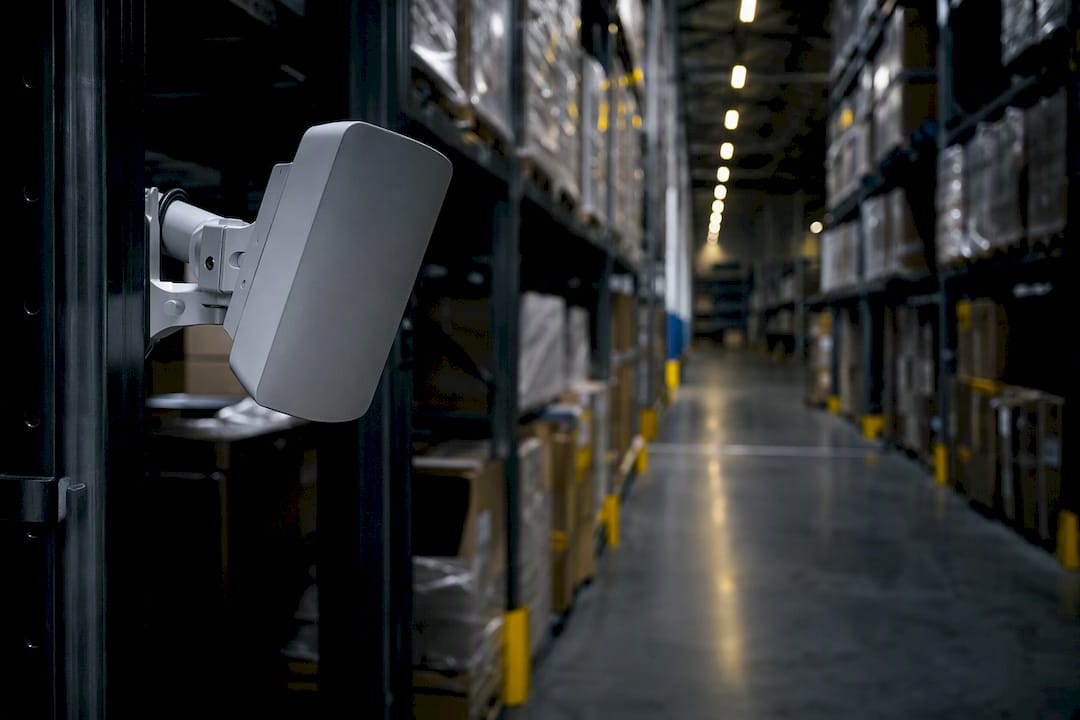
Once racks climb past 20 feet, ceiling-mounted omnidirectional APs lose too much signal punching down through steel and stocked pallets before it reaches a scanner at floor level. Aruba’s warehouse guidance calls for aisle-based mounting on poles or end-of-aisle walls instead, with directional antennas aimed straight down the aisle corridor. This keeps the RF path inside the aisle rather than forcing it through layers of racking.
3. Staggered and W-pattern layouts for dense storage
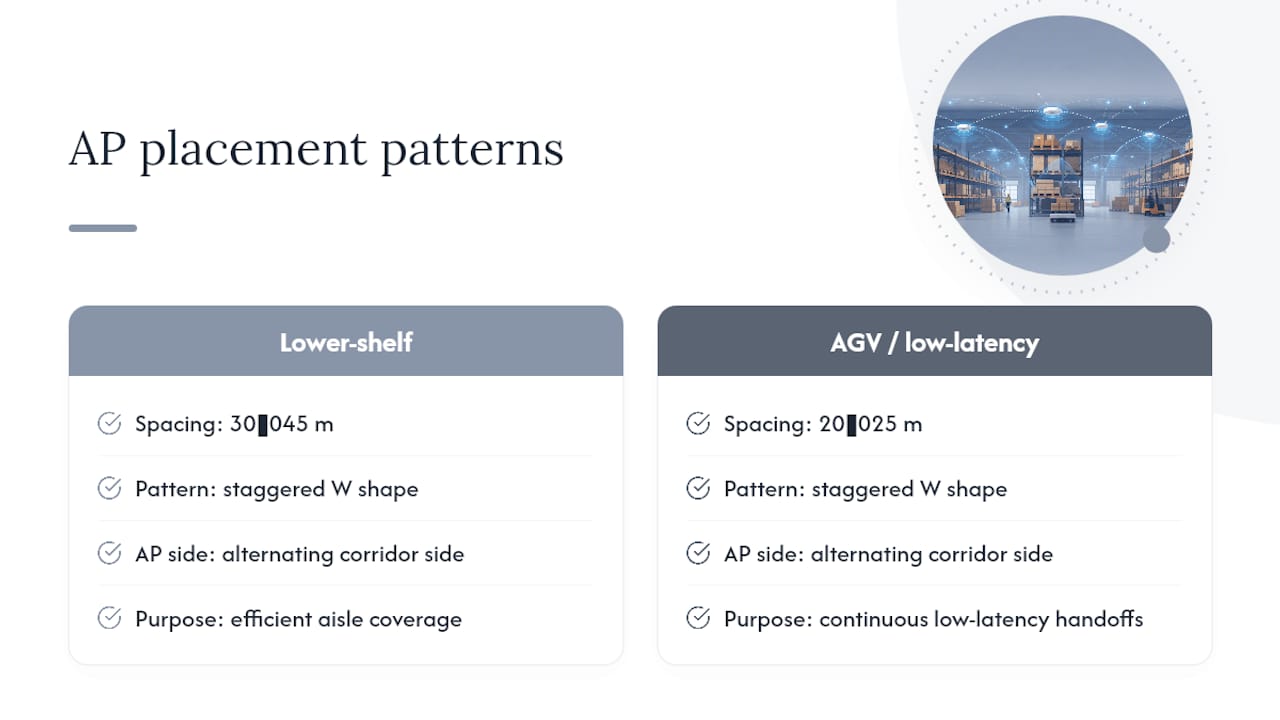
Placing an AP at the end of every single aisle is rarely necessary and gets expensive fast. A staggered, W-shaped pattern, alternating which side of the corridor an AP sits on, covers adjacent aisles more efficiently while improving roaming handoffs between cells. Huawei’s scenario-based planning guidance puts typical spacing at 30 to 45 meters for lower-shelf scenarios, tightening to 20 to 25 meters where AGVs need continuous low-latency handoffs.
4. When every aisle actually needs its own AP
Very narrow aisle widths under 8 feet, combined with rack heights above 30 feet and dense metal shelving, sometimes force an AP into every aisle regardless of cost. This is the exception, not the rule, and a predictive survey will tell you within the first modeling pass whether your facility falls into this category.
Pro Tip: Antenna choice matters as much as mounting location. A connectorized AP with an external directional antenna lets you fine-tune aim after installation without remounting the whole unit, which saves real labor cost during the on-site validation phase when you’re adjusting based on measured RSSI rather than the model’s prediction.
Mounting height rules of thumb worth locking in before your team starts drilling suggest keeping ceiling-mounted APs at heights that balance coverage and signal strength. Similarly, aisle-mounted units perform best at heights that clear forklift traffic without excessive signal loss.
How Racking and Ceiling Height Change Your RF Model
Steel racking doesn’t just block signal, it reflects it, and that reflection creates multipath interference that a naive coverage model won’t predict. A predictive tool that only accounts for simple attenuation will overstate real-world performance in any aisle with dense metal shelving.
The gap between stocked and empty racks is the single biggest source of post-installation surprises. H3C’s warehouse deployment guidance is direct about this: surveys run against empty racks will consistently overstate coverage, because dense inventory, particularly liquids, metals, and tightly packed cardboard, adds attenuation that an empty shelf simply doesn’t have. If your survey team walks the floor before the inventory arrives, budget for a second validation pass once the racks are loaded.
Practical modeling inputs to feed into your predictive tool:
- Rack height and material (steel racking attenuates more than wire shelving).
- Typical stock density by zone, not just an average across the whole building.
- Aisle width, since narrower aisles concentrate multipath reflections.
- Ceiling material and height, which changes how much signal escapes upward and gets wasted.
Ekahau’s industrial planning approach treats this as a two-stage process: build the predictive model as a digital twin of the facility first, then validate with an actual heatmap walk and spectrum scan once the environment reflects real operating conditions. That second stage is where stocked-rack attenuation actually shows up in the data instead of staying a theoretical estimate.
Redundancy planning follows directly from this. A single AP covering a critical aisle with no overlap means any hardware failure, firmware crash, or even a temporary Wi-Fi interference event from a nearby forklift radio creates a coverage hole exactly where a scanner needs connectivity. Design overlapping cells with at minimum negative 67 dBm signal from a second AP in every high-traffic aisle, so a failure degrades performance rather than killing it outright.
Choosing Access Points Built for Warehouse Conditions
Not every access point belongs in a warehouse, and picking based on office-grade specs is how facilities end up replacing hardware within 18 months instead of the 5 to 7 years they budgeted for.
Freezer zones, dock doors exposed to weather, and outdoor yard coverage all call for outdoor-rated or industrial APs with an IP65 or better ingress rating and an extended operating temperature range down to negative 40 degrees Fahrenheit in cold storage applications. A standard indoor AP will condense moisture and fail inside a freezer within a season. If your facility runs cross-dock operations with roll-up doors open to outside air for extended periods, treat that zone with the same hardware standard as true outdoor coverage.
Connectorized versus integrated antennas is a real trade-off, not a minor spec detail:
- Connectorized APs let you swap antenna type and gain after installation, which matters when your predictive model turns out to be wrong about an aisle’s actual RF behavior. The tradeoff is more exposed cabling and connectors that need weatherproofing in harsh zones.
- Integrated-antenna APs are simpler to install and have fewer failure points, but you’re locked into whatever coverage pattern the built-in antenna delivers. Fine for ceiling-mount open zones, riskier for aisle-mount deployments where aim matters.
On the radio side, confirm your shortlist supports 802.11k, 802.11v, and 802.11r before anything else, since these three standards govern how fast a moving scanner or AGV hands off between access points without dropping a connection. Wi-Fi 6 or Wi-Fi 6E support gives you better performance in dense device environments, and dual 5 GHz radios on select models can help split load between infrastructure backhaul and client traffic in the busiest zones.
PoE budgeting deserves a line item of its own. Outdoor and industrial APs frequently draw more power than office-grade units, especially with heaters built in for cold-storage models, so confirm your switch infrastructure supports 802.3at or 802.3bt PoE budgets before you specify hardware, not after.
Building the Wired Backbone That Supports Your Wireless Design
Every wireless design is only as good as the wired network feeding it. A warehouse with beautifully placed access points and an undersized switch stack will bottleneck exactly where you need throughput most.
Cat6 cabling handles the vast majority of AP backhaul runs inside a typical warehouse, but distances matter. Runs beyond roughly 300 feet, or paths through zones with heavy electrical interference near conveyor motors and forklift charging stations, are strong candidates for fiber instead, either straight to the AP location or to an intermediate distribution point. For a facility spanning multiple docks or a mezzanine level, fiber backbone between switch closets keeps your core network from becoming the constraint once your wireless side is performing at spec.
Switch placement should mirror your zone map, not your building’s electrical layout. Distribution switches placed near each major zone, ambient storage, freezer, dock, office, reduce cable run lengths and simplify troubleshooting when something in one zone goes down. Our network installation guidance walks through practical cabling and switch placement decisions in more depth if you’re scoping this alongside the wireless plan.
PoE budgets need headroom beyond your current AP count. Facilities that add cameras, environmental sensors, or a second radio to existing APs later routinely discover their switch stack was specified with zero spare capacity. Build in 20 to 30% headroom on total PoE budget from day one.
Redundant controllers or a redundant management plane matter more in a warehouse than in a typical office, since a controller outage during a peak shipping window has a direct cost in missed orders. VLAN segmentation should separate voice-picking traffic, scanner and handheld traffic, security camera and access-control traffic, and guest or office traffic into distinct VLANs with QoS policies that prioritize latency-sensitive scanner and AGV traffic over bulk data transfers. Reviewing the different network architecture types available helps clarify which segmentation model fits your existing switch capabilities before you finalize the design.
Turning Device Inventory Into Measurable KPIs
Every device class on your warehouse floor has different bandwidth, latency, and roaming requirements, and lumping them into one generic “Wi-Fi coverage” target is how acceptance testing turns into an argument after installation instead of a clean sign-off.
Start with an honest device inventory. Handheld barcode scanners need reliable low-bandwidth connections but are extremely sensitive to roaming delays, since a picker walking between aisles can’t wait two seconds for a handoff. Forklift-mounted computers face the same roaming sensitivity at higher speed. AGVs and AMRs need the tightest roaming latency of anything on the floor, often requiring sub-50-millisecond handoffs to avoid a navigation stall, and H3C’s deployment guidance notes that vehicle-mounted or dedicated onboard AP hardware often outperforms standard client radio adapters for this specific use case. Fixed security cameras need sustained bandwidth but no roaming at all.
| Device Class | Primary Requirement | Roaming Sensitivity |
|---|---|---|
| Handheld scanners | Low bandwidth, high reliability | High |
| Forklift-mounted computers | Moderate bandwidth | High |
| AGVs and AMRs | Low latency, continuous connection | Very high |
| Fixed security cameras | Sustained bandwidth | None |
| Voice-picking headsets | Low latency, low jitter | High |
Once devices are mapped, set the KPIs your acceptance test will actually measure against. The Mist AI warehouse design framework recommends RSSI at negative 65 dBm or better across 95% of the floor, roaming success rates above 97%, and roaming latency targets that stay well under 100 milliseconds for real-time systems like AGVs. Add per-AP client density limits, typically 25 to 50 concurrent clients depending on traffic mix, so no single access point becomes a bottleneck during peak shift changeover.
Pro Tip: *Write these KPIs directly into your installation contract or RFP language before work begins. A vague requirement like “reliable coverage throughout” gives an installer nothing to be held accountable to.
Interoperability testing rounds out this section. Confirm that your actual scanner and AGV fleet, not a generic test client, actually implements 802.11k, 802.11v, and 802.11r correctly. Older handheld devices sometimes claim standard support in their spec sheet but fail to negotiate fast roaming properly in practice, and you won’t catch that mismatch until you test with the real fleet.
How to Run a Predictive Survey and Validate It On-Site
A predictive model tells you where access points probably belong. A physical walk tells you where they actually need to go. Skipping the second step is the most common reason warehouse Wi-Fi projects need rework within the first year.
- Gather your inputs first. Pull accurate floor plans, rack height and layout data, ceiling height by zone, existing power and PoE drop locations, and your full device inventory before opening any modeling software.
- Build the predictive model. Tools built for this use case, Ekahau’s industrial planning platform among them, let you build a digital twin of the facility and simulate coverage before any hardware ships.
- Schedule the physical walk under real conditions. Racks stocked, not empty, since empty-shelf surveys overstate coverage in exactly the aisles where it matters most.
- Measure more than signal strength. Channel utilization, SNR, and packet loss under operational load all belong in your validation data, and Aruba’s design methodology specifically calls out testing under moving-device conditions rather than a static walk-through.
- Test roaming scenarios explicitly. Walk a handheld device the length of a high-traffic aisle and log every handoff event, or better, run an actual AGV or forklift-mounted unit through its normal route.
- Tune AP placement or power settings based on findings. Practitioner experience consistently shows that combining predictive modeling with a follow-up physical survey catches dead zones a model alone misses, and this is the step where those corrections get made before final sign-off.
- Document acceptance metrics and hand them over. The final report should list measured RSSI by zone, roaming success rate, latency figures, and packet loss, matched against the KPIs you set at the start of the project.
Building your device list correctly at step one saves rework at step six. A network review like the one covered in Lowvoltagecorp’s wireless network basics guide is a useful reference if your team is assembling this checklist for the first time.
Keeping the Network Healthy After Installation
Installation day isn’t the finish line. A warehouse Wi-Fi network that scored perfectly on acceptance testing can degrade within months if nobody owns ongoing maintenance.
Physical installation quality matters more here than in office environments, since a loose cable connection near a forklift charging area or an AP mount that vibrates loose from constant equipment traffic will fail eventually. Label every AP, run cable in conduit or protected pathways wherever forklift or pallet jack traffic crosses the path, and photograph every mounting location for your documentation before drywall or racking obscures it.
- Keep a firmware update schedule and test updates in a non-production zone before pushing fleet-wide.
- Set up monitoring and alerting on AP health, client count, and roaming failure rates rather than waiting for a picker to report a dead zone.
- Protect outdoor and freezer-zone hardware housings from condensation and physical impact with rated enclosures where the AP’s own IP rating isn’t enough for the specific mounting location.
- Schedule a re-survey any time rack layout changes materially, since a reconfigured storage plan can invalidate your original RF model overnight.
Pro Tip: Treat any warehouse layout change, a new mezzanine, reconfigured racking, an added freezer expansion, as a trigger for revalidation, not just a note in a change log. The RF model that was accurate in January can be wrong by March if 200 feet of racking moved.
Integration with your warehouse management system deserves a mention here too. If your WMS or automation platform depends on real-time location data or continuous AGV connectivity, that dependency should be part of your monitoring dashboard, not something you discover is broken when a pick rate drops.
Bringing Field Experience to Your Warehouse Wi-Fi Project
The gap between a clean predictive model and a network that actually performs on a stocked warehouse floor comes down to fieldwork most guides don’t spend enough time on. Lowvoltagecorp works directly with the physical layer that determines whether your KPIs hold up: structured cabling, PoE switch capacity, mounting hardware rated for freezer and dock exposure, and the on-site validation walk that catches what a model alone misses.
- Structured cabling and PoE infrastructure sized for current AP counts plus headroom for growth.
- Camera and access-control integration alongside your wireless design, since many warehouses run both systems over shared infrastructure.
- Cell signal boosters for dock and yard areas where carrier coverage inside a steel building is inconsistent.
- On-site survey and validation work that follows the same stocked-rack, real-load testing approach outlined above.
If your facility is planning a new build, an expansion, or a network refresh, a site survey and cabling review from a team already familiar with South Florida warehouse conditions saves time that would otherwise go to troubleshooting after the fact.
What Most Warehouse Wi-Fi Guides Get Wrong
Most warehouse Wi-Fi advice treats the predictive survey as the deliverable instead of the starting draft. That’s backwards, and it’s the single biggest reason projects need rework. A model built from floor plans and rack heights gives you a reasonable first placement guess, nothing more, because no software vendor’s propagation algorithm has walked your specific aisle with 20 pallets of shrink-wrapped inventory sitting exactly where it sits on a Tuesday in October.
The conventional advice also underweights roaming compared to raw coverage. Facility teams obsess over signal bars and RSSI heatmaps, then discover their AGVs stall mid-aisle because nobody tested 802.11r handoff timing with the actual vehicle fleet. Coverage without fast, tested roaming is a network that looks fine on a report and fails on the floor.
If you take one thing from this guide, make it this: write your KPIs before you buy hardware, and validate them with stocked racks and moving equipment, not an empty building on a quiet Sunday. Everything else, mounting style, antenna choice, switch capacity, exists to hit those numbers.
— Aaron
Get a Site Survey Before You Buy a Single Access Point
Lowvoltagecorp is the alternative to guessing your way through a warehouse Wi-Fi rollout with hardware specs pulled from a vendor’s generic office guide. The advantage is straightforward: one team handles the survey, the structured cabling, the PoE switch capacity planning, and the AP installation together, so nothing gets lost in translation between three separate vendors pointing fingers at each other when a coverage gap shows up.

Rework after installation is expensive, both in labor and in the operational cost of dead zones during peak shipping. A team that plans cabling and power alongside AP placement from day one avoids the redo cycle that happens when the network installer and the electrical contractor never talked to each other. Lowvoltagecorp’s approach to wired network infrastructure starts with the same zone-by-zone assessment covered throughout this guide, applied to your actual facility rather than a generic template.
If your facility is due for a wireless refresh, an expansion, or a first-time structured design, schedule a site survey with Lowvoltagecorp and get your predictive model, device inventory, and KPI checklist built around your actual floor plan before any hardware order goes out.
Sources
- Warehouse | TechDocs – WLAN, SD-Branch, & Location Services
- Wi-Fi for industrial, manufacturing, and warehouses
- Scenario-based WLAN Planning Design for Warehouse (Wi-Fi 6) – Huawei