A Virtual Local Area Network, or VLAN, is a logical partition of a physical network that groups devices into separate broadcast domains regardless of their physical location. The role of VLANs in facility networks is to isolate traffic by function, enforce security boundaries, and reduce unnecessary data flooding across shared infrastructure. Governed by the IEEE 802.1Q standard, VLANs are the foundation of any well-designed industrial, enterprise, or multi-building facility network. Whether you are separating SCADA control systems from guest Wi-Fi or isolating IP cameras from corporate workstations, VLANs give you the architectural control to run a facility network that is both secure and predictable.
How vlans manage data traffic in facility networks
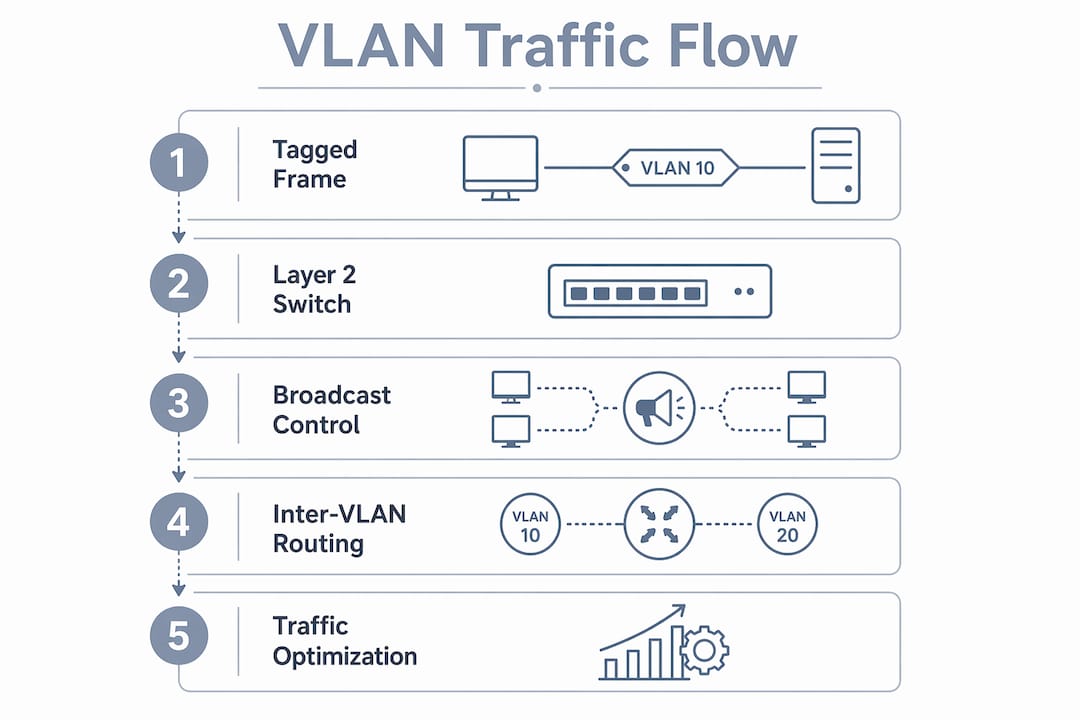
The role of VLANs in data traffic management starts at the Ethernet frame level. 802.1Q tagging inserts a 4-byte tag into each Ethernet frame, carrying a 12-bit VLAN ID that tells every managed switch exactly which logical network that frame belongs to. This is how a single physical cable can carry traffic for your building automation system, your security cameras, and your corporate LAN simultaneously without those streams ever mixing.
The direct performance benefit is broadcast control. VLANs segment physical switches into up to 4,094 distinct broadcast domains, which stops broadcast storms from propagating across your entire facility. In a large warehouse or campus environment, an unchecked broadcast storm can saturate every port on the network within seconds. Containing that storm to a single VLAN limits the blast radius to one segment.

There is an important limitation you need to understand. VLANs reduce broadcast flooding but do not solve physical bandwidth congestion. If a high-definition video feed from 40 IP cameras all lives on one VLAN and shares a single uplink, that uplink will still saturate. VLANs fix the broadcast problem. Capacity planning fixes the bandwidth problem. You need both.
Key traffic categories that benefit from VLAN separation in facility environments include:
- SCADA and PLC traffic: Isolated from all other traffic to prevent latency spikes and unauthorized access
- Building automation systems (BAS): Separated from corporate devices to protect HVAC, lighting, and access control logic
- Guest Wi-Fi: Contained so visitors cannot reach internal systems
- IP cameras and physical security devices: Segmented to prevent a compromised camera from reaching your server infrastructure
- Corporate workstations: Kept off operational technology networks entirely
Layer 2 switching handles traffic within a VLAN. Layer 3 routing handles traffic between VLANs. That distinction matters because every time traffic needs to cross a VLAN boundary, it must pass through a router or a Layer 3 switch where you can apply access control lists and firewall rules.
Pro Tip: Always verify that every switch in your VLAN path is a managed switch. Unmanaged switches treat 802.1Q tags as noise, breaking VLAN isolation silently. You will not see an error. Traffic will just leak.
What are the best practices for VLAN design in facilities?
Good VLAN architecture in facility network design is not just about creating segments. It is about creating the right segments in the right places with the right controls. These six practices separate a stable, secure facility network from one that creates more problems than it solves.
-
Keep VLANs local to distribution blocks. Stretching VLANs across many switches creates large Spanning Tree Protocol domains that increase failure risk. A topology change in one part of the building can trigger a network-wide STP recalculation. Confine each VLAN to a single distribution block to contain that risk.
-
Align segments with security trust levels. Your SCADA network and your guest Wi-Fi should never share a VLAN. Group devices by the level of trust they require and the damage they could cause if compromised.
-
Separate critical operational technology from IT networks. PLC and HMI systems belong on dedicated VLANs with no direct path to corporate systems. This is not optional in 2026. Ransomware that enters through a corporate endpoint should never reach your facility controls.
-
Change the native VLAN from the default. The native VLAN, often VLAN 1 by default, is a well-known attack vector. Untagged traffic on trunk links travels on the native VLAN. Changing it to a dedicated unused VLAN ID on all trunk links eliminates the most common VLAN hopping attack path.
-
Apply ACLs and firewalls at every inter-VLAN boundary. VLANs prevent lateral movement by isolating devices, but only if inter-VLAN routing is tightly controlled. A firewall between your operational technology VLAN and your corporate VLAN is not optional. It is the enforcement point for your entire security policy.
-
Document every VLAN assignment before you deploy. Undocumented VLANs become orphaned segments that nobody manages. Orphaned segments are where attackers and failures hide.
Pro Tip: Consider network infrastructure maintenance schedules that include quarterly VLAN audits. Verify that every active VLAN ID matches your documentation and that no unmanaged switches have been added to the topology.
Vlans vs. subnets: what is the difference?
Understanding VLANs in networks requires understanding how they relate to IP subnets. These two concepts are often confused because they are usually deployed together, but they operate at different layers and solve different problems.
| Feature | VLAN | Subnet |
|---|---|---|
| OSI Layer | Layer 2 (Data Link) | Layer 3 (Network) |
| Primary function | Isolates broadcast domains | Defines IP address scope and routing boundaries |
| Traffic control | Stops broadcast flooding | Controls routed IP traffic |
| Requires routing to cross | Yes, via Layer 3 switch or router | Yes, via router |
| Security enforcement | Limits device visibility within a segment | Enables ACL and firewall rules on IP traffic |
| Typical facility use | Separating camera, BAS, and SCADA segments | Assigning IP ranges per department or system |
VLANs operate at Layer 2 and control which devices can see each other’s broadcast traffic. Subnets operate at Layer 3 and define the IP address ranges that routers use to forward packets. In practice, a well-designed facility network maps one subnet to one VLAN. That one-to-one relationship gives you both broadcast isolation and IP routing control in a single, manageable structure.
The security benefit of combining both is significant. A VLAN stops a device from seeing broadcast traffic outside its segment. A subnet with an ACL stops that same device from sending routed traffic to systems it should not reach. Together, they create two independent layers of access control. If one fails, the other still holds.
Inter-VLAN routing is the deliberate exception. When your building automation system needs to send an alert to a corporate monitoring dashboard, that traffic must cross a VLAN boundary through a router or Layer 3 switch. That crossing point is where you apply your firewall and access control rules to inspect and filter the traffic.
Real-world VLAN use cases in facility environments
The importance of VLANs becomes concrete when you look at how they solve specific facility problems. Industry best practices recommend at least 3–4 distinct VLANs for facility networks, with most industrial settings running five or more to properly segregate operational and public traffic.
Here is how those segments typically map to real facility systems:
- VLAN 10 (Control/SCADA): PLC communication, HMI terminals, historian servers. Zero internet access. No path to corporate systems.
- VLAN 20 (Physical Security): IP cameras, door access controllers, motion sensors. Isolated to prevent a compromised camera from reaching internal systems.
- VLAN 30 (Building Automation): HVAC controllers, lighting systems, energy meters. Separated from IT to protect operational continuity.
- VLAN 40 (Corporate IT): Workstations, printers, file servers. Standard IT security policies apply.
- VLAN 50 (Guest/IoT): Visitor Wi-Fi, personal devices, non-managed IoT. No access to any internal VLAN.
The table below shows how these assignments map to facility types:
| Facility Type | Typical VLAN Count | Critical Isolated Segments |
|---|---|---|
| Manufacturing plant | 6–8 | SCADA, PLC, engineering, guest |
| Commercial office building | 4–5 | BAS, security cameras, corporate, guest |
| Multi-tenant property | 5–7 | Per-tenant isolation, shared services, security |
| Healthcare facility | 6–9 | Medical devices, patient data, staff, guest |
For building automation systems, VLAN segmentation is especially critical. A BAS network that shares a VLAN with corporate workstations is one phishing email away from a facility-wide HVAC failure. Keeping BAS traffic on its own segment means a security incident on the IT side does not cascade into operational disruption.
Multi-tenant and multi-building facilities benefit from VLANs for traffic management as well. Each tenant or building can receive its own VLAN, preventing one tenant’s broadcast traffic from affecting another’s performance and giving facility managers clear visibility into per-segment traffic loads.
Key takeaways
VLANs are the primary tool for separating broadcast domains, enforcing security boundaries, and organizing traffic in facility networks, and they work best when combined with IP subnets, Layer 3 routing, and documented design standards.
| Point | Details |
|---|---|
| VLANs isolate broadcast domains | IEEE 802.1Q segmentation stops broadcast storms and limits failure scope to one segment. |
| Native VLAN must be changed | Leaving VLAN 1 as the native VLAN on trunk links creates a VLAN hopping vulnerability. |
| Keep VLANs local, not campus-wide | Stretching VLANs across many switches creates large STP domains that increase outage risk. |
| Combine VLANs with subnets | One VLAN per subnet gives you both broadcast isolation and IP-level access control. |
| Managed switches are non-negotiable | Unmanaged switches silently break VLAN boundaries, causing traffic leaks with no error alerts. |
What i have learned deploying vlans in facility networks
The most common mistake I see in facility networks is not a misconfigured ACL or a wrong VLAN ID. It is scope creep on the VLAN design itself. Someone adds a new system, it gets dropped onto an existing VLAN because it is convenient, and six months later that VLAN spans eight switches across two buildings. STP instability after VLAN changes can bring down a facility network in minutes, and tracing the cause through an undocumented topology is a miserable experience.
The second thing I have learned is that VLANs are not a set-and-forget configuration. They are a living part of your security policy. Every new device added to the network is a decision about trust level and segment placement. Facilities that treat VLAN assignment as a security decision, not just a configuration task, are the ones that avoid breaches.
The future of facility network design is moving toward routed access layer architectures where Layer 3 boundaries exist between access and distribution layers. This approach eliminates large STP domains entirely and gives you sub-second failover. If you are designing a new facility network or doing a major refresh, that is the direction worth planning toward.
For ongoing reliability, pair your VLAN design with a solid network troubleshooting process so your team can identify segment failures fast when they do occur.
— Aaron
How Lowvoltagecorp supports your facility network
Lowvoltagecorp specializes in the installation, repair, and maintenance of wired and wireless networks for commercial facilities, including the structured cabling and managed switch infrastructure that makes VLAN segmentation work reliably. If your facility runs IP cameras, access control systems, building automation, or SCADA equipment, Lowvoltagecorp can design and implement a segmented network architecture that keeps those systems isolated and protected.
From security upgrades for South Florida properties to full wired network installations built around proper VLAN architecture, Lowvoltagecorp brings the low-voltage expertise that facility managers and IT teams need to get this right the first time. Contact Lowvoltagecorp to schedule a network assessment for your facility.
FAQ
What is a VLAN in a facility network?
A VLAN is a logical network segment that groups devices into separate broadcast domains on a shared physical infrastructure. In facility networks, VLANs separate systems like SCADA, IP cameras, building automation, and guest access to improve security and reduce traffic interference.
How many vlans does a facility network need?
Most facility networks require at least 3–4 VLANs, with industrial and multi-tenant environments typically running five or more. The exact count depends on the number of distinct system types and security trust levels present in the facility.
Do vlans improve network speed?
VLANs improve performance by eliminating broadcast storms and reducing unnecessary traffic across segments, but they do not increase physical port bandwidth. High-volume traffic within a VLAN still requires adequate uplink capacity to avoid congestion.
What is the risk of leaving the native VLAN as VLAN 1?
Leaving VLAN 1 as the native VLAN on trunk links exposes the network to VLAN hopping attacks, where an attacker sends untagged frames that travel across VLAN boundaries. Changing the native VLAN to a dedicated unused ID on all trunk links closes this vulnerability.
Can vlans replace a firewall in a facility network?
VLANs cannot replace a firewall. VLANs control Layer 2 broadcast separation, while firewalls inspect and filter routed IP traffic at Layer 3. Effective facility network security requires both: VLANs to isolate segments and firewalls to control what traffic is allowed to cross between them.