Network maintenance is the ongoing, scheduled work that keeps your wired and wireless low-voltage network healthy before something breaks. It is proactive by design, covering firmware updates, configuration backups, monitoring, and physical inspections on a defined calendar. If you manage a commercial or residential property, three things deserve attention this week: verify your network diagram is current, confirm backups ran and are readable, and set a monitoring baseline with alert thresholds. Everything else in a maintenance program builds from those three.
Table of Contents
- What is network maintenance, and how does it differ from support?
- Core maintenance tasks and the cadence to follow
- What documentation every maintenance program must include
- What to monitor and which metrics actually matter
- How vendors price maintenance and what to expect in a contract
- When to hire a professional and what to ask them
- How Lowvoltagecorp approaches network maintenance
- Key Takeaways
- The discipline most property managers are sold short on
- Lowvoltagecorp handles the maintenance your property needs
- Useful sources for deeper reading
What is network maintenance, and how does it differ from support?
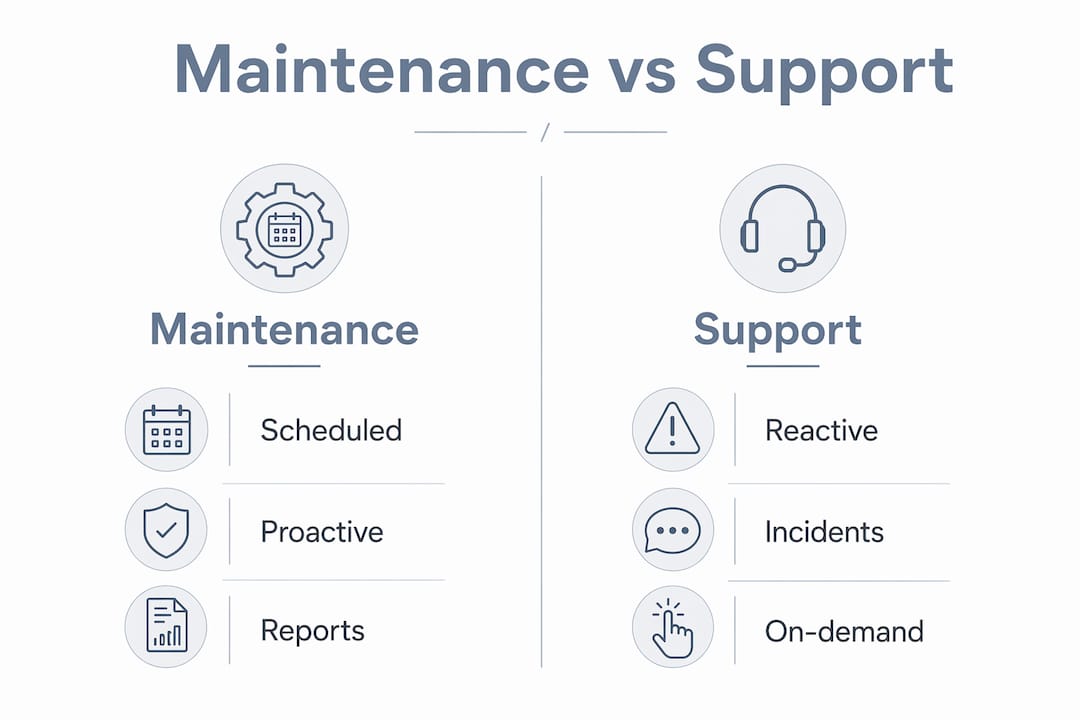
Most vendors sell “network support” and refer to it as maintenance, though they are not the same thing.

Network maintenance is a proactive, scheduled discipline: patch windows, configuration archives, UPS load tests, wireless site checks, and documented change control. Support is reactive: someone calls, a technician responds, the fire gets put out. The structured approach reduces downtime and costs less over time; the interrupt-driven “fireman” model waits for trouble and then scrambles.
| Dimension | Proactive maintenance | Reactive support |
|---|---|---|
| Trigger | Calendar or threshold alert | Incident or complaint |
| Goal | Prevent failure, extend lifecycle | Restore service |
| Output | Reports, updated docs, change log | Ticket closure |
| Budget impact | Predictable retainer | Variable, often higher per event |
| Documentation | Required, versioned | Often absent |
For a property manager, the practical difference is this: a maintenance contract gives you a monthly report and a change log. A support contract gives you a phone number. Neglected networks accumulate performance bottlenecks, increased energy use, and security vulnerabilities that compound quietly until a failure forces an expensive emergency call.
Pro Tip: When reviewing a vendor proposal, ask for a sample monthly report. If they cannot produce one, the contract is support-only, regardless of what the label says.
Core maintenance tasks and the cadence to follow
Successful maintenance runs on a calendar with specific tasks and review points, not on gut feel. The cadence below maps to a practical operations rhythm for low-voltage wired and wireless networks.
Daily
- Review system logs for error patterns and authentication failures
- Confirm backup jobs completed and are readable
- Check interface status and verify HA or failover links are active
- Scan monitoring dashboard for open alerts
Weekly
- Clear resolved alerts and review any recurring ones for root cause
- Spot-check wireless access point signal levels and client counts
- Verify UPS battery status indicators
Monthly
- Apply firmware and security patches within a defined change window
- Run a wireless site spot-check for coverage gaps or rogue devices
- Review bandwidth utilization trends and flag capacity concerns
- Test one configuration restore to confirm backup integrity
Quarterly
- Conduct a full UPS load test and recalculate capacity if hardware was added
- Review device lifecycle: flag end-of-support hardware for replacement planning
- Audit the IP addressing plan and VLAN map for accuracy
- Deliver a written operational review to the property manager
Annual
- Full physical inspection: cable condition, cabinet cleanliness, dust filters, labeling
- Refresh the network diagram and asset inventory
- Review and update the disaster recovery and failover plan
A localized version of this list, formatted for South Florida properties, is available as a printable maintenance checklist you can drop directly into a work order.
What documentation every maintenance program must include
Documentation is the foundation of maintainability. Without it, audits are slow, technician handoffs are unsafe, and repeat incidents become routine.
Every active maintenance program needs these six documents, each with a minimum metadata set (author, version, date, owner, rollback instructions where applicable):
- Network diagram: physical and logical topology, updated after every change
- Asset inventory: device name, model, serial, firmware version, MAC, and location
- IP addressing plan: assigned ranges, VLAN IDs, gateway, DNS, and DHCP scope
- VLAN map: which ports and SSIDs belong to which VLAN and why
- Configuration backups: versioned, automated, stored in a vendor-agnostic format
- Change log: every change with date, engineer, description, validation steps, and rollback path
The change log matters more than most managers realize. Undocumented quick fixes are a leading cause of mystery outages, especially when a second technician inherits the network months later.
Pro Tip: Store configuration backups in plain-text or vendor-agnostic format (e.g., exported running-config files) in a location your team controls, not only inside the vendor’s cloud portal. If the vendor relationship ends, you still own the configs.
A practical guide to building and maintaining these records is available at Lowvoltagecorp’s network diagram basics guide.
What to monitor and which metrics actually matter
Daily checks are about pattern recognition, not just single-point readings. A healthy network is predictable; the goal is to make it an invisible utility rather than a recurring discussion topic.
Key metrics to track:
- Device CPU and memory utilization (flag sustained spikes above baseline)
- Interface up/down state and error counters
- Latency and packet loss on critical paths
- Throughput against provisioned capacity
- Authentication failures (repeated failures signal a security or config issue)
- RAID and backup job health
- UPS status, battery charge, and estimated runtime
Tool categories that cover these needs:
| Category | What it does | Best for |
|---|---|---|
| SNMP-based NMS | Polls device health, generates alerts | Switches, routers, APs |
| RMM platforms | Remote monitoring and patch management | Multi-site estates |
| Wireless survey tools | Maps signal, identifies dead zones | Wi-Fi coverage validation |
| Syslog / log aggregation | Centralizes event logs for pattern analysis | Security and troubleshooting |
| Synthetic testers | Simulates user traffic to validate SLA paths | Uptime and latency SLAs |
Alert thresholds should be tuned to your baseline, not factory defaults. An alert that fires every day trains staff to ignore it. Set escalation rules: a single packet-loss spike is a note; packet loss on the same interface three days running is a ticket that requires a root-cause response.
Pro Tip: Ask your vendor for a sample alert report from an active site. If every alert is “informational,” their thresholds are too loose to catch real problems early.
For deeper guidance on network performance optimization, Lowvoltagecorp publishes practical diagnostics steps for property-facing IT work.
How vendors price maintenance and what to expect in a contract
Pricing models vary, but the cost drivers are consistent: estate size, device count, required monitoring depth, onsite travel, SLA response time, and whether parts and warranty management are included.
Common pricing models:
- Flat monthly retainer: fixed fee covers scheduled tasks, monitoring, and a defined response SLA
- Per-incident (break-fix): no retainer; you pay per call, typically at a higher hourly rate
- Hybrid: retainer covers scheduled maintenance; incidents beyond scope are billed separately
- Project-based: one-time fee for a defined scope (e.g., firmware audit and remediation)
For properties where uptime is critical, a retainer with a defined SLA is almost always cheaper over a 12-month period than repeated emergency call-outs. An electrical maintenance contract follows similar logic: scheduled service costs less per event than unplanned response.
| Contract line item | What to verify |
|---|---|
| Scheduled maintenance windows | Dates, frequency, and scope per visit |
| Patch and firmware cadence | Monthly or quarterly, with change-control process |
| Reporting | Monthly written report with metrics and findings |
| Configuration backup | Frequency, storage location, restore test schedule |
| SLA response time | Business hours vs. onsite vs. remote |
| Change-control process | Documented approval, validation, and rollback steps |
When to hire a professional and what to ask them
Certain conditions make a professional maintenance contract non-negotiable rather than optional.
Hire a professional when:
- You have experienced two or more unexplained outages in the past year
- No current network diagram exists or the last one is more than 12 months old
- Configuration backups are absent or have never been tested
- Hardware is past its manufacturer end-of-support date
- You cannot validate that failover or redundancy is working
- Coverage gaps exist in wireless zones that affect operations or tenants
Questions to ask every prospective vendor:
- Can you show me a sample monthly maintenance report from a current client?
- What is your change-control process, and do you document rollback steps?
- Where are configuration backups stored, and how often are restores tested?
- What is your onsite SLA response time for this property’s location?
- What firmware patch cadence do you follow, and how are changes approved?
- Can you provide references from property or facility management clients?
- How do you handle hardware that reaches end-of-support during the contract?
Red flags in any proposal:
- No mention of change control or rollback procedures
- Configuration backups stored only in the vendor’s proprietary portal
- SLA language that says “best effort” without a defined response window
- No sample report available
- Scope limited to “monitoring and response” with no scheduled proactive tasks
How Lowvoltagecorp approaches network maintenance
Lowvoltagecorp delivers structured network infrastructure maintenance for commercial and residential properties across South Florida, covering wired and wireless low-voltage systems. The service maps directly to the maintenance program described in this article.
Deliverables to request in any RFP or contract with Lowvoltagecorp:
- Current network diagram and asset inventory (updated after every visit)
- Monthly written report covering alerts, changes, and firmware status
- Quarterly operational review with capacity and lifecycle notes
- Versioned configuration archive stored in a format the property controls
- Change log with rollback documentation for every modification
- UPS load test results and battery replacement schedule
- Onsite response with defined SLA windows for South Florida properties
Pro Tip: Request the first network diagram and asset inventory as a deliverable of the initial site review, not a promise for later. If a vendor cannot produce it within the first visit, the maintenance program has no foundation.
Key Takeaways
Proactive network maintenance requires a defined cadence, complete documentation, and a contract that specifies deliverables, not just a response phone number.
| Point | Details |
|---|---|
| Maintenance vs. support | Demand a monthly report and change log; a phone number alone is a support contract, not maintenance. |
| Documentation first | Require a current network diagram, asset inventory, and versioned config backups before any other work begins. |
| Cadence matters | Daily log checks, monthly firmware patches, and quarterly UPS load tests prevent the failures that generate emergency costs. |
| Contract specifics | Verify SLA response times, patch cadence, backup storage location, and change-control process in writing before signing. |
| Lowvoltagecorp | Delivers structured maintenance for South Florida properties, including diagrams, monitoring, firmware schedules, and onsite response. |
The discipline most property managers are sold short on
The conventional wisdom in property management is that network issues are an IT problem, not a facilities problem. That framing is why so many properties end up with a vendor who shows up only when something breaks and hands over a bill with no documentation attached.
The properties that run without network drama treat maintenance the same way they treat HVAC service: scheduled, documented, and contracted with specific deliverables. Just as a well-structured HVAC maintenance schedule prevents costly equipment failures, a network maintenance program prevents the outages that disrupt tenants, trigger lease complaints, and expose the property to security risk.
What gets overlooked is that the documentation requirement is not bureaucracy. A current network diagram and a versioned configuration backup are the difference between a two-hour recovery and a two-day one. Most properties do not find that out until the hard way.
The managers who get the best outcomes from their vendors are the ones who ask for the report before they sign the contract. If the vendor hesitates, that tells you everything.
Lowvoltagecorp handles the maintenance your property needs
Property managers in South Florida have a direct option for structured low-voltage network maintenance without the overhead of a large managed-services contract. Lowvoltagecorp provides installation, repair, and ongoing maintenance for wired and wireless networks, security cameras, motorized gates, and cell signal boosters, all under one service relationship.

The starting point is a site review that produces a current network diagram, asset inventory, and a written maintenance plan. From there, scheduled visits, monthly reports, and a defined SLA replace the guesswork of reactive support. For properties that also need network wiring or cabling work, Lowvoltagecorp handles installation and ongoing maintenance as a single engagement.
Request a maintenance review for your South Florida property at lowvoltagecorp.com.
Useful sources for deeper reading
- Network maintenance fundamentals overview — HowToNetwork: Covers documentation requirements, audit readiness, and the foundational principles of a structured maintenance program.
- Daily network health checks: a practical operations guide — ITVue: Practical guidance on what daily checks should reveal and how to use logs for pattern recognition.
- Network support and maintenance best practices — Stratus Information Systems: Explains the weekly, monthly, and quarterly review cadence and how to shift from reactive firefighting to intentional operations.
- Key tasks in a network maintenance checklist — TechTarget: Covers backup testing, UPS load testing, and the hardware checks most teams skip.
- Network administration best practices — Cloudswitched: Details change-control requirements and why undocumented fixes cause outages. Note: written for UK SMEs; the operational principles apply broadly.
- Network maintenance checklist for South Florida managers — Lowvoltagecorp: A localized checklist formatted for South Florida commercial and residential properties, ready to use in a work order or vendor RFP.