The best maintenance tools for CCTV systems fall into two clear groups: a basic owner kit (multi-bit screwdriver set, digital multimeter, LAN cable tester, microfiber lens cleaning kit, spare 12V power adapter) and a pro installer kit that adds a multifunction CCTV field tester, borescope, BNC crimper, PoE injector/tester, and a laptop loaded with Wireshark, nmap, ONVIF Device Manager, and VLC. According to the Essential CCTV maintenance tools guide, a digital multimeter and a portable CCTV tester are the two tools that most reliably isolate wiring, power, and camera faults on the first visit.
Basic owner kit (start here):
- Multi-bit screwdriver set (Phillips, flathead, Torx)
- Digital multimeter (Fluke-style, auto-ranging)
- LAN/cable tester (Klein Tools-style, wiremap + continuity)
- Microfiber lens cleaning kit with contact cleaner
- Spare 12V DC power adapter
Pro installer kit (add these for service work):
- Multifunction CCTV field tester (NOYAFA IPC-716 or Henkion IPC-5200C Plus) supporting IP, AHD, TVI, CVI, CVBS, and SDI formats with TDR and PoE output
- Borescope for non-destructive inspection behind walls and in cable bundles
- BNC crimper and RJ45 punch-down tool with spare connectors
- PoE injector/tester (IEEE 802.3af/at compliant)
- Laptop with Wireshark, nmap, ONVIF Device Manager, and VLC
Lowvoltagecorp technicians carry both kits on every South Florida service call. The basic kit resolves most faults. The field tester covers faults requiring advanced diagnostics.
Table of Contents
- How the top CCTV maintenance tools compare at a glance
- Deep dive: every essential CCTV repair tool and how to use it
- How to choose the right tools for your role and budget
- Routine CCTV maintenance checklist: what to check and how often
- Step-by-step troubleshooting workflows for common CCTV faults
- Side-by-side matrix: representative field testers and core tools
- On-site safety, PPE, and electrical precautions for CCTV work
- What Lowvoltagecorp technicians actually carry on service calls
- Key Takeaways
- Why the right tools matter more than most technicians admit
- When to call Lowvoltagecorp instead of troubleshooting it yourself
- Useful sources and further reading
How the top CCTV maintenance tools compare at a glance
Before going deep on each tool, here is a high-level snapshot of the main categories and what role each plays. This is not a ranking by quality — it is a map of function to use case.
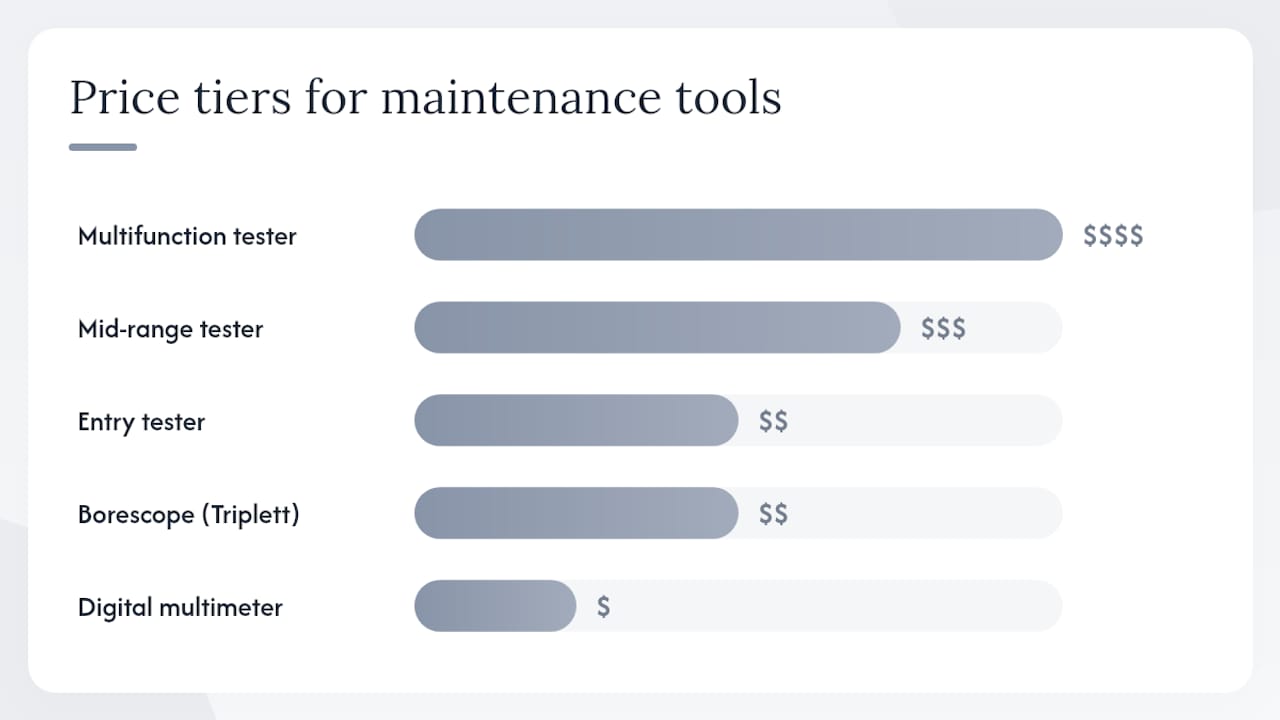
| Tool Category | Best For | Camera Compatibility | PoE Support | TDR / Cable Diag | Portability | Price Tier |
|---|---|---|---|---|---|---|
| Multifunction field tester (NOYAFA IPC-716) | Pro installers, integrators | IP up to 8K, AHD/TVI/CVI/CVBS/SDI | Yes (IEEE 802.3af/at) | Yes + Wi-Fi analyzer | High (7" touchscreen, battery) | $$$$ |
| Mid-range field tester (Henkion IPC-5200C Plus) | Service technicians | IP up to 12MP, AHD/TVI/CVI/CVBS up to 8MP | Yes | Yes (RJ45 TDR, cable tracer) | High | $$$ |
| Entry field tester (WANLUTECH IPC-5100 Plus) | Small installers, budget buyers | IP up to 8K, core analog formats | Yes | Yes | High | $$ |
| Digital multimeter (Fluke-style) | All roles | N/A (electrical) | N/A | No | Very high | $ |
| LAN/cable tester (Klein-style) | Owners, technicians | N/A (network) | No | Continuity/wiremap | Very high | $ |
| Borescope (Triplett bundle) | Technicians, integrators | N/A (inspection) | No | No | High | $$ |
| Software toolkit (Wireshark, nmap, ONVIF DM, VLC) | All roles | IP cameras only | N/A | No (network layer) | Laptop-dependent | Free |
A few things to keep in mind before buying:
- Model names like NOYAFA IPC-716 and Henkion IPC-5200C Plus are representative examples. Availability and warranty terms vary across U.S. distributors — always confirm before ordering.
- Entry testers cover the basics well. You only need the top-tier models if you run TDR diagnostics, export reports, or work with 8K IP cameras regularly.
- Software tools are free and run on any Windows or Mac laptop. They cover the network layer that hardware testers miss.
Deep dive: every essential CCTV repair tool and how to use it
1. Multi-bit screwdriver set
Primary use: Mounting bracket removal, housing access, terminal block connections.
Every CCTV housing uses a mix of Phillips, flathead, and sometimes Torx or hex screws. A 32-piece or larger bit set with a magnetic driver handles all of them. Look for a set with a non-slip grip and a bit holder that locks — loose bits on a ladder are a hazard. Budget sets run $15–$30; a Wiha or Wera set with better torque control runs $50–$80.
What to avoid: Single-driver kits. You will strip a screw on the first call.
2. Digital multimeter (Fluke-style)
Primary use: Voltage checks at the camera terminal, continuity on coax and power runs, resistance on ground loops.
A Fluke 115 or equivalent auto-ranging multimeter reads DC voltage (12V camera power), AC voltage (transformer output), and resistance. At the camera end, you want to see 11.5–13.5V DC on a 12V system. Anything below 10.5V and the camera will drop out or show a degraded image. Multimeters in this class run $80–$150. A $20 no-name meter works for basic checks but drifts on resistance readings.
Pro Tip: Use the DC voltage function first before assuming a camera is dead. A failing power supply or a long cable run with undersized wire drops voltage enough to kill the image without tripping any alarm.
3. LAN and cable tester (Klein-style)
Primary use: Wiremap verification on Cat5e/Cat6 runs, continuity on coax, RJ45 pinout confirmation.
Klein Tools makes several models in the $30–$80 range that handle both network cable and coax. The VDV526-200 and similar units check all eight conductors for opens, shorts, and miswires. For CCTV work, this catches the most common installer error: a crossed pair on a PoE run that kills power delivery without breaking the data link entirely.
4. Multifunction CCTV field tester
This is the single most important tool in a pro kit. A good field tester replaces five separate instruments and lets you diagnose a camera without connecting it to the NVR.
NOYAFA IPC-716 MOVTADHS Plus: The top-tier option. It supports 8K/4K IP cameras and all major analog formats (AHD, TVI, CVI, CVBS, SDI), outputs PoE (IEEE 802.3af/at), runs TDR cable diagnostics, includes a Wi-Fi analyzer, optical power meter (OPM), visual fault locator (VFL), basic multimeter functions, and exports reports. The 7-inch touchscreen makes it usable in direct sunlight. U.S. price: $400–$600 depending on the bundle.
Henkion IPC-5200C Plus: Supports IP cameras up to 12MP and analog formats up to 8MP (AHD/TVI/CVI/CVBS), with HDMI/VGA inputs, PoE output, cable tracer, and RJ45 TDR. The HDMI/VGA input is particularly useful — you can plug a camera directly into the tester and verify the image without an NVR in the loop. U.S. price: $250–$400.
WANLUTECH IPC-5100 Plus: The entry-level pick for smaller installers. It covers IP up to 8K and core analog formats, includes TDR and PoE, and runs on a 5.4-inch touchscreen. It skips the Wi-Fi analyzer and report export, but for basic diagnostics it covers everything you need at a lower cost.
Pro Tip: If you work on both IP and analog systems, an all-in-one field tester pays for itself on the third service call. Carrying a separate IP tester, analog monitor, and cable tester adds weight and doubles your setup time on site.
5. Borescope
Primary use: Non-destructive inspection inside walls, ceiling voids, conduit, and bundled cable runs.
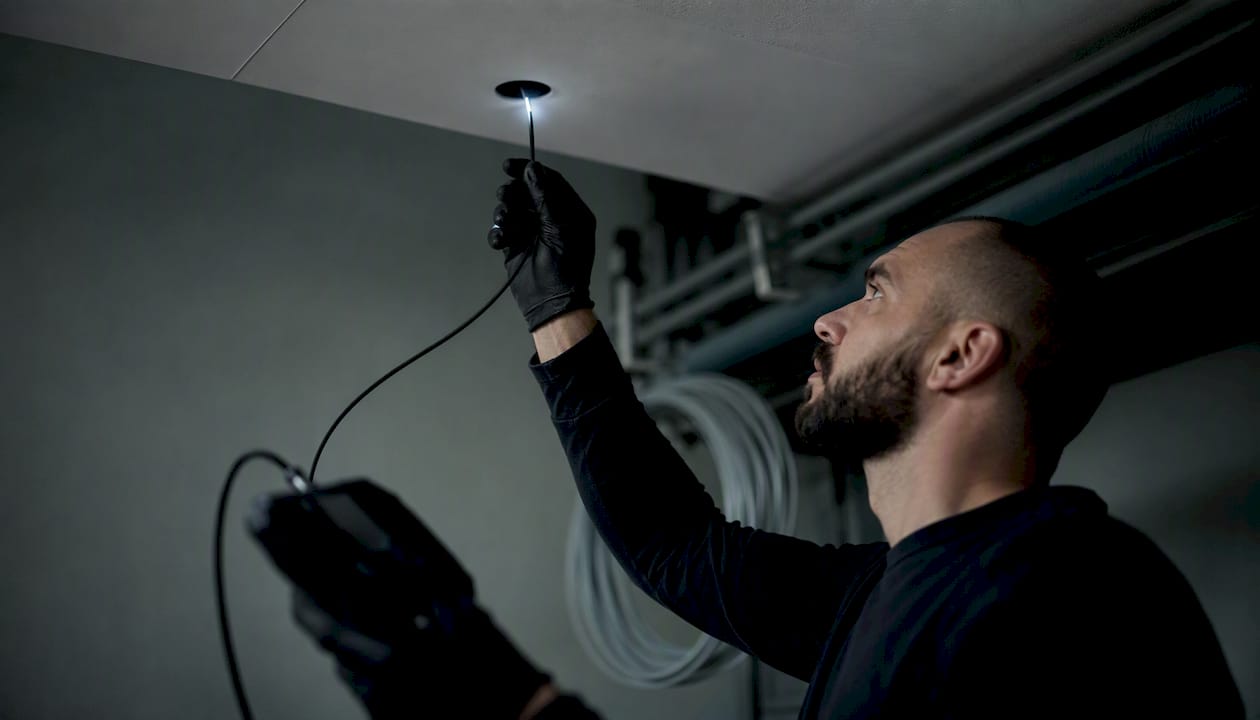
The Triplett 8150-BR-KIT CamView IP Pro 5 HD bundles a CCTV tester with a 6.5 ft (2 m), 8mm borescope. That combination lets you inspect behind drywall for rodent damage, moisture intrusion, or a cable pulled out of a junction box — without cutting a single hole. Standalone borescopes with a 1-meter flexible probe run $30–$80. The Triplett bundle with the tester runs higher but justifies the cost on any job with hidden cable runs.
6. PoE injector and PoE tester
Primary use: Powering IP cameras for bench testing, verifying PoE output on switch ports, confirming IEEE 802.3af/at compliance.
A PoE injector ($20–$50) lets you power a camera from a laptop or standalone switch port without a full NVR setup. A dedicated PoE tester ($30–$80) reads the actual wattage being delivered — useful when a camera is browning out under load. Most mid-range and pro field testers include PoE output, so if you already have a NOYAFA or Henkion unit, you may not need a separate injector for field work.
7. BNC crimper, RJ45 punch-down tool, and spare connectors
Primary use: Terminating coax for analog cameras, re-terminating damaged RJ45 ends on IP camera runs.
A compression BNC crimper ($25–$60) and a bag of RJ45 connectors and BNC compression fittings handle 90% of connector-related faults. Twisted or corroded BNC connectors cause intermittent video loss that looks like a camera fault. Re-terminating the connector takes three minutes and costs cents. Skip the twist-on BNC fittings — they corrode faster and fail under vibration.
8. Spare 12V DC power adapter
Primary use: Swapping out a suspected failing power supply during diagnosis.
A spare regulated 12V/2A adapter ($10–$20) lets you rule out the power supply as a fault source in under a minute. Unregulated adapters from no-name brands drop voltage under load — always use a regulated supply for testing. Keep two in the kit.
9. Microfiber lens cleaning kit and contact cleaner
Primary use: Cleaning camera domes, lenses, and connector contacts.
Dirty lenses cause blurry images and false IR reflections at night. A microfiber cloth and a lens pen handle dome cleaning without scratching. Contact cleaner (DeoxIT D5 or equivalent) clears oxidation from BNC and RJ45 contacts that cause intermittent signal loss. The full kit runs under $30 and prevents a surprising number of callbacks.
How to choose the right tools for your role and budget
The right kit depends on three things: how often you work on CCTV systems, whether you handle IP, analog, or both, and how much diagnostic depth you need on site.
Role-based starting points:
-
Small-business technician (1–5 cameras per job): — Add an entry-level field tester like the WANLUTECH IPC-5100 Plus. It handles IP and analog testing, TDR, and PoE verification in one unit. Pair it with a borescope for hidden-run inspections. Total kit: $300–$500.
-
Service engineer / integrator (multi-site, mixed systems): Invest in a mid-range or pro field tester (Henkion IPC-5200C Plus or NOYAFA IPC-716), a laptop with the full software toolkit, and a field camera programming tool for bulk configuration on large deployments. Total kit: $700–$1,200.
Decision map by common job type:
- Intermittent recording: Check HDD health in the NVR interface first. Then use the field tester to verify the camera stream is stable. Use camera health monitoring software for ongoing HDD wear detection.
- Cable fault (no signal, no power): TDR on the field tester to locate the fault distance, then visual confirmation. Per Steedvision’s field guidance, TDR readings can be misleading depending on cable impedance — always verify with a continuity check or visual inspection before pulling a new run.
For PoE-heavy IP systems, confirm your tester and injector are IEEE 802.3af/at compliant. A tester that outputs only 802.3af (15.4W) will not power 802.3at (30W) cameras correctly, and the camera will either fail to boot or run at reduced performance.
Routine CCTV maintenance checklist: what to check and how often
Cameras run 24/7 in heat, humidity, and UV exposure. Scheduled checks catch voltage drift, dirty lenses, and loose connections before they cause downtime. The preventative maintenance checklist for facility managers from Lowvoltagecorp covers the full interval structure — here is the tool-mapped version for CCTV specifically.
| Interval | Task | Tool | Who |
|---|---|---|---|
| Monthly | Lens and dome cleaning | Microfiber kit, lens pen | Owner / technician |
| Monthly | Visual housing inspection (cracks, moisture, IR LEDs) | Eyes, flashlight | Owner |
| Monthly | Camera stream verification (live view check) | NVR interface or VLC | Owner |
| Quarterly | Voltage check at camera terminal | Digital multimeter | Technician |
| Quarterly | PoE output verification on switch ports | PoE tester or field tester | Technician |
| Quarterly | Cable continuity and connector inspection | LAN/cable tester, BNC crimper | Technician |
| Quarterly | NVR/DVR HDD health check | NVR interface or monitoring software | Technician |
| Quarterly | Firmware check (cameras and NVR) | NVR interface, manufacturer portal | Technician |
| Annual | Full TDR cable diagnostic on all runs | CCTV field tester (TDR) | Service engineer |
| Annual | Full system record verification (playback test) | NVR interface | Technician |
| Annual | Borescope inspection of hidden cable runs | Borescope | Service engineer |
| Annual | Contact cleaning on all BNC and RJ45 connectors | Contact cleaner (DeoxIT D5) | Technician |
Firmware and software update procedure: Log into the NVR web interface or manufacturer portal, download the latest firmware for each camera model, and apply updates one camera at a time. Never update all cameras simultaneously on a live site — a failed update on one unit should not take the whole system offline. After each update, verify the live stream with VLC or ONVIF Device Manager before moving to the next unit.
For multi-site deployments, centralized camera health monitoring flags HDD degradation and camera disconnects before they cause data loss, reducing the need for reactive on-site visits. A proactive security system checklist paired with remote monitoring is the most cost-effective maintenance structure for property managers.
Step-by-step troubleshooting workflows for common CCTV faults
Work through each workflow in order. Skipping steps wastes time and leads to unnecessary part replacements.
Before you start: Confirm with the site manager before powering down any camera or NVR. On PoE systems, warn staff that cameras will go offline during switch port cycling. Use a multimeter to confirm power is off before touching terminals.
Fault 1: No video on a single camera
- Check the NVR channel assignment — confirm the camera is assigned to the correct channel.
- Measure DC voltage at the camera terminal with a multimeter. Below 10.5V on a 12V system indicates a power fault.
- Swap the power adapter with a known-good spare. If video returns, the adapter was the fault.
- Connect the camera directly to the field tester (Henkion IPC-5200C Plus or equivalent) using a short patch cable. If the image appears, the fault is upstream (cable run, switch, or NVR port).
- Run TDR on the cable run to locate any break or impedance fault. Confirm with a continuity test before pulling a new run.
- If the camera shows no image on the field tester with confirmed power, the camera itself is likely faulty. Escalate to replacement or warranty claim.
Fault 2: Blurry or degraded image (especially at night)
- Clean the dome and lens with a microfiber cloth and lens pen.
- Check IR LED function in low light — if LEDs are dim or uneven, check voltage at the camera.
- Verify the camera’s focus setting in the NVR interface (motorized zoom cameras can drift).
- If the image is blurry only at night, check for IR reflection off a nearby surface (wall, ceiling). Adjust the camera angle.
- If cleaning and repositioning don’t resolve it, connect the camera to the field tester and compare the direct image to the NVR output. A difference indicates a compression or encoding issue on the NVR side.
Fault 3: IP camera offline (network drop)
- Ping the camera’s IP address from a laptop on the same subnet. No response means the camera is not reachable.
- Run nmap on the subnet to confirm whether the IP is active at all.
- Check the switch port — cycle the PoE port (disable/enable) and re-ping.
- Verify PoE wattage with a PoE tester. An 802.3at camera on an 802.3af port will not power up reliably.
- Use ONVIF Device Manager to rediscover the camera. If it appears, pull the RTSP URL and verify the stream in VLC.
- If the camera is still unreachable, connect it directly to a laptop via a PoE injector and run nmap locally. If it responds, the fault is in the switch or VLAN configuration.
- Run Wireshark on the switch port to check for broadcast storms or VLAN mismatches dropping the camera’s traffic.
Fault 4: Intermittent recording or missing footage
- Check NVR HDD health in the system interface. Most NVRs report SMART data — look for reallocated sectors or pending sector counts above zero.
- Verify the camera stream is stable by watching the live feed for 5–10 minutes in VLC. Frame drops or freezes indicate a camera or cable issue, not an HDD issue.
- Check available storage. A full HDD stops recording without an alert on some NVR models.
- Review the recording schedule in the NVR — confirm motion-triggered recording zones are configured correctly.
- If HDD errors are present, back up footage immediately and replace the drive. Do not wait for a full failure.
Fault 5: Poor image across multiple cameras simultaneously
- Check the NVR’s network bandwidth utilization. High-resolution cameras on a congested switch can cause frame drops across all channels.
- Verify the main power supply voltage with a multimeter. A failing UPS or power strip affects all cameras on that circuit.
- Check for a recent firmware update that may have changed encoding settings. Roll back if the timing correlates.
- Use Wireshark to capture traffic on the NVR’s uplink port. Excessive broadcast traffic from another device can saturate the switch.
For a detailed repair handoff process, the security camera repair workflow for property managers from Lowvoltagecorp covers documentation and escalation steps.
Side-by-side matrix: representative field testers and core tools
The columns below reflect the dimensions that matter most when choosing a field tester for CCTV maintenance. Specs are drawn from manufacturer data — confirm current availability with U.S. distributors before purchasing, as stock and warranty terms change.
| Model / Tool | Camera Types Supported | PoE Output | TDR / Cable Diag | Display | Battery Life | Extra Features | Price Tier (USD) |
|---|---|---|---|---|---|---|---|
| NOYAFA IPC-716 | IP 8K/4K, AHD/TVI/CVI/CVBS/SDI | Yes (802.3af/at) | Yes + Wi-Fi analyzer | 7" touchscreen | Full day (stated) | OPM, VFL, multimeter, report export | $400–$600 |
| Henkion IPC-5200C Plus | IP up to 12MP, AHD/TVI/CVI/CVBS up to 8MP | Yes | Yes (RJ45 TDR, cable tracer) | Color touchscreen | Half to full day | HDMI/VGA input, ONVIF/RTSP | $250–$400 |
| WANLUTECH IPC-5100 Plus | IP up to 8K, AHD/TVI/CVI/CVBS up to 8MP | Yes | Yes (TDR) | 5.4" touchscreen | Half day | HDMI/VGA input, RS485 | $150–$250 |
| Triplett CamView (8150-BR-KIT) | IP + analog (HD formats) | Yes | Yes | Color display | Portable | Borescope bundle (6.5 ft, 8mm) | $300–$500 |
| Fluke 115 multimeter | N/A (electrical) | N/A | No | Digital display | Battery (years) | Auto-ranging, True RMS | $80–$150 |
| Klein Tools VDV526-200 | N/A (network/coax) | No | Continuity/wiremap | LED indicators | Battery | Coax + Cat5e/6 | $30–$60 |
Where to buy in the U.S.: NOYAFA and Henkion units are available through Amazon, B&H Photo, and specialist distributors. Triplett products ship through Nestes Instruments and other test equipment dealers. Klein Tools and Fluke are stocked at Home Depot, Grainger, and electrical supply houses. Always confirm the seller offers a U.S. warranty — some gray-market units ship without domestic support.
On-site safety, PPE, and electrical precautions for CCTV work
CCTV maintenance involves ladders, live electrical circuits, and PoE-powered equipment. Most injuries on low-voltage jobs come from ladder falls and accidental contact with 120V AC circuits near camera mounting points — not from the cameras themselves.
Before you start any service call:
- Inspect the ladder for cracks, bent rails, and worn feet. Never use a ladder on an uneven surface without leveling feet or a standoff.
- Wear safety glasses when drilling into ceilings or walls. Debris falls straight down.
- Use cut-resistant gloves when handling coax and pulling cable through conduit.
- Confirm the camera’s power source before touching terminals. Use a multimeter to verify the circuit is de-energized — do not rely on a switch being in the “off” position.
- On PoE systems, disable the switch port before disconnecting the camera. Live PoE ports deliver up to 30W (802.3at) — not lethal, but enough to damage equipment and cause a spark.
Pro Tip: Before cycling power on any NVR or switch, photograph the current cable layout and port assignments. A five-second photo prevents a 30-minute reconnection puzzle.
Electrical and regulatory notes: U.S. low-voltage work is governed by NFPA 70 (National Electrical Code) Article 725 for Class 2 and Class 3 circuits. Some jurisdictions require a low-voltage license for commercial CCTV installation — check your local authority having jurisdiction (AHJ) before starting work on a permitted site. When in doubt, pull the permit.
Fall prevention: Use a tool lanyard for anything you carry above 6 feet. A dropped multimeter from a 10-foot ladder can injure someone below and destroy the meter. Keep the work area below the ladder clear.
What Lowvoltagecorp technicians actually carry on service calls
The kit that works in theory and the kit that works at 2 PM on a South Florida rooftop are not always the same list.
Standard one-person service call kit:
- Top pouch: multi-bit screwdriver, multimeter, LAN tester, lens pen, contact cleaner, spare 12V adapter, spare BNC and RJ45 connectors
- Main bag: CCTV field tester (Henkion IPC-5200C Plus for most calls, NOYAFA IPC-716 for integrator jobs), borescope, BNC crimper, RJ45 punch-down tool, PoE injector
- Laptop bag: Windows laptop with Wireshark, nmap, ONVIF Device Manager, VLC, and a USB drive with offline installers and a copy of FieldToolkit for bulk camera programming on multi-camera jobs
Documentation flow: Before touching anything, photograph the NVR channel layout, the cable labels at the patch panel, and the camera mounting position. After the repair, photograph the completed work and log the fault, cause, and corrective action. That documentation prevents the same call from happening twice.
Common mistakes Lowvoltagecorp technicians see in the field:
- Over-relying on TDR without visual confirmation. TDR gives you a distance estimate, not a diagnosis. A reading of “22 meters” on a 20-meter run could mean a connector issue at the camera end, not a mid-run break. Always walk the run or use a borescope before pulling new cable.
- Skipping firmware checks. A camera that “just stopped working” after a power outage often has corrupted firmware. Checking the firmware version takes 90 seconds and can save a replacement.
- Ignoring voltage at the camera terminal. Technicians often replace cameras that are actually being starved of voltage by a long cable run with undersized wire. Measure first.
For a broader look at maintaining security equipment, the practical maintenance guide from Lowvoltagecorp covers workflows across camera types and system configurations.
Key Takeaways
A basic owner kit under $150 resolves the majority of common CCTV faults; a pro field tester handles everything else and pays for itself within a few service calls.
| Point | Details |
|---|---|
| Start with the basic kit | A multimeter, LAN tester, screwdriver set, and microfiber kit resolve most owner-serviceable faults for under $150. |
| Add a field tester for pro work | Mid-range testers (Henkion IPC-5200C Plus, $250–$400) handle IP and analog, TDR, and PoE in one unit. |
| Software tools are free and critical | Wireshark, nmap, ONVIF Device Manager, and VLC cover the network layer no hardware tester reaches. |
| Schedule maintenance by interval | Monthly lens cleaning, quarterly voltage and PoE checks, and annual TDR diagnostics prevent most unplanned failures. |
| Lowvoltagecorp for complex faults | For persistent HDD issues, high-elevation work, or multi-site systems, Lowvoltagecorp provides on-site service and maintenance contracts in South Florida. |
Why the right tools matter more than most technicians admit
The conventional wisdom in CCTV maintenance is that experience beats equipment. That is only half right. A skilled technician with a bad kit still replaces parts that didn’t need replacing, pulls cable runs that were fine, and spends an hour diagnosing something a $300 field tester would have flagged in four minutes.
The tools listed here are not about having the most gear. They are about having the right information at the right moment. A TDR reading that says “fault at 18 meters” changes the entire scope of a job. A Wireshark capture that shows a camera is broadcasting normally but the NVR’s VLAN is blocking it saves a camera replacement. ONVIF Device Manager finding a camera that the NVR “lost” after a firmware update prevents a truck roll entirely.
What gets underestimated is the cost of the wrong diagnosis. Replacing a camera that had a failing power supply costs $150 in parts and two hours of labor. Measuring voltage first costs 45 seconds. The math is obvious, but it only works if the multimeter is in the bag.
Preventative maintenance follows the same logic. Cameras running 24/7 in South Florida heat and humidity degrade faster than the manufacturer’s spec assumes. A quarterly voltage check and an annual TDR sweep catch the slow failures before they become emergency calls. The network maintenance checklist for South Florida managers from Lowvoltagecorp extends this thinking to the PoE infrastructure that powers the cameras — because a failing switch port looks exactly like a failing camera until you measure both.
The technicians who generate the fewest callbacks are not the ones with the most experience. They are the ones who measure before they replace, document every fault, and treat a $400 field tester as a cost-reduction tool rather than an expense.
When to call Lowvoltagecorp instead of troubleshooting it yourself
Some CCTV faults are genuinely owner-serviceable. Others look simple and aren’t.

Lowvoltagecorp handles the calls that go beyond the basic kit: persistent HDD corruption that keeps recurring after drive replacement, high-elevation camera mounts that require lift equipment, multi-site systems where a single configuration error cascades across dozens of cameras, and warranty-covered hardware replacements that require documented fault reports. The team carries the full pro kit on every call and follows a structured repair workflow that includes pre- and post-repair documentation — the kind of paper trail property managers need for insurance and compliance purposes.
For property and facility managers in South Florida, Lowvoltagecorp offers maintenance contracts that cover scheduled inspections, on-site troubleshooting, and multi-site monitoring. If your system has more than a handful of cameras, a service contract costs less per year than two emergency call-outs. Proactive maintenance for homeowners follows a similar logic — a regular inspection schedule, as outlined in guides like this preventive home maintenance resource prevents the kind of deferred failures that turn a $50 fix into a $500 replacement.
Contact Lowvoltagecorp to schedule a service call or discuss a maintenance contract for your South Florida property.
Useful sources and further reading
The sources below are worth bookmarking for spec lookups, software downloads, and deeper technical reference.
-
Essential CCTV maintenance tools guide: — A solid overview of basic and pro tool lists with practical guidance on diagnosing wiring, power, and camera faults. Good starting point for owners building their first kit.
-
NOYAFA IPC-716 product page: — Full spec sheet for the IPC-716 MOVTADHS Plus, including supported formats, PoE specs, and feature list. Use this to confirm compatibility before purchasing.
-
Henkion IPC-5200C Plus product page: — Detailed specs for the IPC-5200C Plus, including HDMI/VGA input, TDR capability, and analog format support.
-
WANLUTECH IPC-5100 Plus product page: — Entry-level tester specs for smaller installers who need core IP and analog diagnostics at a lower price point.
-
Triplett 8150-BR-KIT at Nestes Instruments: — Product page for the CamView IP Pro 5 HD tester with borescope bundle. Useful for understanding borescope specs and tester capabilities together.
-
Steedvision IPC-5200 Plus field guidance: Includes practical notes on TDR accuracy and when to verify readings with alternate methods.
-
Tentovision camera health monitoring: — Remote HDD wear detection and camera disconnect monitoring. Relevant for multi-site deployments where manual checks are impractical.
-
FieldToolkit — field camera programming tool: — Bulk camera programming by MAC address match, firmware capture, and verification workflows for large installs.