Running a multi-tenant property in South Florida without a structured network maintenance checklist is like managing an HVAC system without filter schedules: everything works until it suddenly doesn’t, and by then someone is filing a complaint. Tenants expect reliable Wi-Fi in common areas, secure access to building systems, and zero dead zones in parking garages or stairwells. When those expectations go unmet, the calls land on your desk. A consistent, documented network maintenance checklist prevents most of those calls before they happen and gives you a defensible record when something does go wrong.
Table of Contents
- What you need for effective network maintenance
- Step-by-step network maintenance checklist execution
- Validating wireless network performance and troubleshooting common issues
- Documenting changes and maintaining compliance with security checklists
- Why checklist-driven network maintenance beats ad-hoc fixes
- How Low Voltage Corp supports South Florida property managers
- Frequently asked questions
Key Takeaways
| Point | Details |
|---|---|
| Regular assessments | Schedule full network infrastructure assessments every 18-24 months or after major business changes to ensure health and scalability. |
| Configuration backups | Back up switch configurations regularly and verify compatibility before restoring to prevent network failures. |
| Wireless validation | Test beyond coverage, including roaming, capacity, and authentication, to diagnose wireless network issues accurately. |
| Security documentation | Maintain detailed configuration change records with proof artifacts for compliance and early detection of unauthorized changes. |
| Checklist discipline | Use structured, multi-dimensional checklists to avoid reactive fixes and ensure network reliability and security. |
What you need for effective network maintenance
Before you touch a single cable or log into a switch, you need the right foundation in place. Skipping this step is exactly why most ad-hoc fixes don’t hold.
Documentation you must have ready:
- A current network diagram showing all switches, access points, routers, and cable runs
- A device inventory with model numbers, firmware versions, and IP assignments
- Configuration baselines for every managed switch and router
- A record of any changes made in the past 12 months
- Security configuration checklists aligned to your compliance requirements
Tools and utilities to have on hand:
- A Wi-Fi scanner app (for channel analysis and signal mapping)
- Command-line diagnostic tools: "ping
,traceroute, andnslookup` - Automated config comparison software to flag unauthorized changes
- A cable tester for physical layer verification
- A spreadsheet or IT ticketing system for logging every task
| Preparation item | Why it matters | Frequency to update |
|---|---|---|
| Network diagram | Prevents guesswork during troubleshooting | After any topology change |
| Device inventory | Confirms firmware versions and EOL status | Quarterly |
| Configuration baseline | Detects drift and unauthorized changes | After every authorized change |
| Security config checklist | Ensures compliance and audit readiness | Semi-annually |
| Diagnostic tool kit | Enables rapid root cause identification | Verify tools monthly |
Network infrastructure assessment requires data collected over a full business week to establish accurate performance baselines. Pulling one afternoon’s worth of data and calling it a baseline is a common mistake that leads to false confidence.
Pro Tip: Store your configuration baselines and network diagrams in a cloud location with version control. If a technician makes an unauthorized change over the weekend, you can identify exactly what moved and restore the correct state within minutes rather than hours.
With the right preparation in place, you can confidently start the network maintenance process following a structured approach. Review network infrastructure maintenance practices that translate directly to South Florida facility environments.
Step-by-step network maintenance checklist execution
Order matters here. Jumping to wireless scans before verifying your physical layer is like checking tire pressure before confirming you have tires. Follow this sequence.
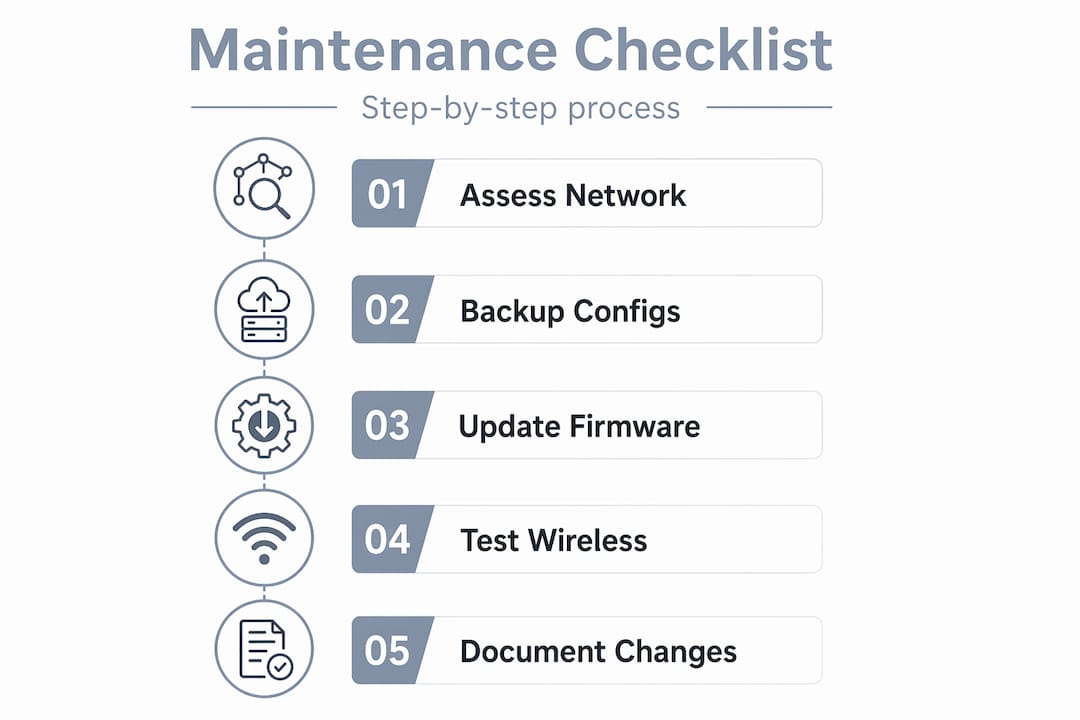
- Audit your device inventory. Confirm every switch, access point, and router is accounted for. Flag any device running end-of-life firmware or unsupported software.
- Review configuration baselines. Compare current switch and router configs against your stored baseline. Any unexplained deviation is a red flag that needs investigation before proceeding.
- Back up all switch configurations. Back up configurations regularly, and only perform restores during planned maintenance windows to avoid unexpected outages.
- Verify physical layer integrity. Walk cable runs, check patch panels, and test any connections flagged in previous maintenance reports. Use a cable tester on any run showing intermittent errors.
- Update firmware and software. Apply manufacturer-approved updates. Document the previous and new version numbers as part of your change log.
- Test routing and switching performance. Run
pingandtraceroutefrom multiple points in the network. Document latency and compare to your baseline. - Scan wireless channels. Identify co-channel interference on 2.4 GHz. Stick to non-overlapping channels 1, 6, and 11. Move congested access points to a cleaner channel where possible.
- Verify authentication paths. Confirm RADIUS or captive portal authentication is functioning on every SSID. A broken auth path looks like a coverage problem but isn’t.
- Check and test power delivery. Confirm PoE (Power over Ethernet) switches are delivering adequate power to every connected access point and camera.
- Log everything. Record every task completed, every change made, and every anomaly found, even if you didn’t fix it yet.
Infrastructure assessments should occur every 18 to 24 months or after any major business change such as adding a new building wing, onboarding a large tenant, or migrating services to the cloud.
| Task | Recommended frequency | Priority if skipped |
|---|---|---|
| Configuration backup | Monthly | High: no recovery path |
| Firmware review | Quarterly | High: security exposure |
| Channel scan | Monthly | Medium: interference creep |
| Physical layer check | Semi-annually | Medium: intermittent faults |
| Full infrastructure assessment | Every 18-24 months | High: undetected degradation |

Pro Tip: Never perform a firmware update and a configuration restore on the same maintenance window unless you have tested the compatibility of the new firmware with your saved config file in a lab or staging environment first. Both changes at once make it impossible to isolate the cause if something breaks.
After following the checklist steps, verifying your results ensures lasting network health and stability. For hands-on guidance, the network maintenance procedures at Low Voltage Corp are built around South Florida property environments. You can also reference testing wired connections to cover the physical layer thoroughly.
Validating wireless network performance and troubleshooting common issues
A heatmap showing green across your floor plan does not mean your wireless network is healthy. This is one of the most common misunderstandings in property-level network maintenance, and it costs managers time and credibility when tenants complain despite “good coverage.”
What you must validate beyond signal strength:
- Client roaming behavior. Test whether devices hand off cleanly between access points without dropping sessions. “Sticky clients” that refuse to roam are a frequent source of slow performance in hallways and lobbies.
- Capacity under load. Connect multiple devices to a single access point and run simultaneous throughput tests. One access point handling 40 connections in a leasing office will underperform even with a strong signal.
- Authentication path integrity. Confirm that clients can complete the full authentication handshake. A proper AP validation workflow includes testing coverage, capacity, roaming, channel health, latency, and authentication.
- Latency stability under load. Run continuous pings during peak usage periods. Spiking latency under load points to upstream congestion or an overloaded access point radio.
Channel interference is the silent killer on 2.4 GHz. In a South Florida apartment complex or office building, you are almost certainly sharing spectrum with neighbors. Channel scanning as a routine maintenance step catches co-channel interference before users start complaining about dropped calls or slow loading.
| Symptom | Likely cause | First diagnostic step |
|---|---|---|
| Slow speeds in one area | Channel interference | Run a channel scan |
| Dropped sessions while walking | Sticky client or roaming misconfiguration | Test roaming handoff between APs |
| Good signal, poor app performance | Capacity overload or auth failure | Check connected client count and auth logs |
| Intermittent drops at peak hours | Upstream congestion | Test latency during peak vs. off-peak |
| No connectivity despite signal | Authentication path failure | Check RADIUS/captive portal logs |
The most effective troubleshooting method is “baseline, then retest.” Make one change at a time, document it, and retest using the same conditions you used before the change. If you adjust channel assignments, firmware, and power settings in the same window, you will not know which change fixed or broke anything.
Pro Tip: For troubleshooting persistent wireless issues across multiple floors, use the same client device for all tests. Different devices have different Wi-Fi chipsets and roaming aggressiveness settings, which means results will vary if you switch between a laptop, phone, and tablet mid-test.
Effective troubleshooting is strengthened by disciplined verification and documentation. Our wireless troubleshooting guide covers related signal and connectivity issues that affect South Florida properties.
Documenting changes and maintaining compliance with security checklists
Documentation is not a bureaucratic formality. It is the difference between fixing a problem in 20 minutes and spending a full afternoon guessing what changed and when.
Documentation practices that protect you:
- Export configuration files before and after every change and store both copies
- Take dated screenshots or generate automated reports from your network management platform
- Require technicians to fill out a change log entry for every modification, including rejected changes
- Keep your configuration baselines in a secure, access-controlled location
- Review your change log monthly for any entries that lack corresponding approval records
“NIST’s National Checklist Program advocates using security configuration checklists to minimize attack surface, verify configurations, and detect unauthorized changes with audit artifacts.”
Following NIST guidelines is not only a security best practice. It is also the most direct way to demonstrate due diligence if a tenant or regulatory body questions your network’s integrity. Configuration drift, where settings gradually move away from your baseline without a clear record of who changed what, is one of the most common sources of unexplained network degradation in managed properties.
What a compliant change record includes:
- Date and time of the change
- Name or ID of the technician who made it
- Description of what was changed and why
- Before and after configuration exports or screenshots
- Sign-off from an authorized approver
Pro Tip: Set a calendar reminder to review your configuration baselines against live device configs every 90 days. Most unauthorized or accidental changes are small enough to go unnoticed for months but large enough to create real security exposure by the time someone finds them.
Having secured your configurations and documented changes, gaining perspective on common pitfalls will deepen your maintenance effectiveness. These security checklist practices are especially relevant for South Florida properties managing shared-access networks.
Why checklist-driven network maintenance beats ad-hoc fixes
Here is what 15 years working in building systems and low voltage infrastructure has made clear: the managers who react to network problems are always more exhausted and more expensive than the managers who prevent them.
Ad-hoc maintenance creates a pattern that’s easy to recognize. A problem surfaces, a technician fixes the most visible symptom, documentation is skipped because “we’re already behind,” and the same issue reappears three months later. Nobody knows what changed because nothing was written down. The real cost isn’t the repair bill. It’s the compounding effect of unnoticed configuration drift, unpatched firmware, and silent degradation across scalability, security, and manageability.
Multi-dimensional assessments prevent costly single-metric upgrades by ensuring performance, security, scalability, reliability, and manageability are all addressed together. Replacing access points because Wi-Fi “seems slow” without checking channel interference, firmware, or capacity first is exactly the kind of expensive shortcut that a checklist prevents.
Checklists also do something that informal maintenance never can: they scale. When you have consistent checklist-driven maintenance procedures, a new technician can follow the same process as a veteran and produce the same quality of work. That consistency builds tenant trust over time. It also produces the proof artifacts that checklists are specifically designed to generate, making your network defensible during audits and insurance reviews.
The uncomfortable truth is that most property managers treat network maintenance like a car inspection: something to deal with when a warning light appears. The managers who avoid that trap are the ones whose properties hold occupancy, attract quality tenants, and avoid the kind of emergency repair bills that make quarterly budgets look like guesswork.
How Low Voltage Corp supports South Florida property managers
Running through a full network maintenance checklist takes expertise, tools, and time that most property management teams don’t have on staff. That’s where Low Voltage Corp comes in.
We work specifically with South Florida property and facility managers to install, maintain, and troubleshoot wired and wireless networks, security cameras, motorized gates, and cell signal boosters. Whether you need a baseline assessment, a recurring maintenance plan, or fast repair on a network that went down at the wrong time, our team handles it. Learn more about the wired network benefits for your property, get fast resolution on low voltage issues before they escalate, and stay current with the latest low voltage trends shaping property technology in 2026.
Frequently asked questions
How often should I perform a full network infrastructure assessment?
Perform a comprehensive assessment every 18 to 24 months or after any major business change like expansion or cloud migration to ensure your network meets current needs.
What is the importance of backing up switch configurations regularly?
Regular backups allow you to restore switch settings quickly after upgrades or changes, avoiding prolonged outages and ensuring configuration consistency across your property.
Why is channel scanning essential for wireless network maintenance?
Channel scanning detects co-channel interference and overlapping channels, allowing you to optimize channel assignments for better Wi-Fi performance and reliability before users start complaining.
What should I document when making network configuration changes?
You should keep exports, screenshots, or automated reports as proof of authorized changes for compliance and to detect unauthorized modifications during routine audits.
How can I differentiate between Wi-Fi coverage and capacity problems?
Coverage issues show weak signals while capacity problems cause slow speeds despite good coverage; testing roaming behavior and authentication paths helps identify the real root cause.