If you manage a commercial property in South Florida and someone hands you a quote for “low voltage cabling,” you might assume that phrase describes one specific thing. It does not. The types of cable for low voltage systems span at least four distinct cable families, each with different performance specs, fire code requirements, and appropriate applications. Choosing the wrong one does not just affect performance — it can fail a building inspection, void your warranty, or force a complete reinstall. This guide breaks down exactly what you need to know to specify the right cable before a single foot of wire gets pulled.
Table of Contents
- Understanding low voltage cable types and their applications
- Choosing the right coaxial cables: RG-6 versus RG-59
- Structured cabling: selecting Cat5e, Cat6, or Cat6A for data and power over Ethernet
- Fire code and jacket requirements: plenum, riser, and general purpose cable ratings
- Practical cable selection guide for South Florida property managers
- Why most property managers overlook critical low voltage cabling details and how to get it right
- Find all your low voltage cabling needs with Low Voltage Corp
- Frequently asked questions
Key Takeaways
| Point | Details |
|---|---|
| Broad definition | Low voltage cables include both data communication cables and low-voltage power/control wiring used in buildings. |
| Coax cable choice | Use RG-6 for modern and longer CCTV or video runs and RG-59 only for short legacy analog runs. |
| Structured cabling | Cat6A is the best choice to future-proof Ethernet and PoE applications in commercial properties. |
| Fire code matters | Select cable jackets based on NEC codes for plenum, riser, or general purpose to pass inspections. |
| Plan carefully | Consider applications, route locations, and future needs to avoid costly rework or compliance issues. |
Understanding low voltage cable types and their applications
The confusion starts with the term itself. Low voltage cable types include both structured cabling for data, like Cat5e, Cat6, fiber optics, and coax, and building control or power wiring rated up to 0.6/1 kV. Some of those circuits operate at 50 volts or less. Others sit in a completely different regulatory category. Treating them as interchangeable is where projects start going sideways.
For property and facility managers, low voltage systems for security and communications are the most common reason this cable selection decision comes up. Here is what typically runs through your building on low voltage wiring:
- Security cameras (CCTV/IP): Coaxial cable for analog, Cat6 or Cat6A for IP cameras with PoE
- Alarm systems: 18 AWG to 22 AWG control wire, typically unshielded or shielded depending on interference risk
- Data networks: Cat5e, Cat6, Cat6A, or fiber depending on speed and distance needs
- HVAC controls: Twisted pair control cable or 18/2 to 18/4 thermostat wire
- Fire alarms: Listed fire alarm cable, usually 18 AWG or 16 AWG with specific jacket ratings
- Landscape and gate controls: Low voltage power cable in conduit, often 12 AWG to 16 AWG
Specifying the correct cable category for each system keeps your installers from improvising with whatever is on the truck, which is exactly how compliance problems start.
Choosing the right coaxial cables: RG-6 versus RG-59
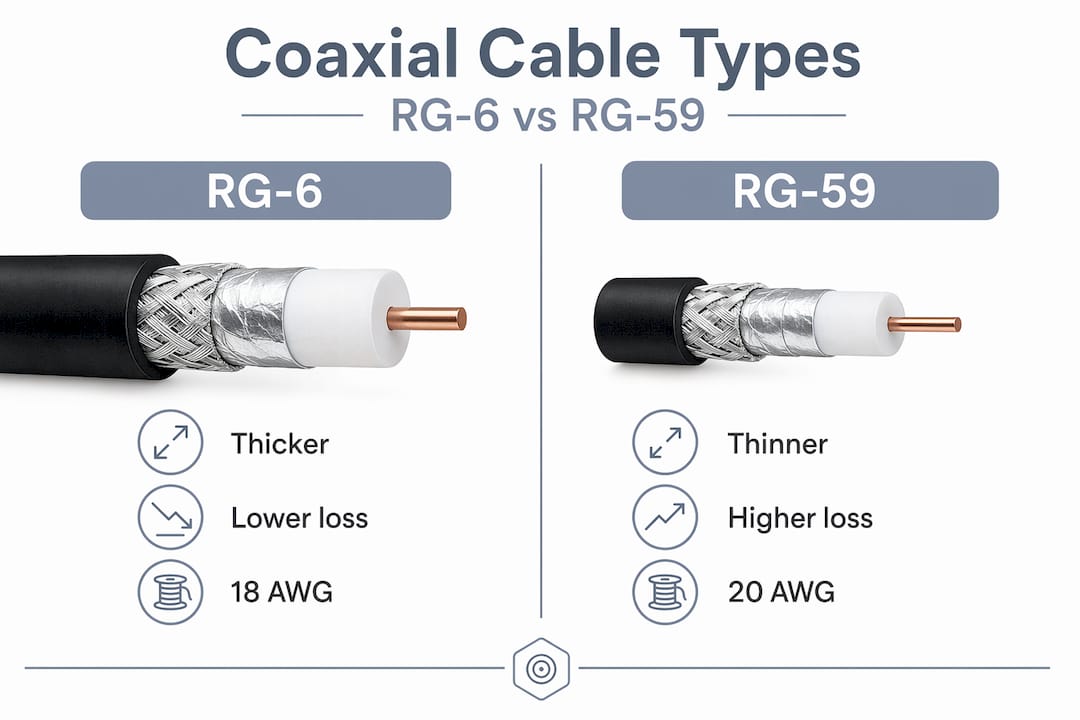
Coaxial cable shows up in two main types for property applications: RG-6 and RG-59. Both are 75-ohm cables, and that similarity is what causes most of the confusion. The real difference is in how each handles signal loss across frequency and distance.
RG-6 versus RG-59 signal loss is significant enough to matter in practice. RG-6 uses a larger conductor and thicker dielectric, which means less signal loss at higher frequencies. RG-59 was standard for analog CCTV and still works for short legacy runs, but it was not designed for the signal demands of HD video or broadband distribution.
| Spec | RG-6 | RG-59 |
|---|---|---|
| Impedance | 75 ohm | 75 ohm |
| Conductor size | 18 AWG | 20 AWG |
| Signal loss (at 1 GHz) | Lower | Higher |
| Max recommended run | 300+ feet | Up to 150 feet |
| Best for | IP/HD CCTV, cable TV, broadband | Legacy analog CCTV, short runs |
| Cost | Slightly higher | Lower |
For any new installation involving video distribution cables, RG-6 is the correct choice. Its lower attenuation makes it the right fit for modern HD cameras and satellite or cable systems. RG-59 only makes sense when you are maintaining or extending an existing legacy system and the runs are short.
Pro Tip: If you are seeing washed-out or grainy images on a CCTV system that otherwise checks out fine, the cable may be the culprit. RG-59 pushed past its frequency range on long runs produces exactly that symptom. Before replacing cameras, verify the coax spec.
Structured cabling: selecting Cat5e, Cat6, or Cat6A for data and power over Ethernet
Ethernet cable categories are where most facility managers feel confident, but confidence here can be expensive when PoE (Power over Ethernet) enters the picture. PoE lets a single cable carry both data and electrical power to devices like IP cameras, access points, and VoIP phones. The category of cable you install directly affects how much power can flow and how much heat that cable generates inside a conduit.
Higher-spec structured cabling, such as Cat6A or Cat8, is now the recommended starting point for facilities where PoE workloads are growing because it reduces the likelihood of expensive overhauls later. Here is how the categories compare:
| Category | Bandwidth | Max speed | PoE support | Heat dissipation | Typical cost |
|---|---|---|---|---|---|
| Cat5e | 100 MHz | 1 Gbps | PoE/PoE+ (up to 30W) | Lower, may derate | Lowest |
| Cat6 | 250 MHz | 10 Gbps (up to 55m) | PoE++ (up to 60W) | Moderate | Mid-range |
| Cat6A | 500 MHz | 10 Gbps (100m) | PoE++ (up to 90W+) | Best, larger diameter | Higher upfront |
Cat6A’s larger conductor and tighter construction also dissipate heat better under sustained PoE loads, which matters when you have a bundle of 20 camera cables sitting in conduit all pulling power simultaneously. Use PoE and structured cabling planning early to size your cable and conduit correctly.
How to decide which category fits your project:
- Identify every powered device on the network (cameras, WAPs, intercoms, locks)
- Look up the PoE class for each device and total the expected wattage per run
- Check if any future expansion plans include 10G Ethernet switches or higher-resolution cameras
- Evaluate installation environment (conduit fill, ambient temperature, run length)
- Compare upfront cable cost against the cost of re-cabling in three to five years
Pro Tip: Cat6A costs roughly 20 to 30 percent more per foot than Cat6, but re-cabling a finished building costs 10 to 20 times more than the cable itself. If you are unsure, go with Cat6A the first time.
Fire code and jacket requirements: plenum, riser, and general purpose cable ratings
This is the section most property managers skip, and it is the one that causes the most expensive problems. Cable jacket ratings are not suggestions. They are NEC code requirements tied directly to where a cable is physically installed in your building.
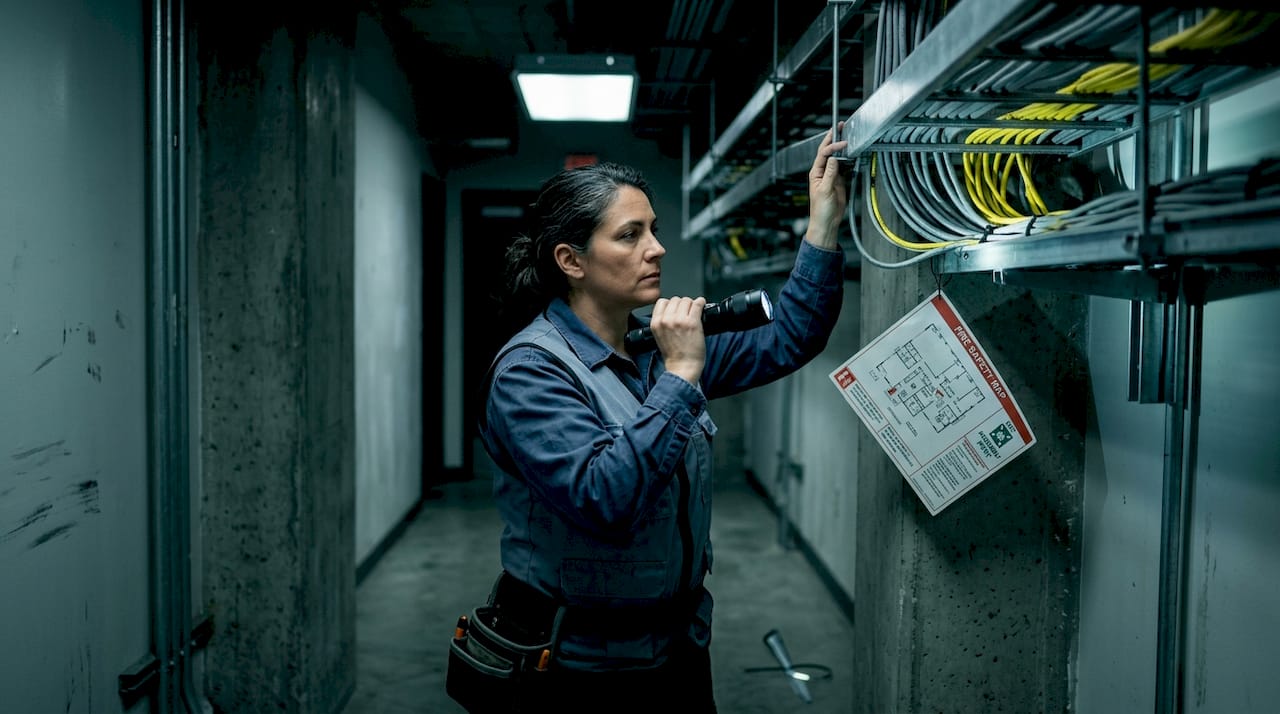
NEC 800.113 fire code requirements mandate CMP-rated (plenum) cable in air-handling plenum spaces, CMR (riser) in vertical shafts, and CM or CMG for general interior horizontal runs. Installing riser-rated cable in a plenum space fails inspection, period, regardless of how well the cable performs electrically.
Key jacket types at a glance:
- CMP (plenum): Required in spaces used for HVAC air return or supply. Burns with low smoke and low flame spread. Most expensive, but can substitute for any lower rating.
- CMR (riser): Used in vertical shafts between floors. Flame retardant but not approved for plenum environments.
- CM/CMG (general purpose): For horizontal runs in walls or ceilings that are not air-handling spaces. Lowest fire rating, least expensive.
Checklist for identifying required cable ratings by location:
- Pull your building’s HVAC plans and identify all air-handling spaces (these require CMP)
- Mark all vertical cable paths between floors (these require CMR or better)
- Identify horizontal runs inside standard walls and non-plenum ceilings (CM/CMG acceptable)
- Flag any outdoor or conduit runs that may need additional environmental ratings (like OSP or direct burial)
- Confirm your selected cable rating with your local Authority Having Jurisdiction before purchasing
Pro Tip: CMP-rated cable is code-compliant everywhere CMR or CM is required. Buying CMP for your entire project costs more upfront but eliminates the risk of a cable-type error triggering a failed inspection mid-project.
Practical cable selection guide for South Florida property managers
South Florida adds a layer of complexity most cabling guides ignore. High ambient temperatures, hurricane wind-load requirements for conduit and raceway systems, and the salt-air environment near the coast all affect how well certain cable types perform and hold up over time.
Step-by-step cable selection process:
- Define every system the cable will serve (cameras, network, access control, fire, AV)
- Match each system to its cable family (coax, Cat, control wire, fiber)
- Determine the run length and maximum signal or power loss budget for each
- Map cable routes against building floor plans to identify plenum, riser, and general zones
- Select jacket ratings based on location, then verify with your installer against local AHJ requirements
- Factor in the South Florida environment: outdoor runs need UV-resistant or direct burial jackets
Recommended cable by common property use case:
- IP security cameras (indoor): Cat6A plenum or riser depending on route
- IP security cameras (outdoor to building entry): Cat6A with conduit or outdoor-rated direct burial jacket
- Analog CCTV legacy systems: RG-6 for all new or replacement runs
- Wi-Fi access points: Cat6A for PoE++ support and 10G uplink readiness
- Gate and entry controls: 18/2 or 22/4 shielded control wire in conduit
- Fire alarm systems: Listed fire alarm cable per NFPA 72 and local AHJ
Skipping professional consultation on cable routes low voltage safety tips is one of the most common ways projects end up with rework. Local installers who know South Florida building stock and the regional inspectors save you time and money.
Why most property managers overlook critical low voltage cabling details and how to get it right
Here is an uncomfortable truth: the majority of cabling problems we see are not caused by budget cuts or bad equipment. They are caused by a narrow focus on speed and category while completely ignoring fire rating and route compliance. A property manager specifies Cat6A everywhere, feels confident, and then the installer pulls CMR through a plenum space because it was on the truck. Inspection fails. Cable gets ripped out.
Jacket fire rating and route location are compliance-critical decisions under NEC rules, and getting them wrong fails inspection even when the network would have performed perfectly. That is not a performance problem. That is a planning problem.
The other mistake we see constantly is treating plenum versus riser as a description of physical direction, up or down, rather than a space classification. A horizontal cable run in a ceiling that serves as an HVAC air return is a plenum environment regardless of whether the cable travels vertically or horizontally. The space type determines the requirement, not the cable direction.
One more issue worth naming: the confusion between ELV (extra-low voltage) control wiring and IEC-rated low voltage power cable. These are different regulatory categories, and procuring one when you need the other creates real problems on job sites. Get this distinction written into your specs early.
Addressing common low voltage mistakes before a project starts requires one thing above all else: map your cable routes against your building’s HVAC and fire compartmentalization plans before you buy a single foot of cable. That one step eliminates most of the inspection failures we see on South Florida properties.
Find all your low voltage cabling needs with Low Voltage Corp
At Low Voltage Corp, we work exclusively with property and facility managers in South Florida on exactly the systems covered in this article: security cameras, wired and wireless networks, motorized gates, and cell signal boosters. Our team understands both the cable selection side and the local code environment, so we are not guessing when it comes to plenum ratings or South Florida environmental requirements.
Whether you need guidance on wired network solutions for a new build or need to fix low voltage issues fast on an existing system, we are the local resource that removes the guesswork. We also offer support for facilities that need CCTV cable alternatives when existing infrastructure no longer meets current standards. Contact us to get straightforward, code-compliant guidance matched to your specific property and systems.
Frequently asked questions
What does “low voltage cable” mean in building systems?
Low voltage cable refers to wiring operating at 50 volts or less for control and signaling, or cables rated up to 0.6/1 kV used for structured cabling like Ethernet and coax. The term covers two distinct regulatory categories that should not be confused in your procurement specs.
Can I use riser-rated cable in plenum spaces?
No. Riser-rated cable is not permitted in plenum spaces because those environments require CMP-rated cable that meets stricter flame and smoke standards that CMR cable cannot satisfy.
Which coax cable type is best for modern CCTV installations?
RG-6 coaxial cable is the standard for modern CCTV because it handles higher frequencies with lower signal loss and is designed for the longer runs that HD camera systems require.
Should I install Cat6 or Cat6A cable for future-proofing my property’s network?
Cat6A is the better investment because it supports 10-Gigabit Ethernet at the full 100-meter standard and handles higher PoE wattages, meaning you are less likely to face expensive re-cabling when device power demands increase.